
21. Routing Protocols
21.1. OSPF & RIPv2
The Peplink supports OSPF and RIPv2 dynamic routing protocols.
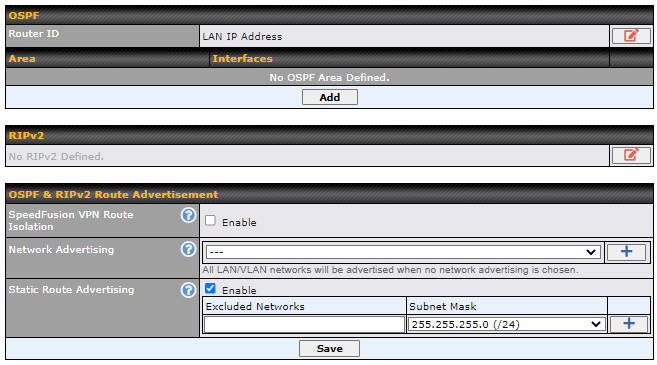
Click the Advanced tab from the top bar, and then click the Routing Protocols > OSPF & RIPv2 item on the sidebar to reach the following menu:
OSPF | |
Router ID | This field determines the ID of the router. By default, this is specified as the WAN IP address. If you want to specify your own ID, enter it into the Custom field. |
Area | This is an overview of the OSPF areas that you have defined. Clicking on the name under Area allows you to configure the connection. To define a new area, click Add. To delete an existing area, click on the |
 .
OSPF Settings | |
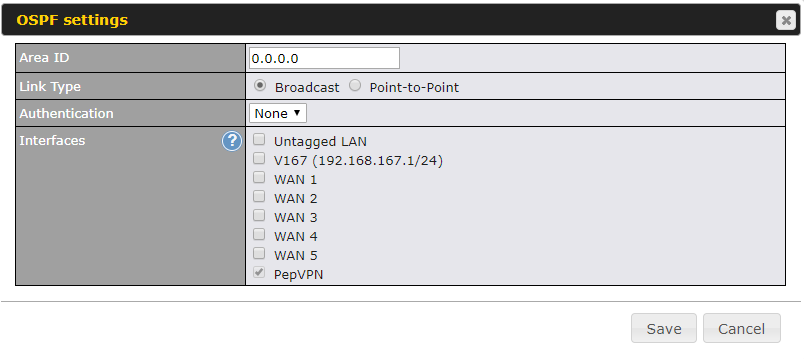
Area ID | Assign a name to be applied to this group. Machines linked to this group will send and receive related OSPF packets, while unlinked machines will ignore them. |
Link Type | Choose the type of network that this area will use. |
Authentication | If an authentication method is used, select one from this drop-down menu. Available options are MD5 and Text. Authentication key(s) may be input next to the drop-down menu after selecting an authentication method. |
Interfaces | Select the interface(s) that this area will use to listen to and deliver OSPF packets. |
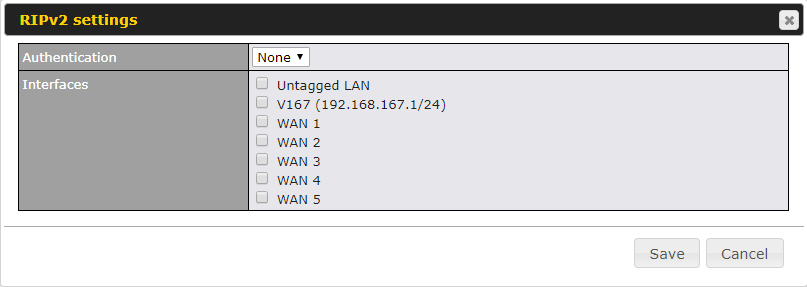
To access RIPv2 settings, click on  .
RIPv2 Settings | |
Authentication | If an authentication method is used, select one from this drop-down menu. Available options are MD5 and Text. Authentication key(s) may be input next to the drop-down menu after selecting an authentication method. |
Interfaces | Select the interface(s) that this area will use to listen to and deliver RIPv2 packets. |
OSPF & RIPv2 Route Advertisement | |
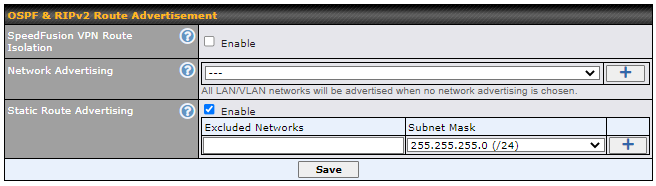
SpeedFusion VPN Route Isolation | Isolate SpeedFusion VPN peers from each other. Received SpeedFusion VPN routes will not be forwarded to other SpeedFusion VPN peers to reduce bandwidth consumption. |
Network Advertising | Networks to be advertised over OSPF & RIPv2. If no network is selected, all LAN / VLAN networks will be advertised by default. |
Static Route Advertising | Enabling OSPF & RIPv2 Route Advertising allows it to advertise LAN static routes over OSPF & RIPv2. Static routes on the Excluded Networks table will not be advertised. |
21.2. BGP
Click the Advanced tab along the top bar, and then click the BGP item on the sidebar to configure BGP.

Click the "x" to delete a BGP profile.
Click "Add" to create a new BGP profile.
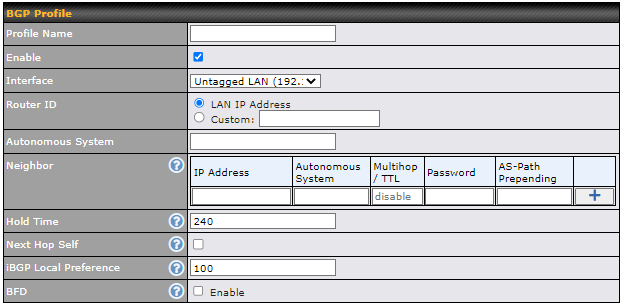
BGP Profile | |
Name | This field specifies the name that represents this profile. |
Enable | When this box is checked, this BGP profile will be enabled. |
Interface | The interface in which the BGP neighbor is located. |
Router ID | This field specifies the unique IP as the identifier of the local device running BGP. |
Autonomous System | The Autonomous System Number (ASN) assigned to this profile. |
Neighbor | BGP Neighbors and their details. |
IP address | The IP address of the Neighbor. |
Autonomous System | The Neighbor's ASN. |
Multihop/TTL | This field determines the Time-to-live (TTL) of BGP packets. |
Password | (Optional) Assign a password for MD5 authentication of BGP sessions. |
AS-Path Prepending: | AS path to be prepended to the routes received from this Neighbor. For example: inputting "64530,64531" will prepend "64530, 64531" to received routes. |
Hold Time | Wait time in seconds for a keepalive message from a Neighbor before considering the BGP connection as stalled. The value must be either 0 (infinite hold time) or between 3 and 65535 inclusively. Default: 240 |
Next Hop Self | Enable this option to advertise your own source address as the next hop when propagating routes. |
iBGP Local Preference | This is the metric advertised to iBGP Neighbors to indicate the preference for external routes. The value must be between 0 and 4294967295 inclusively. Default: 100 |
BFD | Enable this option to add Bidirectional Forwarding Detection for path failure. All directly connected Neighbors that use the same physical interface share the same BFD settings. All multihop Neighbors share the same multihop BFD settings. You can configure BFD settings in the BGP profile listing page after this option is enabled. |
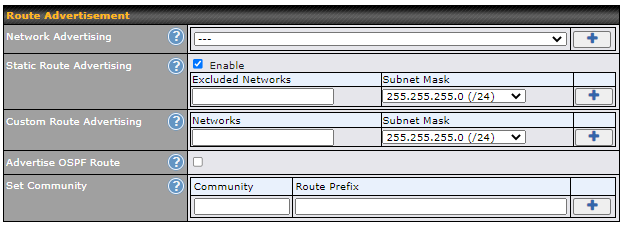
Network Advertising | Select the Networks that will be advertised to the BGP Neighbor. |
Static Route Advertising | Enable this option to advertise static LAN routes. Static routes that match the Excluded Networks table will not be advertised. |
Custom Route Advertising | Additional routes to be advertised to the BGP Neighbor. |
Advertise OSPF Route | When this box is checked, every learnt OSPF route will be advertised. |
Set Community | Assign a prefix to a Community. Community: Two numbers in new-format. e.g. 65000:21344 Well-known communities: no-export 65535:65281 no-advertise 65535:65282 no-export-subconfed 65535:65283 no-peer 65535:65284 Route Prefix: Comma separated networks. e.g. 172.168.1.0/24,192.168.1.0/28 |
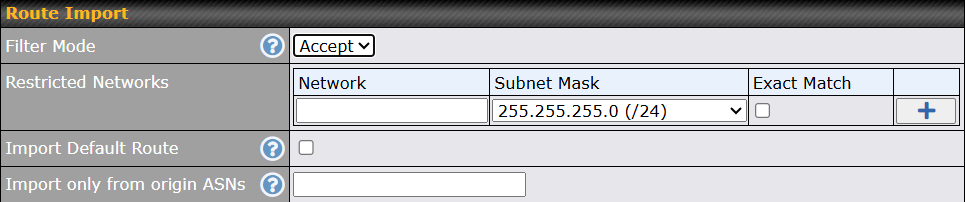
Filter Mode | This field allows for the selection of the filter mode for route import. None: All BGP routes will be accepted. Accept: Routes in "Restricted Networks" will be accepted, routes not in the list will be rejected. Reject: Routes in "Blocked Networks" will be rejected, routes not in the list will be accepted. |
Restricted Networks / Blocked Networks | This field specifies the network(s) in the “route import” entry. Exact Match: When this box is checked, only routes with the same Network and Subnet Mask will be filtered. |
Import Default Route | Enable this option to import the default route from BGP neighbors. |
Import only from origin ASNs | Import only routes originated by the specified ASNs. Enter one or more ASNs, separated by commas (,). |

Filter Mode | This field allows for the selection of the filter mode for route export. None: All BGP routes will be accepted. Accept: Routes in "Restricted Networks" will be accepted, routes not in the list will be rejected. Reject: Routes in "Blocked Networks" will be rejected, routes not in the list will be accepted. |
Restricted Networks / Blocked Networks | This field specifies the network(s) in the “route export” entry. Exact Match: When this box is checked, only routes with the same Network and Subnet Mask will be filtered. |
Export to other BGP Profile | When this box is checked, routes learnt from this BGP profile will be exported to other BGP profiles. |
Export to OSPF | When this box is checked, routes learnt from this BGP profile will be exported to the OSPF routing protocol. |
Redistribute BGP Default Route to OSPF | Enable this option to redistribute the BGP default route to OSPF. |