
16. Port Forwarding
Peplink routers can act as a firewall that blocks, by default, all inbound access from the Internet. By using port forwarding, Internet users can access servers behind the Peplink router. Inbound port forwarding rules can be defined at Advanced > Port Forwarding.

To define a new service, click Add Service.
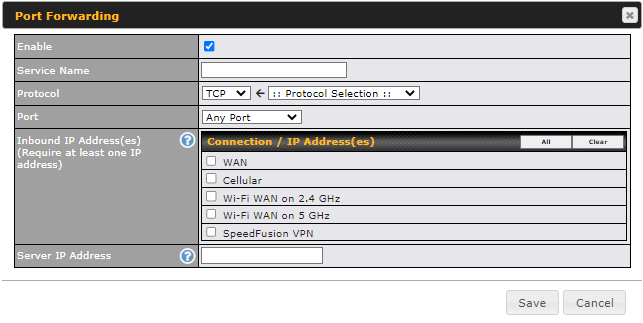
Port Forwarding Settings | |
Enable | This setting specifies whether the inbound service takes effect. When Enable is checked, the inbound service takes effect: traffic is matched and actions are taken by the Peplink router based on the other parameters of the rule. When this setting is disabled, the inbound service does not take effect: the Peplink router disregards the other parameters of the rule. |
Service Name | This setting identifies the service to the system administrator. Valid values for this setting consist of only alphanumeric and underscore “_” characters. |
Protocol | The IP Protocol setting, along with the Port setting, specifies the protocol of the service as TCP, UDP, ICMP, or IP. Traffic that is received by the Peplink router via the specified protocol at the specified port(s) is forwarded to the LAN hosts specified by the Servers setting. Please see below for details on the Port and Servers settings. Alternatively, the Protocol Selection Tool drop-down menu can be used to automatically fill in the protocol and a single port number of common Internet services (e.g. HTTP, HTTPS, etc.). After selecting an item from the Protocol Selection Tool drop-down menu, the protocol and port number remain manually modifiable. |
Port | The Port setting specifies the port(s) that correspond to the service, and can be configured to behave in one of the following manners: Any Port, Single Port, Port Range, Port Map, and Range Mapping
Any Port: all traffic that is received by the Peplink router via the specified protocol is forwarded to the servers specified by the Servers setting. For example, with IP Protocol set to TCP, and Port set to Any Port, all TCP traffic is forwarded to the configured servers.
Single Port: traffic that is received by the Peplink router via the specified protocol at the specified port is forwarded via the same port to the servers specified by the Servers setting. For example, with IP Protocol set to TCP, and Port set to Single Port and Service Port 80, TCP traffic received on port 80 is forwarded to the configured servers via port 80.
Port Range: traffic that is received by the Peplink router via the specified protocol at the specified port range is forwarded via the same respective ports to the LAN hosts specified by the Servers setting. For example, with IP Protocol set to TCP, and Port set to Port Range and Service Ports 80-88, TCP traffic received on ports 80 through 88 is forwarded to the configured servers via the respective ports.
Port Mapping: traffic that is received by the Peplink router via the specified protocol at the specified port is forwarded via a different port to the servers specified by the Servers setting. For example, with IP Protocol set to TCP, and Port set to Port Mapping, Service Port 80, and Map to Port 88, TCP traffic on port 80 is forwarded to the configured servers via port 88. (Please see below for details on the Servers setting.)
Range Mapping: traffic that is received by the Peplink router via the specified protocol at the specified port range is forwarded via a different port to the servers specified by the Servers setting. |
Inbound IP Address(es) | This setting specifies the WAN connections and Internet IP address(es) from which the service can be accessed. |
Server IP Address | This setting specifies the LAN IP address of the server that handles the requests for the service. |





16.1. UPnP / NAT-PMP Settings
UPnP and NAT-PMP are network protocols which allow a computer connected to the LAN port to automatically configure the router to allow parties on the WAN port to connect to itself. That way, the process of inbound port forwarding becomes automated.
When a computer creates a rule using these protocols, the specified TCP/UDP port of all WAN connections' default IP address will be forwarded.
Check the corresponding box(es) to enable UPnP and/or NAT-PMP. Enable these features only if you trust the computers connected to the LAN ports.

When the options are enabled, a table listing all the forwarded ports under these two protocols can be found at Status > UPnP / NAT-PMP.