
13. GRE Tunnel
Generic Routing Encapsulation (GRE) is a tunneling protocol that can encapsulate a wide variety of network layer protocols inside virtual point-to-point links over an Internet Protocol network. A GRE tunnel is similar to IPsec or SpeedFusion VPN.
To configure a GRE Tunnel, navigate to Advanced > GRE Tunnel.

Click the New Profile button to create new GRE tunnel profiles that establish tunnel connections to remote tunnel endpoints via available WAN connections. To edit the profiles, click on its associated connection name in the leftmost column.
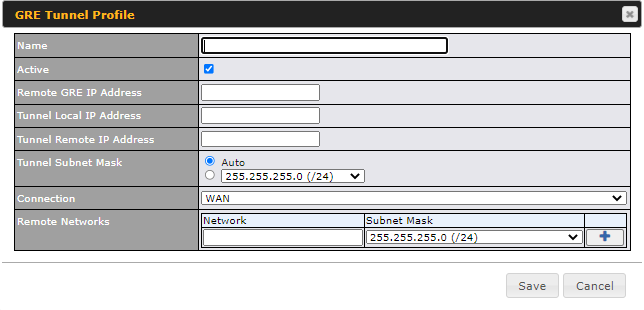
GRE Tunnel Profile Settings | |
Name | This field is for specifying a name to represent this GRE Tunnel connection profile. |
Active | When this box is checked, this GRE Tunnel connection profile will be enabled. Otherwise, it will be disabled. |
Remote GRE IP Address | This field is for entering the remote GRE’s IP address. |
Tunnel Local IP Address | This field is for specifying the tunnel source IP address. |
Tunnel Remote IP Address | This field is for specifying the tunnel destination IP address. |
Tunnel Subnet Mask | This field is to select the subnet mask that is to be used for the GRE tunnel. |
Connection | Select the appropriate WAN connection from the drop-down menu. |
Remote Networks | Input the LAN and subnets that are located at the remote site here. |