
17. NAT Mappings
NAT mappings allow IP address mapping of all inbound and outbound NAT’d traffic to and from an internal client IP address. Settings to configure NAT mappings are located at Advanced > NAT Mappings.

To add a rule for NAT mappings, click Add NAT Rule.
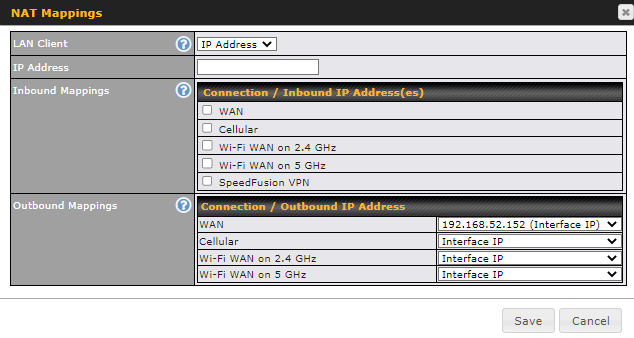
NAT Mapping Settings | |
LAN Client | NAT mapping rules can be defined for a single LAN IP Address, an IP Range, or an IP Network. |
IP Address | This refers to the LAN host’s private IP address. The system maps this address to a number of public IP addresses (specified below) in order to facilitate inbound and outbound traffic. This option is only available when IP Address is selected. |
IP Range | The IP range is a contiguous group of private IP addresses used by the LAN host. The system maps these addresses to a number of public IP addresses (specified below) to facilitate outbound traffic. This option is only available when IP Range is selected. |
IP Network | The IP network refers to all private IP addresses and ranges managed by the LAN host. The system maps these addresses to a number of public IP addresses (specified below) to facilitate outbound traffic. This option is only available when IP Network is selected. |
Inbound Mappings | This setting specifies the WAN connections and corresponding WAN-specific Internet IP addresses on which the system should bind. Any access to the specified WAN connection(s) and IP address(es) will be forwarded to the LAN host. This option is only available when IP Address is selected in the LAN Client(s) field. Note that inbound mapping is not needed for WAN connections in drop-in mode or IP forwarding mode. Also note that each WAN IP address can be associated to one NAT mapping only. |
Outbound Mappings | This setting specifies the WAN IP addresses that should be used when an IP connection is made from a LAN host to the Internet. Each LAN host in an IP range or IP network will be evenly mapped to one of each selected WAN's IP addresses (for better IP address utilization) in a persistent manner (for better application compatibility). Note that if you do not want to use a specific WAN for outgoing accesses, you should still choose default here, then customize the outbound access rule in the Outbound Policy section. Also note that WAN connections in drop-in mode or IP forwarding mode are not shown here. |
Click Save to save the settings when configuration has been completed.
Important Note |
Inbound firewall rules override the Inbound Mappings settings. |