
Appendix D. Case Studies
MPLS Alternative
Our SpeedFusion enabled routers can be used to bond multiple low-cost/commodity Internet connections to replace an expensive managed business Internet connection, private leased line, MPLS, and frame relay without sacrificing reliability and availability.
Below are typical deployments for using our Balance routers to replace expensive MPLS connections with commodity connections, such as ADSL, 3G, and 4G LTE links.
Special features of Balance 580: have high availability capability
Special features of Balance 2500: have high availability capability and capable of connecting to optical fiber based LAN through SFP+ connector
Our WAN-bonding routers which comprise our Balance series and MediaFast series
are capable of connecting multiple devices, and end users’ networks to the Internet through multiple Internet connections.
Our MediaFast series routers have been helping students at many education institutions to enjoy uninterrupted learning
Option 1: MPLS Supplement
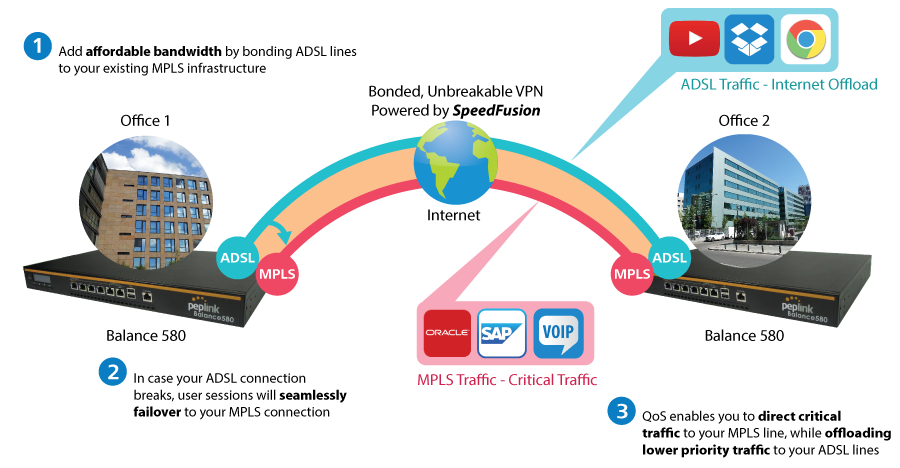
Affordably increase your bandwidth by adding commodity ADSL links to your MPLS connection. SpeedFusion technology bonds all your connections together, enabling session-persistent, user-transparent hot failover. QoS support, bandwidth control, and traffic prioritization give you total control over your network.
Option 2: MPLS Alternative
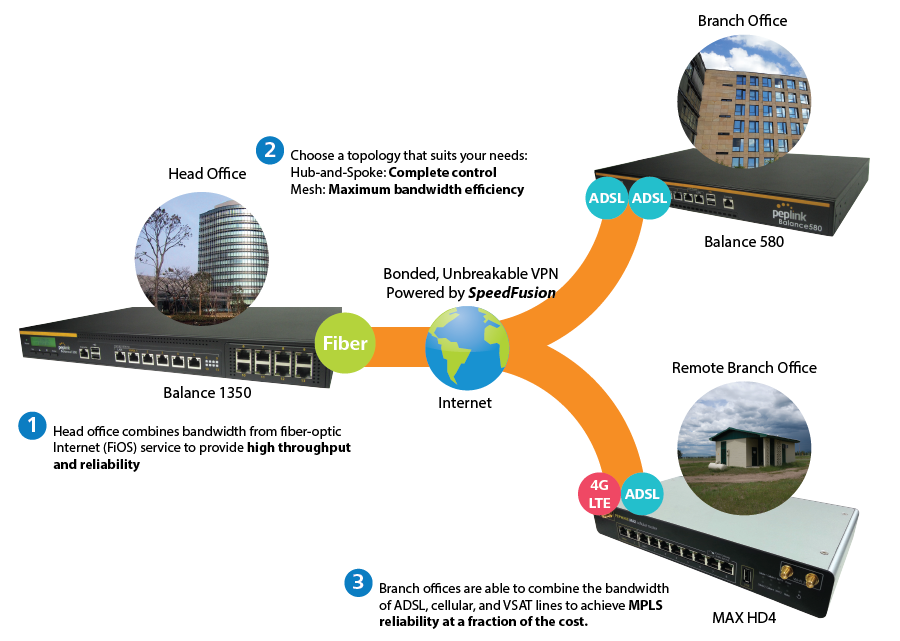
Achieve faster speeds and greater reliability while paying only 20% of MPLS costs by connecting multiple ADSL, 3G, and 4G LTE links. Choose a topology that suits your requirements: a hub-and-spoke topology maximizes control over your network, while a meshed topology can reduce your bandwidth overhead by enabling your devices to form Unbreakable VPN connections directly with each other.
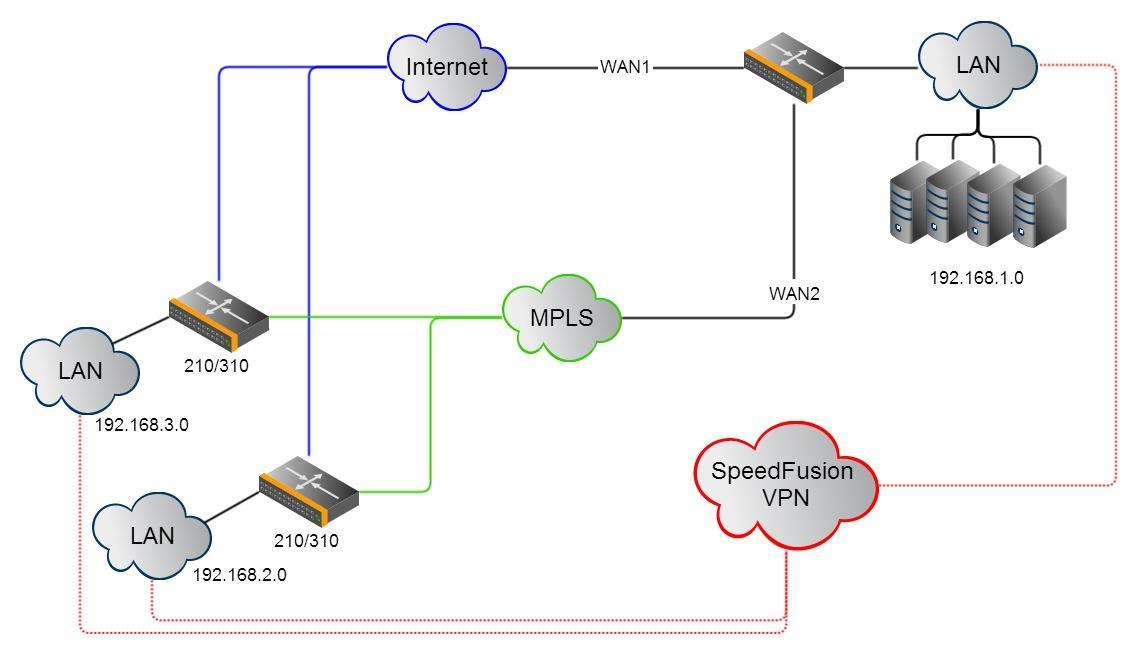
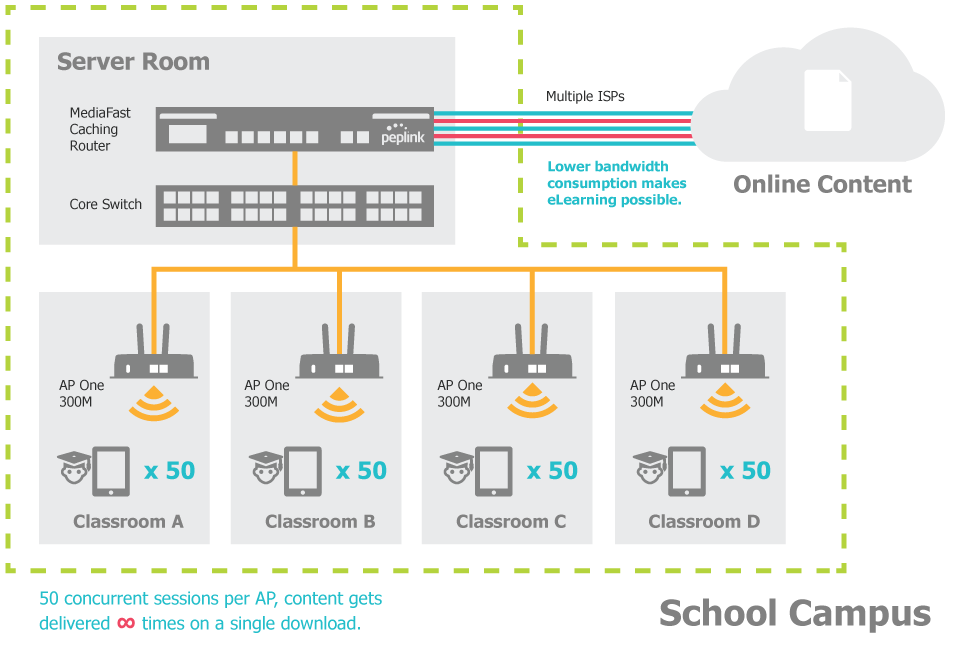
Here is an example of how to supplement an existing Multi-Office MPLS network with DSL bonding through SpeedFusion using a Balance 580 at the headquarters and Balance 210/310 at branch offices.
Environment:
- This organization has one head office with two branch offices, with most of the crucial information stored in a server room at the head office.
- They are connecting the offices together using a managed MPLS Solution. However, the MPLS Network is operating at capacity and upgrading the links is cost prohibitive.
- As the organization grows, it needs a cost-efficient way to add more bandwidth to its wide area network.
- Internet access at the remote sites is sent via a web proxy at head office for corporate web filtering compliance.
Requirement:
- User sessions need to remain uninterrupted
- More bandwidth is required at the head office location for direct internet access.
Recommended Solution:
- Form a SpeedFusion tunnel between the branch offices and head office to bond the MPLS and additional DSL lines.
- SpeedFusion allows for hot failover, maintaining a persistent session while switching connections.
- The DSLs at head office can be used for direct internet access providing lots of cheap internet bandwidth.
- Head office can use outbound policies to send internet traffic out over the DSLs and only use the MPLS connection for SpeedFusion, freeing up bandwidth.
Devices Deployed: Balance 210, Balance 310, Balance 580
Harrington Industrial Plastics
|

Overview
Harrington Plastics, the US’s largest industrial plastics distributor, was looking to upgrade its network equipment. Harrington’s team came across Peplink and started thinking about MPLS alternatives. By choosing Peplink, they saved a fortune on upgrades and ended up with yearly savings of up to $100,000.
Requirements
- Zero network outages
- Flexible resilience options
- Cost-effective solution
Solution
- Peplink Balance 1350
- Peplink Balance 380
- Unbreakable VPN
Benefits
- Extreme savings of $100,000 per year
- 4x the bandwidth
- Seamless hardware failover
- Highly available network due to WAN diversity
- Highly cost-effective compared to competing solutions
- Easy resilience achieved by adding 4G USB modems
Time For An Upgrade
Harrington Industrial Plastics decided it was time to upgrade its network equipment. Its existing solution used redundant MPLS for site-to-site traffic and broadband connections for Internet access. Harrington is the US’s largest distributor of industrial plastics piping, serving all industries with corrosive and high-purity applications. It requires peak performance at all times in order to serve its large customer base and 43 busy branches.
Quick Deployment and Unbreakable Connectivity
In evaluating an upgrade to its network infrastructure, it was only natural that Harrington settled on the best in the industry — Peplink. Peplink partner Frontier Computer Corporation was chosen to help design and deploy the solution. Since Peplink gear is so easy to configure and install, Harrington was able to design, prototype and roll out the entire solution to the corporate headquarters and all 43 branches within just one year.
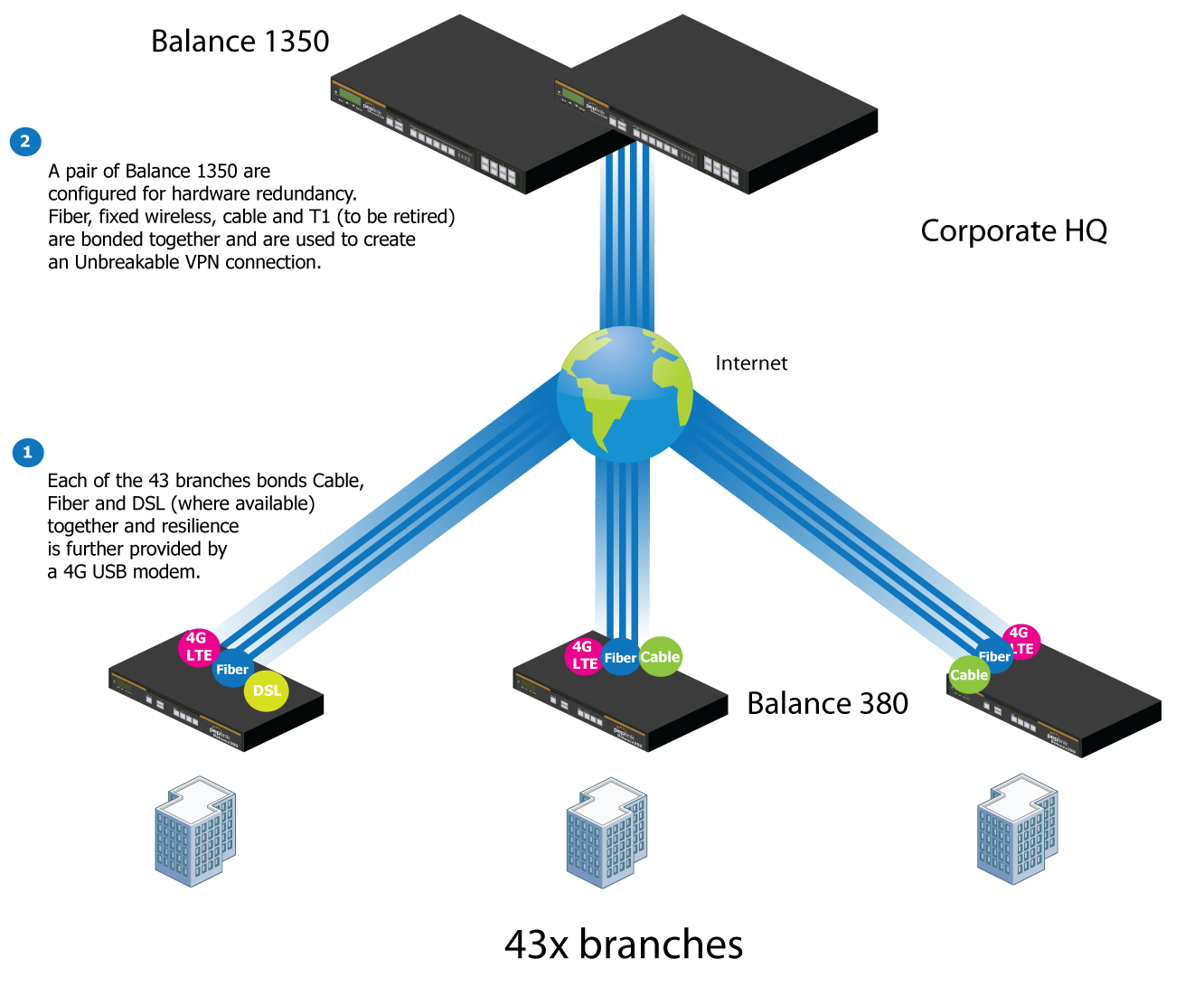
The corporate office houses a pair of redundant Balance 1350s for hardware resilience. Served by 4 separate links from multiple service providers, the network’s chance of an outage is practically zero. All 43 branches are now equipped with a fleet of Balance 380s, bonding a combination of DSL, cable and fiber-optic links together with an additional 4G USB modem for added resilience. These work together to create an Unbreakable VPN connection to the Balance 1350s at the corporate office, connecting the final dot.
Dependable, Resilient Networking that’s also Very Budget-friendly
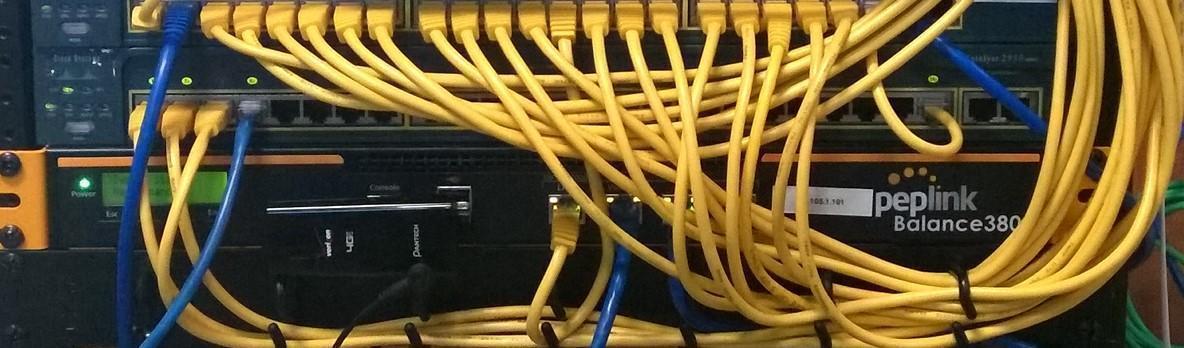
Harrington Industrial Plastics couldn’t be happier. They now benefit from an extremely reliable and cost-effective network. Supplying additional resilience is as easy as plugging in a 4G USB modem. Where the MPLS 768kb deployed previously had cost them $192000 a year for all 40 sites, their new solution is now only costing them $92000. Their total bandwidth has been bumped from 36 Mbps to 138 Mbps.
PLUSS
Peplink + Citrix + VoIP Adds Up to Fast, Cost-Effective WAN for Pluss

A Peplink customer since 2006, Pluss is a social enterprise that each year makes gainful employment a reality for more than 5000 disabled and disadvantaged UK citizens. With 37 locations and 300+ active users, Pluss makes heavy use of its WAN infrastructure, which until recently was built on managed MPLS lines.
Hoping to cut expenses and, if possible, boost performance at the same time, Steve Taylor, IT Manager at Pluss, set out to find a solution that would allow Pluss to replace costly MPLS service with a commodity alternative, such as DSL or EFM.
Steve found the solution Pluss needed in Peplink products, especially the Balance series of high-performance enterprise routers and SpeedFusion bonding technology. Pluss now powers its entire WAN infrastructure with simple-to-install, highly reliable, and cost-effective Peplink gear, which allows it to aggregate DSL and other commodity connections and replace expensive leased lines.
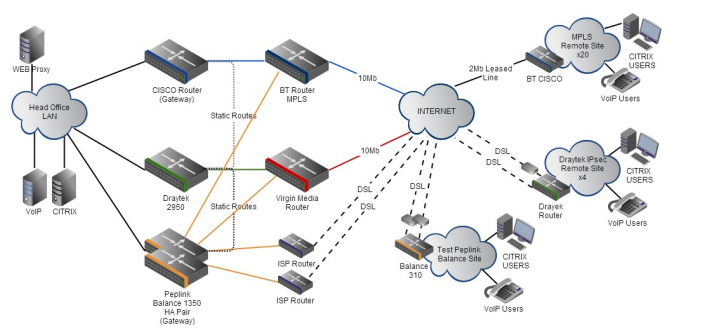
Colégio Next - Enabling eLearning

Colégio Next, a recognized Apple Distinguished School - deploys over 500 iPads to its 600 students as a teaching and learning tool.
Despite being equipped with iPads, teachers and students alike were not making use of them. The reason for this was because of the slow network access speeds. Apps would not download and course contents were inaccessible. Often, having more than a couple students connected to the same Wi-Fi access point was enough to bring it to its knees.
Colégio Next needed a unique solution, so they contacted Peplink.
Requirements
- Solve network congestion problem caused by 600 students over rural Internet connections
- Wi-Fi that can handle 50+ users per classroom
- An affordable network infrastructure that can provide simultaneous access to media-rich educational content
Solution
- Peplink MediaFast
- Multi-WAN Content-caching router, tailor-made for Education networking.
- AP One 300M
- Enterprise grade AP, 5GHz Wi-Fi, up to 60 concurrent users.
Benefits
- Instant, simultaneous access to media-rich educational content for 500+ iPads
- Wi-Fi connection stability for 50+ users per classroom, not achievable by other tested equipment
- Teachers, students and guests can be assigned access priority to available bandwidth, further preventing congestion
- iOS updates (often 2GB size) no longer congest the network as they are downloaded only once, cached on the MediaFast and then distributed to all iOS devices
- AP Controller makes MAC Address Filtering easy. Students are assigned to designated APs by their devices' MAC Address in order to prevent saturating any single AP.
- Flawless iPad AirPlay mirroring at all times
- iPads are used all day, reaching their full potential with a fast and stable network all the time
- Students are far more engaged and teachers rely on their iPads all day
Performance Optimization
Scenario
In this scenario, email and web browsing are the two main Internet services used by LAN users.
The mail server is external to the network. The connections are ADSL (WAN1, with slow uplink and fast downlink) and Metro Ethernet (WAN2, symmetric).
Solution
For optimal performance with this configuration, individually set the WAN load balance according to the characteristics of each service.
- Web browsing mainly downloads data; sending emails mainly consumes upload bandwidth.
- Both connections offer good download speeds; WAN2 offers good upload speeds.
- Define WAN1 and WAN2's inbound and outbound bandwidths to be 30M/2M and 50M/50M, respectively. This will ensure that outbound traffic is more likely to be routed through WAN2.
- For HTTP, set the weight to 3:4.
- For SMTP, set the weight to 1:8, such that users will have a greater chance to be routed via WAN2 when sending email.
Maintaining the Same IP Address Throughout a Session
Scenario
Some IP address-sensitive websites (for example, Internet banking) use both client IP address and cookie matching for session identification. Since load balancing uses different IP addresses, the session is dropped when a mismatched IP is detected, resulting in frequent interruptions while visiting such sites.
Solution
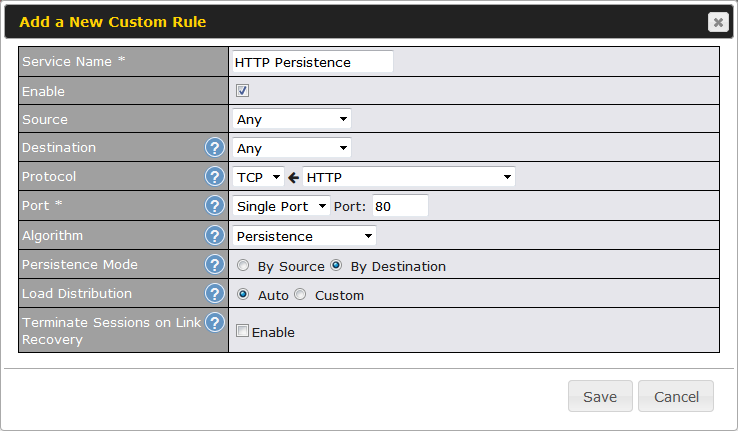
Make use of the persistence functionality of the Peplink Balance. With persistence configured and the By Destination option selected, the Peplink Balance will use a consistent WAN connection for source-destination pairs of IP addresses, preventing sessions from being dropped.
With persistence configured and the option By Source selected, the Peplink Balance uses a consistent WAN connection for same-source IP addresses. This option offers higher application compatibility but may inhibit the load balancing function unless there are many clients using the Internet.
Settings
Set persistence at Advanced>Outbound Policy.
Click Add Rule, select HTTP (TCP port 80) for web service, and select Persistence. Click Save and then Apply Changes, located at the top right corner, to complete the process.
Tip |
A network administrator can use the traceroute utility to manually analyze the connection path of a particular WAN connection. |
Bypassing the Firewall to Access Hosts on LAN
Scenario
There are times when remote access to computers on the LAN is desirable; for example, when hosting web sites, online businesses, FTP download and upload areas, etc. In such cases, it may be appropriate to create an inbound NAT mapping for the network to allow some hosts on the LAN to be accessible from outside of the firewall.
Solution
The web admin interface can be used to add an inbound NAT mapping to a host and to bind the host to the WAN connection(s) of your choice. To begin, navigate to Network>NAT Mappings.
In this example, the host with an IP address of 192.168.1.102 is bound to 10.90.0.75 of WAN1:
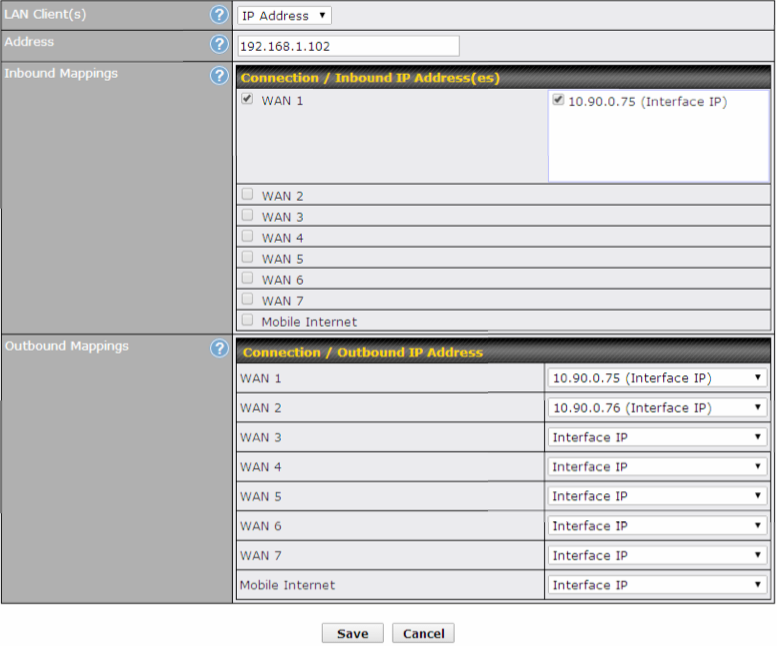
Click Save and then Apply Changes, located at the top right corner, to complete the process.
Inbound Access Restriction
Scenario
A firewall is required in order to protect the network from potential hacker attacks and other Internet security threats.
Solution
Firewall functionality is built into the Peplink Balance. By default, inbound access is unrestricted. Enabling a basic level of protection involves setting up firewall rules.
For example, in order to protect your private network from external access, you can set up a firewall rule between the Internet and your private network. To do so, navigate to Network>Firewall>Access Rules. Then click the Add Rule button in the Inbound Firewall Rules table and change the settings according to the following screenshot:
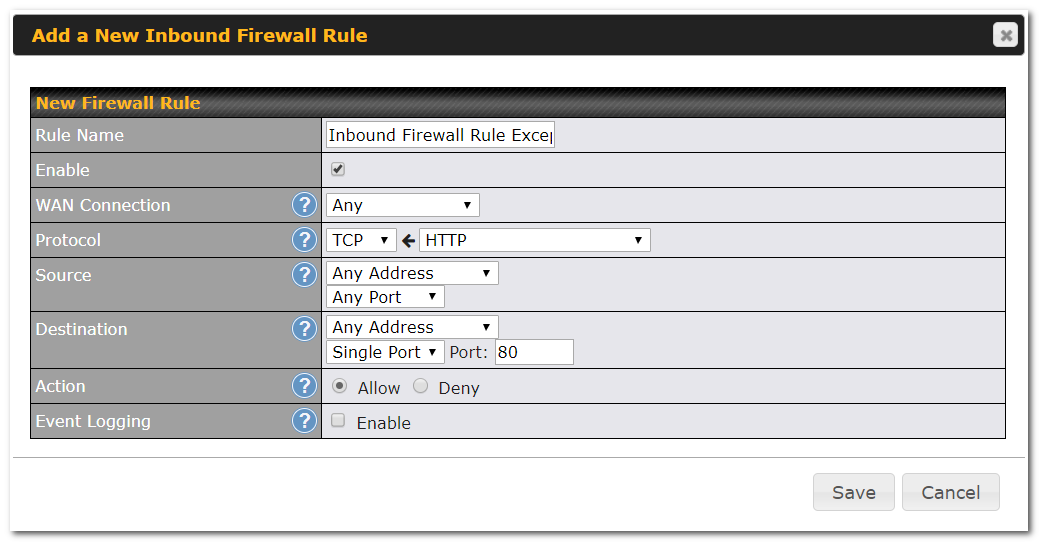
After the fields have been entered as in the screenshot, click Save to add the rule. Afterwards, change the default inbound rule to Deny by clicking the default rule in the Inbound Firewall Rules table. Click Apply Changes on the top right corner to complete the process.
Outbound Access Restriction
Scenario
For security reasons, it may be appropriate to restrict outbound access. For example, you may want to prevent LAN users from using FTP to transfer files to and from the Internet. This can easily be achieved by setting up an outbound firewall rule with the Peplink Balance.
Solution
To set up a firewall between the Internet and private network for outbound access, navigate to Network>Firewall>Access Rules. Click the Add Rule button in the Outbound Firewall Rules table, and then adjust settings according to the screenshot:
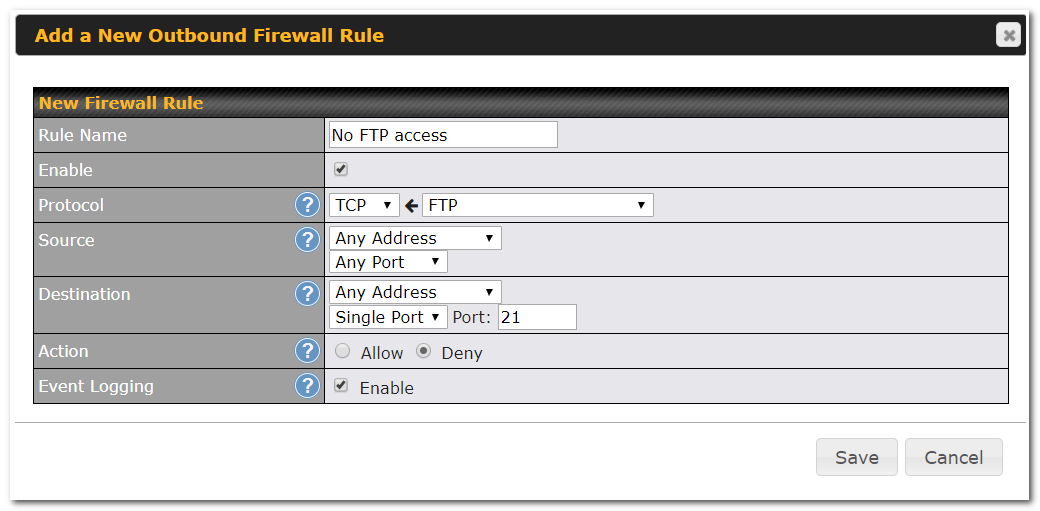
After the fields have been entered as in the screenshot, click Save to add the rule. Click Apply Changes on the top right corner to complete the process.