
7. Peplink Balance Overview
7.1. Peplink Balance One
Panel Appearance
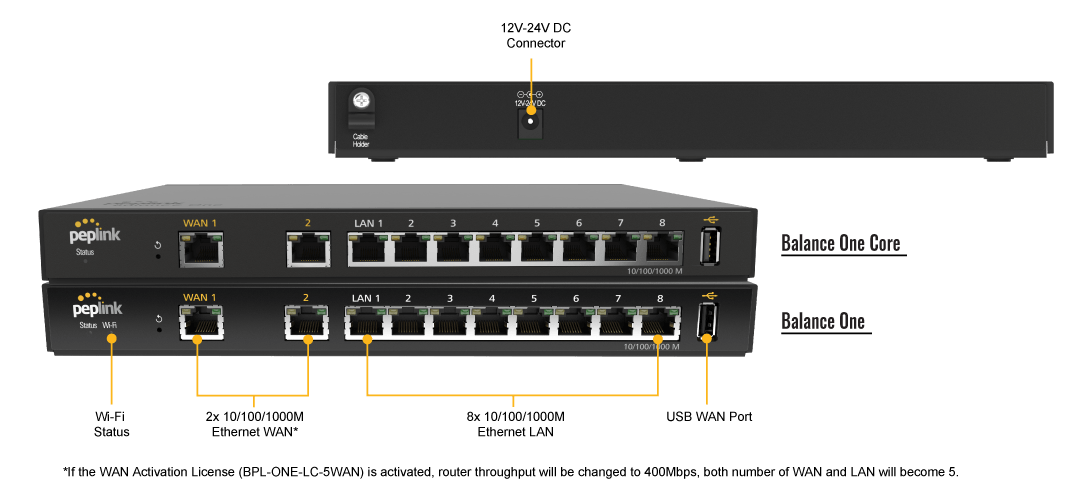
LED Indicators
The statuses indicated by the front panel LEDs are as follows:
Power and Status Indicators | |
Status | OFF – Upgrading firmware |
Red – Booting up or busy | |
Blinking red – Boot up error | |
Green – Ready | |
LAN and WAN Ports | |
Green LED | ON – 1000 Mbps OFF – 10 / 100 Mbps or port is not connected |
Orange LED | Blinking – Data is transferring |
OFF – No data is being transferred or port is not connected | |
Port Type | Auto MDI/MDI-X ports |
Wi-Fi Indicators | ||
Wi-Fi | OFF | Disabled |
Green | Ready | |
USB Port | |
USB Ports | For future functionality |
7.2. Peplink Balance Two
Panel Appearance
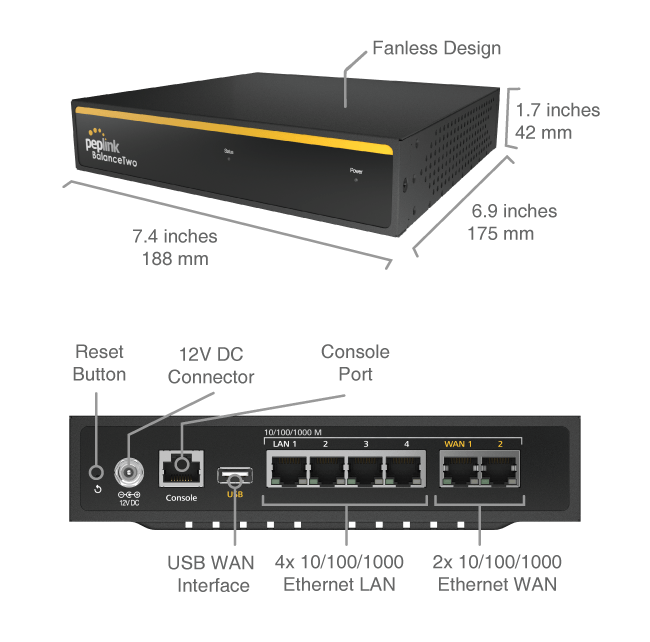
LED Indicators
The statuses indicated by the front panel LEDs are as follows:
Power and Status Indicators | |
Power | OFF – Power off |
Green – Power on | |
Status | OFF – Upgrading firmware |
Red – Booting up or busy | |
Blinking red – Boot up error | |
Green – Ready | |
LAN and WAN Ports | |
Green LED | ON – 1000 Mbps OFF –10 / 100 Mbps or port is not connected |
Orange LED | Blinking – Data is transferring |
OFF – No data is being transferred or port is not connected | |
Port Type | Auto MDI/MDI-X ports |
USB Port | |
USB Ports | For connecting a 4G/3G USB modem |
7.3. Peplink Balance 20
Panel Appearance
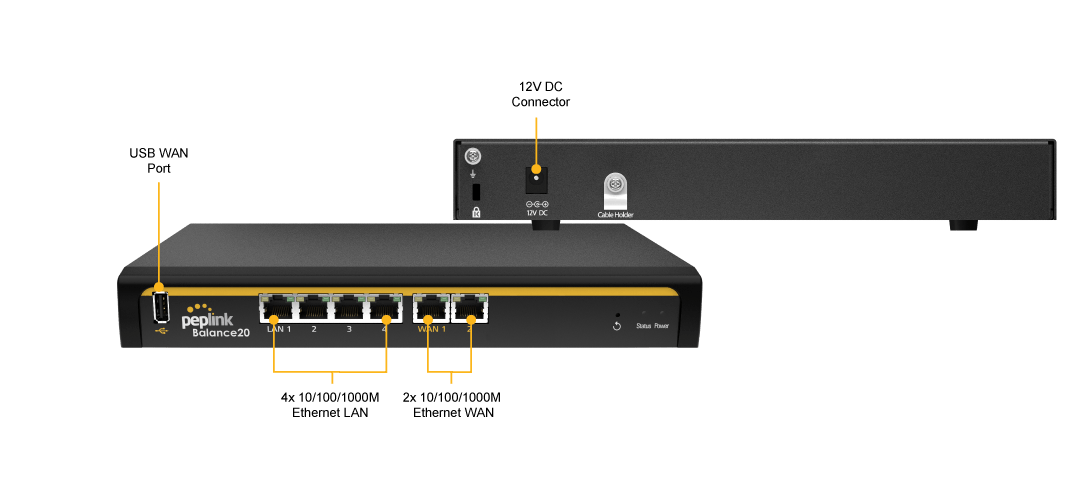
LED Indicators
The statuses indicated by the front panel LEDs are as follows:
Power and Status Indicators | |
Power | OFF – Power off |
Green – Power on | |
Status | OFF – Upgrading firmware |
Red – Booting up or busy | |
Blinking red – Boot up error | |
Green – Ready | |
LAN and WAN Ports | |
Green LED | ON – 10 / 100 / 1000 Mbps |
Orange LED | Blinking – Data is transferring |
OFF – No data is being transferred or port is not connected | |
Port Type | Auto MDI/MDI-X ports |
USB Port | |
USB Ports | For connecting a 4G/3G USB modem |
7.4. Peplink Balance 20X
Panel Appearance
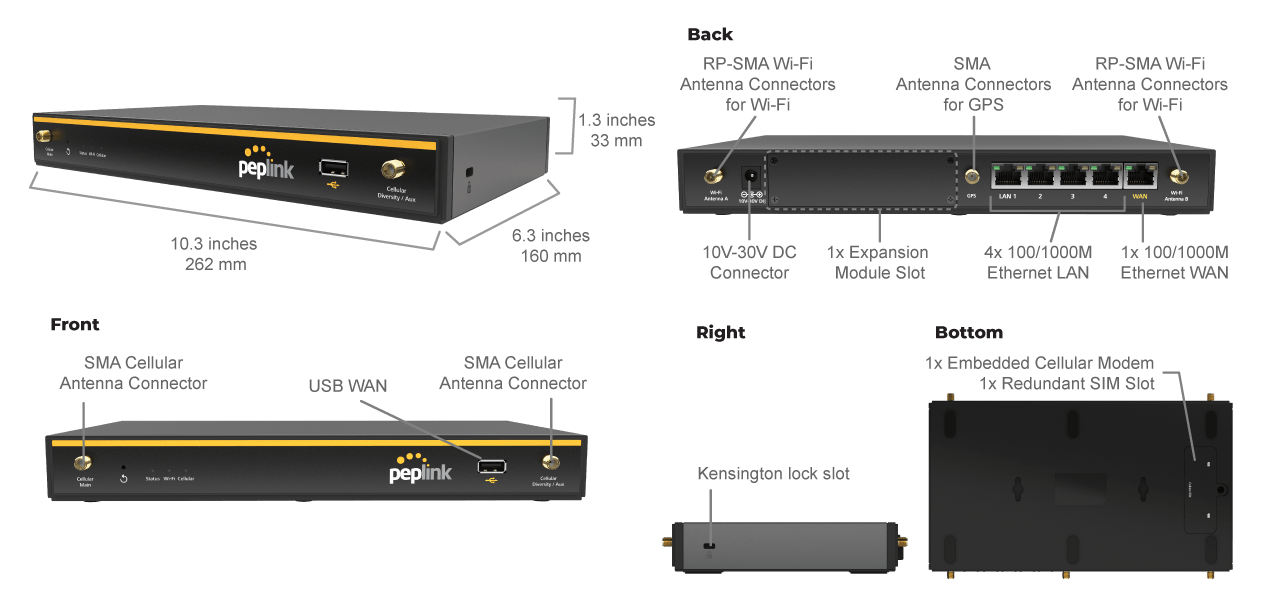
LED Indicators
The statuses indicated by the front panel LEDs are as follows:
Power and Status Indicators | |
Status | OFF – Upgrading firmware |
Red – Booting up or busy | |
Blinking red – Boot up error | |
Green – Ready | |
LAN and WAN Ports | |
Green LED | ON – 1000 Mbps OFF – 10 / 100 Mbps or port is not connected |
Orange LED | Blinking – Data is transferring |
OFF – No data is being transferred or port is not connected | |
Port Type | Auto MDI/MDI-X ports |
Wi-Fi AP Indicators | ||
Wi-Fi AP | OFF | Disabled |
ON | Enabled | |
USB Port | |
USB Ports | For connecting a 4G/3G USB modem |
Flex Module Mini
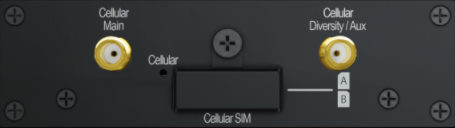
1x LTE-A Module | |
Interface | 1x Embedded LTE-A Cellular Modem with Redundant SIM Slots |
Antenna Connectors | 2x SMA Cellular Antenna Connectors |
Downlink / Uplink Datarate | 300Mbps/50Mbps (CAT-6) 600Mbps/150Mbps (CAT-12) |
Power Consumption | 10W |
Weight | 0.83 pounds | 375 grams |
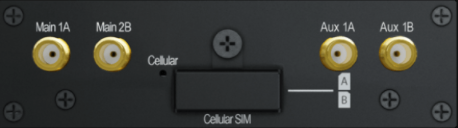
1xLTE-A Module | |
Interface | 1x Embedded LTE-A Cellular Modem with Redundant SIM Slots |
Antenna Connectors | 4x SMA Cellular Antenna Connectors |
Downlink / Uplink Datarate | 1.2 Gbps/150 Mbps (CAT-18) |
Power Consumption | 10W |
Weight | 0.83 pounds | 375 grams |
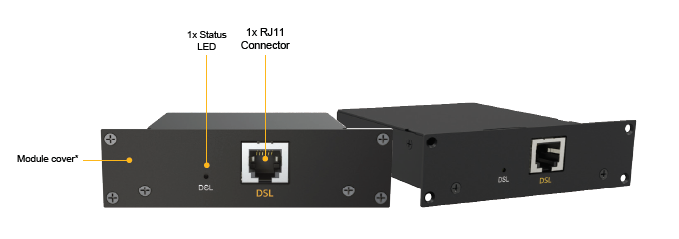
1x VDSL Module | |
Interface | 1x RJ11 Connector, 1x Status LED |
Power Consumption | 9W |
Weight | 0.44 pounds | 200 grams |
7.5. Peplink Balance 30 LTE
Panel Appearance
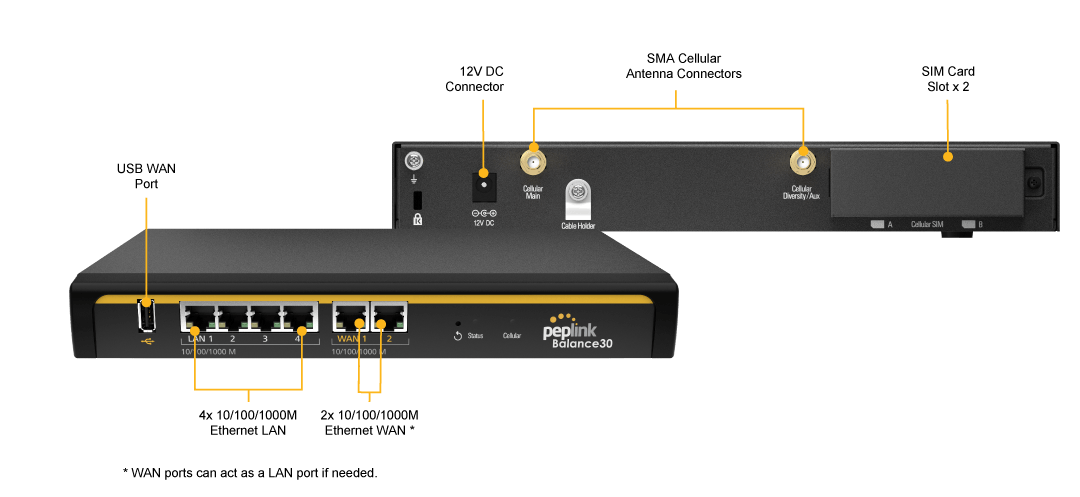
LED Indicators
The statuses indicated by the front panel LEDs are as follows:
Power and Status Indicators | |
Power | OFF – Power off |
Green – Power on | |
Status | OFF – Upgrading firmware |
Red – Booting up or busy | |
Blinking red – Boot up error | |
Green – Ready | |
LAN and WAN Ports | |
Green LED | ON – 10 / 100 /1000 Mbps |
Orange LED | Blinking – Data is transferring |
OFF – No data is being transferred or port is not connected | |
Port Type | Auto MDI/MDI-X ports |
Cellular WAN Indicators | ||
Cellular | OFF | Disabled |
Blinking slowly | Connecting to wireless network | |
ON | Connected to wireless network | |
USB Port | |
USB Ports | For connecting a 4G/3G USB modem |
7.6. Peplink Balance 30 Pro
Panel Appearance
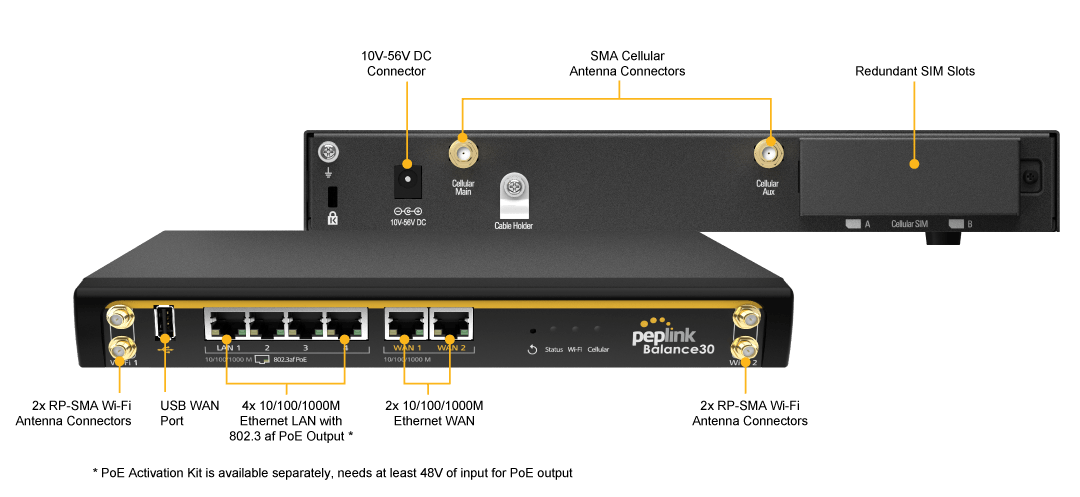
LED Indicators
The statuses indicated by the front panel LEDs are as follows:
Power and Status Indicators | |
Power | OFF – Power off |
Green – Power on | |
Status | OFF – Upgrading firmware |
Red – Booting up or busy | |
Blinking red – Boot up error | |
Green – Ready | |
WAN Ports | |
Green LED | ON – 1000 Mbps OFF -10 / 100 Mbps or port is not connected |
Orange LED | Blinking – Data is transferring |
OFF – No data is being transferred or port is not connected | |
Port Type | Auto MDI/MDI-X ports |
LAN Ports | |
Green LED | ON – PoE Enabled OFF - PoE Disabled |
Orange LED | Blinking – 10 / 100 / 1000 Mbps with activity |
OFF – No data is being transferred or port is not connected | |
Port Type | Auto MDI/MDI-X ports |
Wi-Fi AP Indicators | ||
Wi-Fi AP | OFF | Disabled |
ON | Enabled | |
Cellular WAN Indicators | ||
Cellular | OFF | Disabled |
Blinking slowly | Connecting to wireless network | |
ON | Connected to wireless network | |
USB Port | |
USB Ports | For connecting a 4G/3G USB modem |
7.7. Peplink Balance 50
Front Panel Appearance
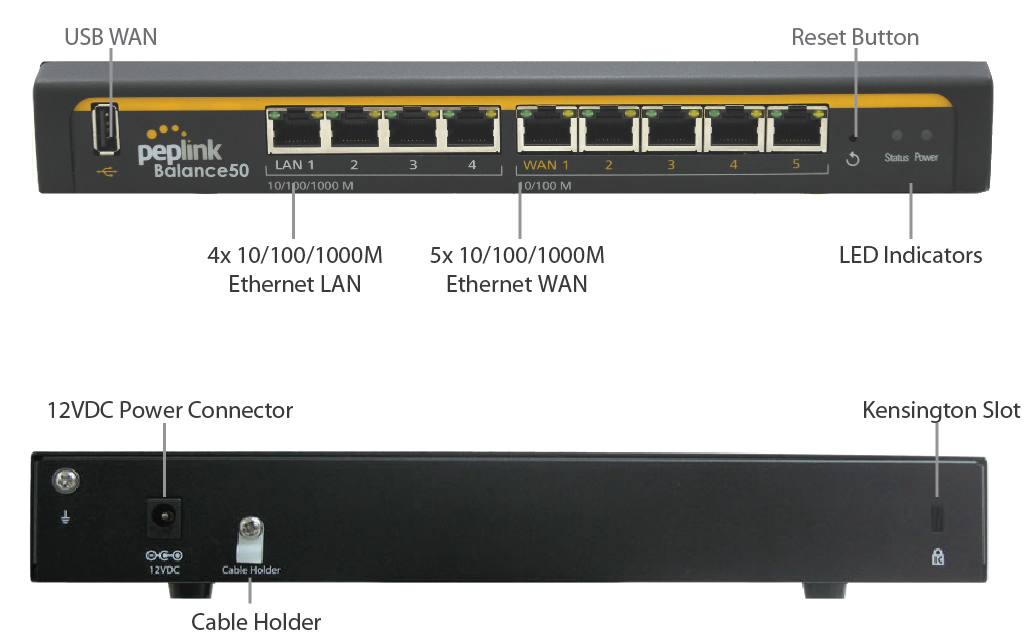
LED Indicators
The statuses indicated by the front panel LEDs are as follows:
Power and Status Indicators | |
Power | OFF – Power off |
Green – Power on | |
Status | OFF – Upgrading firmware |
Red – Booting up or busy | |
Blinking red – Boot up error | |
Green – Ready | |
LAN and WAN Ports | |
Green LED | ON – 10 / 100 /1000 Mbps |
Orange LED | Blinking – Data is transferring |
OFF – No data is being transferred or port is not connected | |
Port Type | Auto MDI/MDI-X ports |
USB Port | |
USB Ports | For connecting a 4G/3G USB modem |
7.8. Peplink Balance 210
Front Panel Appearance
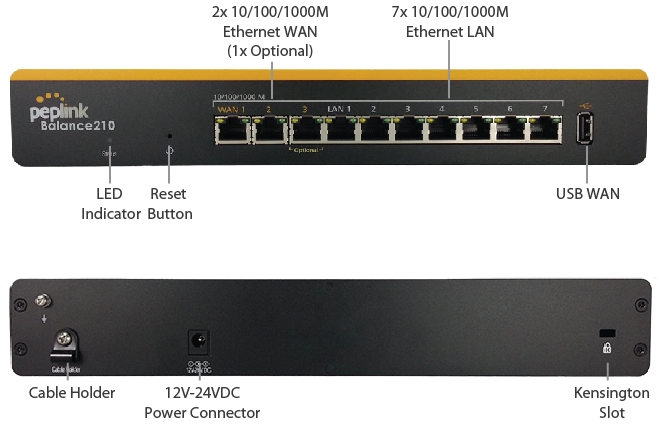
LED Indicators
The statuses indicated by the front panel LEDs are as follows:
Power and Status Indicators | |
Status | OFF – Upgrading firmware |
Red – Booting up or busy | |
Blinking red – Boot up error | |
Green – Ready | |
LAN and WAN Ports | |
Green LED | ON – 10 / 100 / 1000 Mbps |
Orange LED | Blinking – Data is transferring |
OFF – No data is being transferred or port is not connected | |
Port Type | Auto MDI/MDI-X ports |
USB Port | |
USB Ports | For connecting a 4G/3G USB modem |
7.9. Peplink Balance 305
Front Panel Appearance
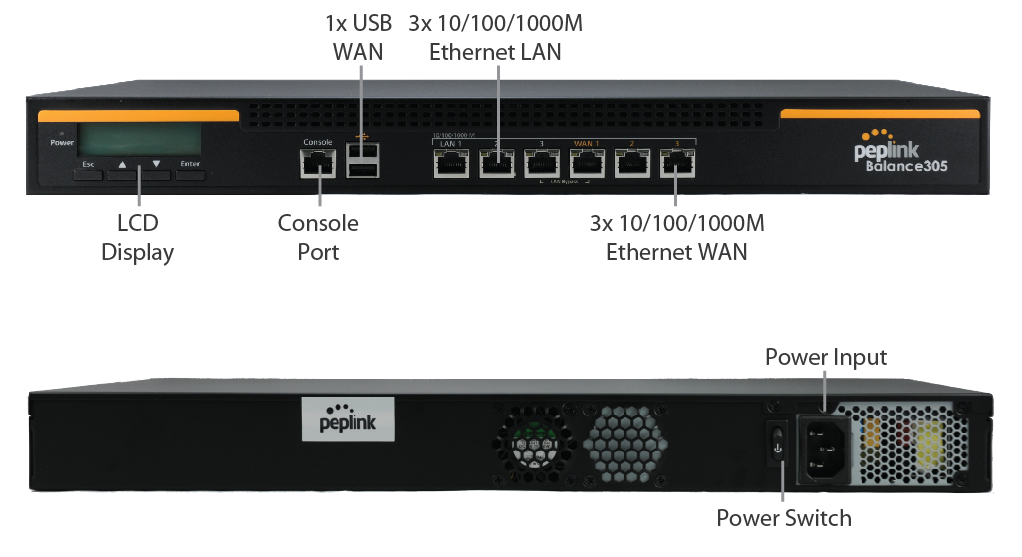
LED Indicators
The statuses indicated by the front panel LEDs are as follows:
Power and Status Indicators | |
Power LED | OFF – Power off |
GREEN – Power on | |
LAN Port, WAN 1 – 3 Ports | |
Right LED | ORANGE – 1000 Mbps |
GREEN – 100 Mbps | |
OFF – 10 Mbps | |
Left LED | Solid – Port is connected without traffic |
Blinking – Data is transferring | |
OFF – Port is not connected | |
Port Type | Auto MDI/MDI-X ports |
Console and USB Ports | |
Console Port | Reserved for engineering use |
USB Ports | For connecting a 4G/3G USB modem |
7.10. Peplink Balance 310 (HW4)
Front Panel Appearance
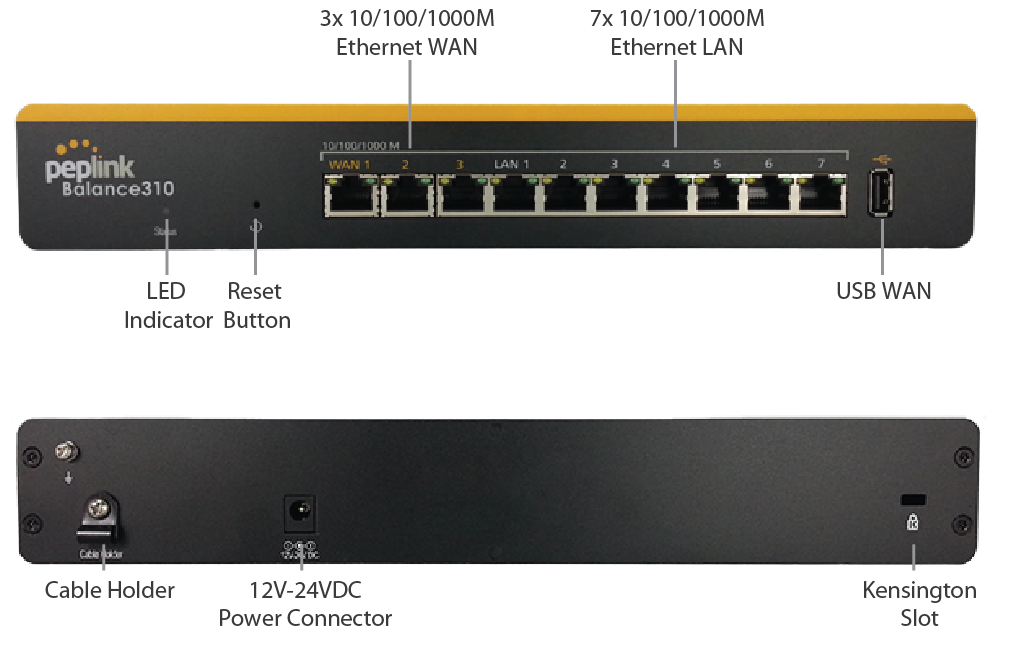
LED Indicators
The statuses indicated by the front panel LEDs are as follows:
Power and Status Indicators | |
Status | OFF – Upgrading firmware |
Red – Booting up or busy | |
Blinking red – Boot up error | |
Green – Ready | |
LAN and WAN Ports | |
Green LED | ON – 10 / 100 / 1000 Mbps |
Orange LED | Blinking – Data is transferring |
OFF – No data is being transferred or port is not connected | |
Port Type | Auto MDI/MDI-X ports |
USB Port | |
USB Ports | For connecting a 4G/3G USB modem |
7.11. Peplink Balance 310 (HW5)
Panel Appearance
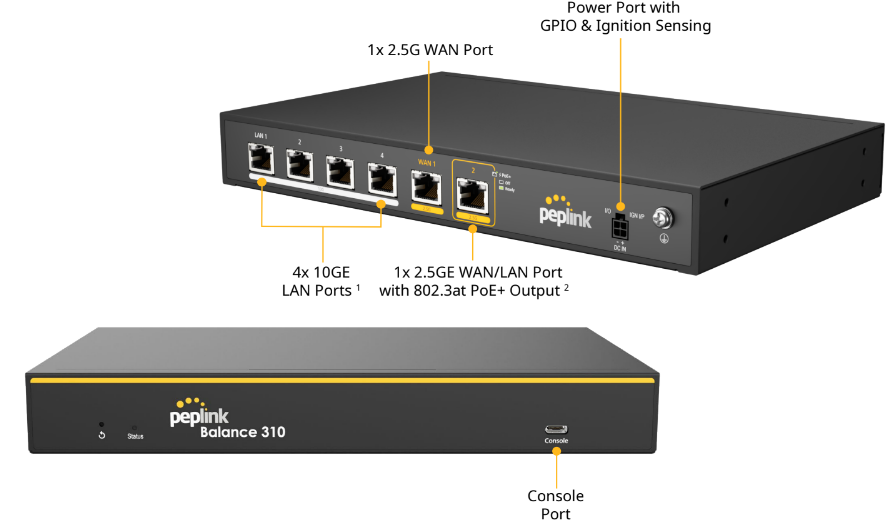
LED Indicators
The statuses indicated by the front panel LEDs are as follows:
Power and Status Indicators | |
Status | OFF – Upgrading firmware |
Red – Booting up or busy | |
Blinking red – Boot up error | |
Green – Ready | |
WAN and LAN Ports (10GBASE-T) | |||
Right | Green - 10 Gbps | ||
Orange - 1000 Mbps / 2500 Mbps / 5000 Mbps | |||
OFF - 100 Mbps | |||
Left | OFF - Port is not connected | ||
Blinking - Data is transferring | |||
ON - Port is connected without traffic | |||
2.5GE WAN / LAN Ports | |||
Green LED | ON – PoE+ Ready OFF – PoE Off | ||
Orange LED | OFF - Port is not connected | ||
Blinking - Data is transferring | |||
ON - Port is connected without traffic | |||
Port Type | Auto MDI/MDI-X ports | ||
Console Ports | |
Console Port | Reserved for engineering use |
7.12. Peplink Balance 310X
Front Panel Appearance
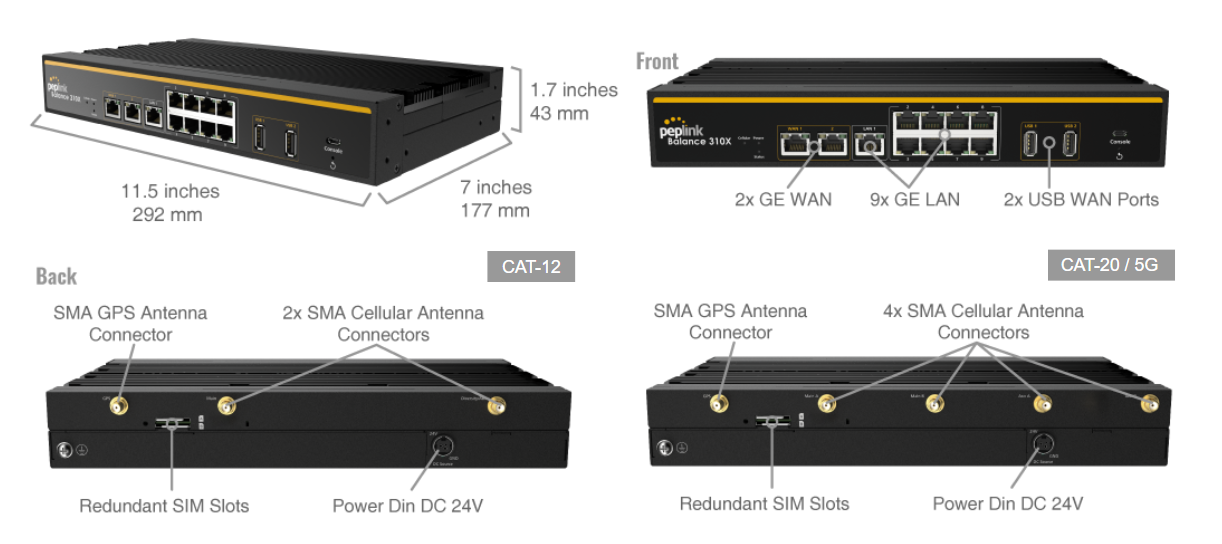
CAT-20 / 5GCAT-12
LED Indicators
The statuses indicated by the front panel LEDs are as follows:
Power and Status Indicators | |
Power | OFF – Power off |
Green – Power on | |
Status | OFF – Upgrading firmware |
Red – Booting up or busy | |
Blinking red – Boot up error | |
Green – Ready | |
WAN Ports | |
Green LED | ON - 1000 Mbps OFF – 10 / 100 Mbps or port is not connected |
Orange LED | Blinking – Data is transferring |
OFF – No data is being transferred or port is not connected | |
Port Type | Auto MDI/MDI-X ports |
LAN Ports | |
Green LED | ON – 1000 Mbps OFF – 10 / 100 Mbps or port is not connected |
Orange LED | Blinking – 10 / 100 / 1000 Mbps with activity |
OFF – No data is being transferred or port is not connected | |
Port Type | Auto MDI/MDI-X ports |
Cellular WAN Indicators | ||
Cellular | OFF | Disabled |
Blinking slowly | Connecting to wireless network | |
ON | Connected to wireless network | |
Wi-Fi AP Indicators | |||
Wi-Fi AP | OFF | Disabled | |
ON | Enabled | ||
USB Port | |
USB Ports | For connecting a 4G/3G USB modem |
7.13. Peplink Balance 310 5G (HW1-2)
Front Panel Appearance
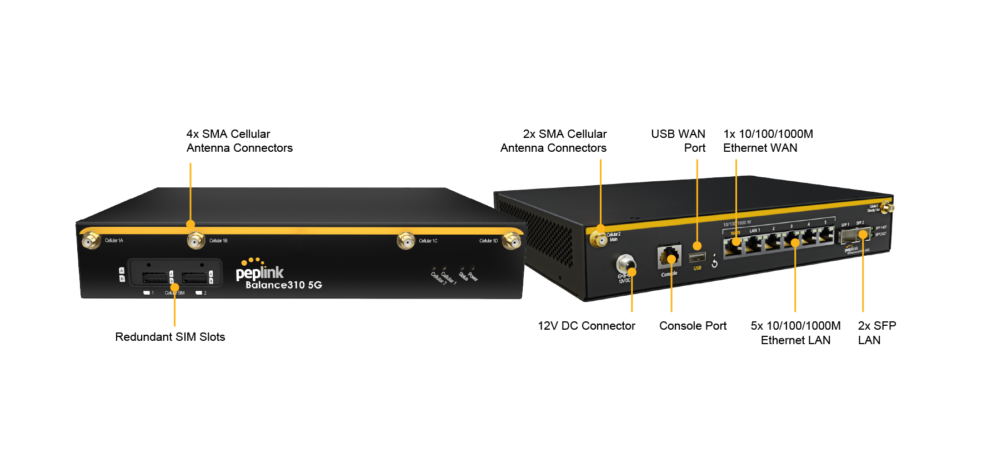
LED Indicators
The statuses indicated by the front panel LEDs are as follows:
Power and Status Indicators | |
Power | OFF – Power off |
Green – Power on | |
Status | OFF – Upgrading firmware |
Red – Booting up or busy | |
Blinking red – Boot up error | |
Green – Ready | |
WAN Port | |
Right LED | GREEN - 1000 Mbps ORANGE - 100 Mbps OFF – 10 Mbps or port is not connected |
Left LED | Blinking – Data is transferring |
OFF – Port is not connected | |
Port Type | Auto MDI/MDI-X ports |
LAN Ports | |
Right LED | GREEN – 1000 Mbps ORANGE - 100 Mbps OFF – 10 Mbps or port is not connected |
Left LED | Blinking – Data is transferring |
OFF – Port is not connected | |
Port Type | Auto MDI/MDI-X ports |
Cellular WAN Indicators | ||
Cellular | OFF | Disabled |
Blinking slowly | Connecting to wireless network | |
ON | Connected to wireless network | |
USB Port | |
USB Ports | For connecting a 4G/3G USB modem |
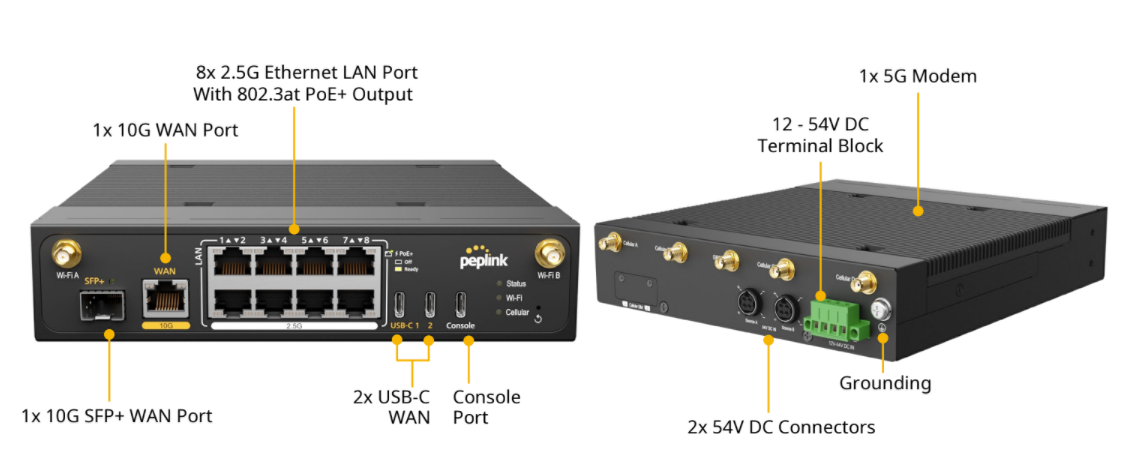
7.14. Peplink Balance 310 5G (HW3)
Panel Appearance
LED Indicators
The statuses indicated by the front panel LEDs are as follows:
Power and Status Indicators | |
Status | OFF – Upgrading firmware |
Red – Booting up or busy | |
Blinking red – Boot up error | |
Green – Ready | |
WAN Port (10GBASE-T) | |||
Right | Green - 10 Gbps | ||
Orange - 1000 Mbps / 2500 Mbps | |||
OFF - 100 Mbps | |||
Left | OFF - Port is not connected | ||
Blinking - Data is transferring | |||
ON - Port is connected without traffic | |||
2.5GE LAN Ports | |||
Green LED | ON – PoE+ Ready OFF – PoE Off | ||
Orange LED | OFF - Port is not connected | ||
Blinking - Data is transferring | |||
ON - Port is connected without traffic | |||
Port Type | Auto MDI/MDI-X ports | ||
SFP+ Ports | |||
Green LED | OFF - Port is not connected | ||
Blinking - Data is transferring | |||
ON - Port is connected without traffic | |||
Console Ports | |
Console Port | Reserved for engineering use |
Cellular WAN Indicators | |
Cellular | OFF – Disabled |
Blinking slowly – Connecting to cellular network | |
ON – Connected to cellular network | |
Wi-Fi AP Indicators | |
Wi-Fi AP | OFF – Disabled |
ON – Enabled | |
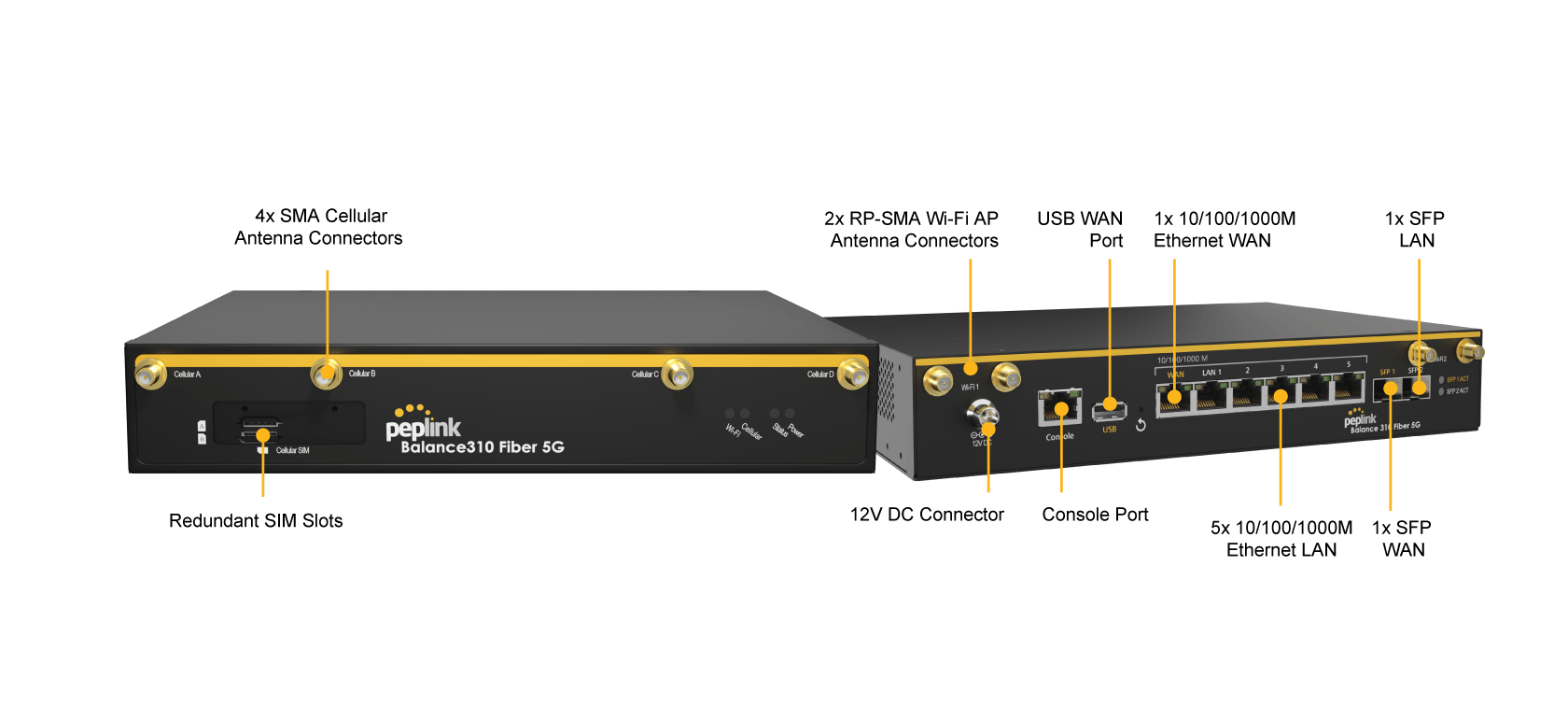
7.15. Peplink Balance 310 Fiber 5G
Front Panel Appearance
LED Indicators
The statuses indicated by the front panel LEDs are as follows:
Power and Status Indicators | |
Power | OFF – Power off |
Green – Power on | |
Status | OFF – Upgrading firmware |
Red – Booting up or busy | |
Blinking red – Boot up error | |
Green – Ready | |
WAN Port | |
Right LED | Green - 1000 Mbps Orange - 100 Mbps OFF – 10 Mbps or port is not connected |
Left LED | Blinking – Data is transferring |
OFF – Port is not connected | |
Port Type | Auto MDI/MDI-X ports |
LAN Ports | |
Right LED | Green – 1000 Mbps Orange - 100 Mbps OFF – 10 Mbps or port is not connected |
Left LED | Blinking – Data is transferring |
OFF – Port is not connected | |
Port Type | Auto MDI/MDI-X ports |
Cellular WAN Indicators | ||
Cellular | OFF | Disabled |
Blinking slowly | Connecting to wireless network | |
ON | Connected to wireless network | |
Wi-Fi AP Indicators | |||
Wi-Fi AP | OFF | Disabled | |
ON | Enabled | ||
USB Port | |
USB Ports | For connecting a 4G/3G USB modem |
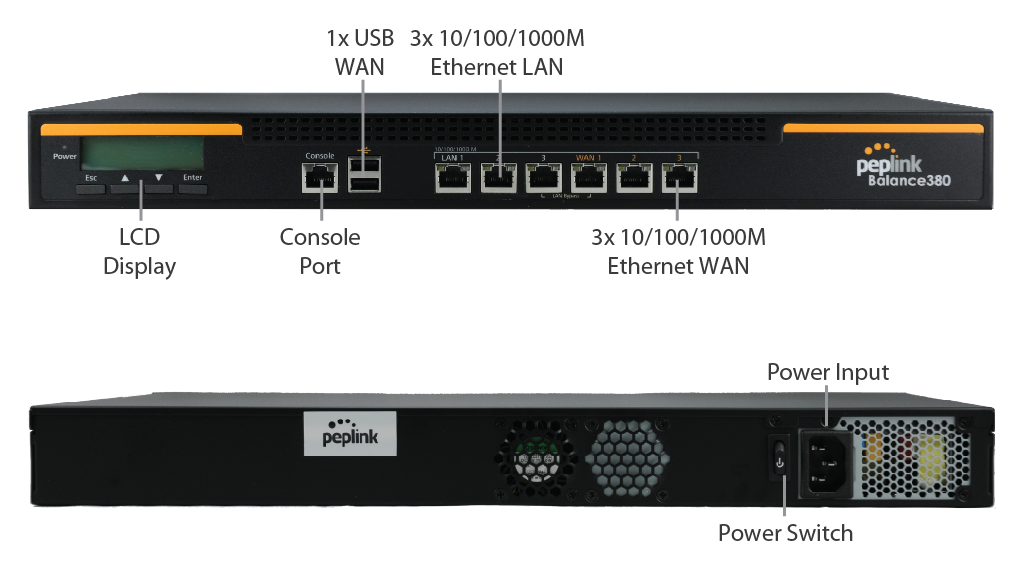
7.16. Peplink Balance 380
Panel Appearance
LED Indicators
The statuses indicated by the front panel LEDs are as follows:
Power and Status Indicators | |
Power LED | OFF – Power off |
Green – Power on | |
LAN Port, WAN 1 – 3 Ports | |
Right LED | Orange – 1000 Mbps |
Green – 100 Mbps | |
OFF – 10 Mbps | |
Left LED | Solid – Port is connected without traffic |
Blinking – Data is transferring | |
OFF – Port is not connected | |
Port Type | Auto MDI/MDI-X ports |
Console and USB Ports | |
Console Port | Reserved for engineering use |
USB Ports | For connecting a 4G/3G USB modem |
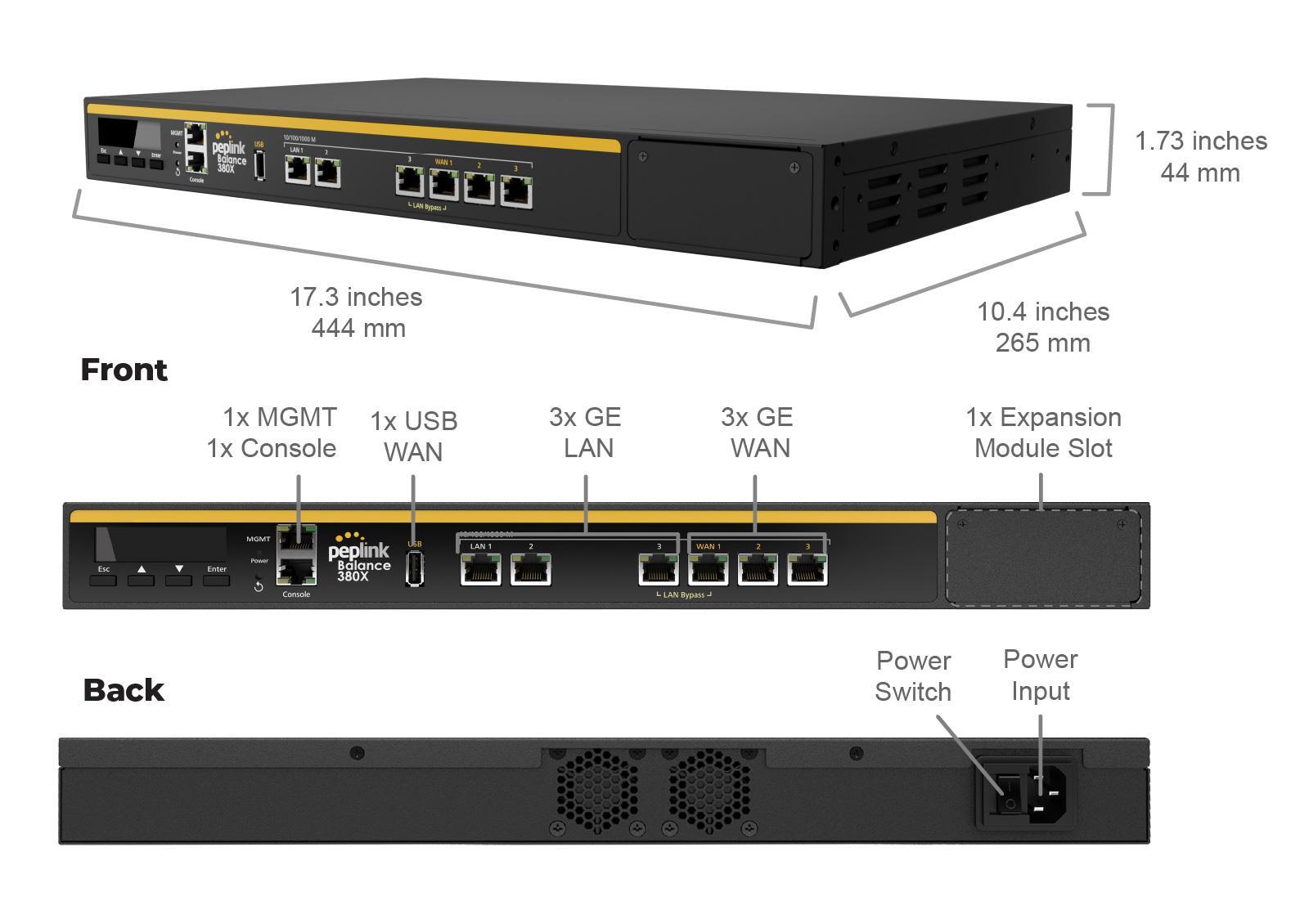
7.17. Peplink Balance 380X
Panel Appearance
LED Indicators
The statuses indicated by the front panel LEDs are as follows:
Power and Status Indicators | |
Power LED | OFF – Power off |
Green – Power on | |
LAN Port, WAN 1 – 3 Ports | |
Right LED | Green – 1000 Mbps |
OFF – 10 / 100 Mbps | |
Left LED | Solid – Port is connected without traffic |
Blinking – Data is transferring | |
OFF – Port is not connected | |
Port Type | Auto MDI/MDI-X ports |
Console and USB Ports | |
Console Port | Reserved for engineering use |
USB Ports | For connecting a 4G/3G USB modem |
Flex Module Mini
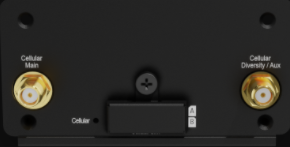
1x LTE-A Module | |
Interface | 1x Embedded LTE-A Cellular Modems with Redundant SIM Slots |
Antenna Connectors | 2x SMA Cellular Antenna Connectors |
Downlink / Uplink Datarate | 300Mbps/50Mbps (CAT-6) 600Mbps/150Mbps (CAT-12) |
Power Consumption | 10W |
Weight | 0.83 pounds | 375 grams |
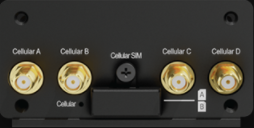
1xLTE-A Module | |
Interface | 1x Embedded LTE-A Cellular Modems with Redundant SIM Slots |
Antenna Connectors | 4x SMA Cellular Antenna Connectors |
Downlink / Uplink Datarate | 1.2 Gbps/150 Mbps (CAT-18) |
Power Consumption | 10W |
Weight | 0.83 pounds | 375 grams |
7.18. Peplink Balance 580
Panel Appearance
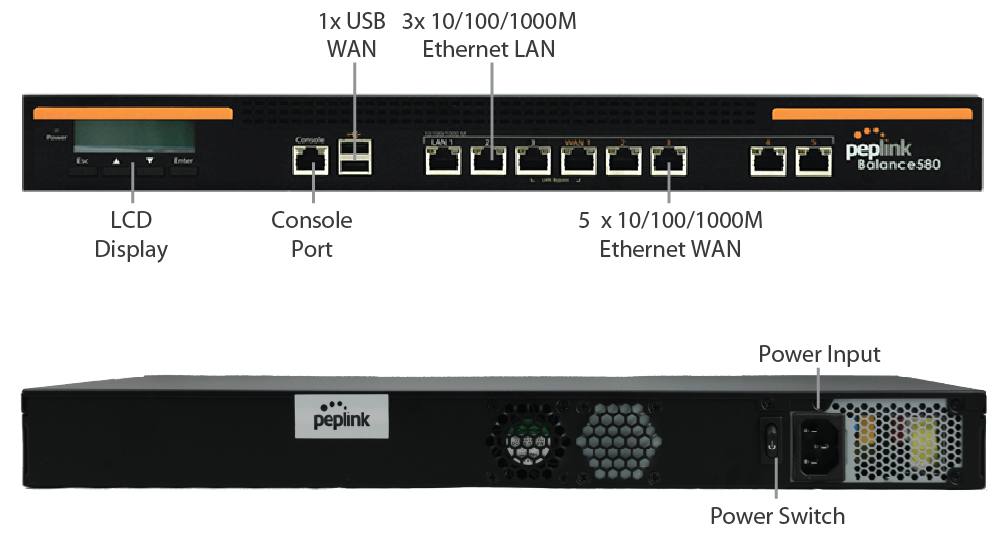
LED Indicators
The statuses indicated by the front panel LEDs are as follows:
Power and Status Indicators | |
Power LED | OFF – Power off |
Green – Power on | |
LAN Port, WAN 1 – 5 Ports | |
Right LED | Orange – 1000 Mbps |
Green – 100 Mbps | |
OFF – 10 Mbps | |
Left LED | Solid – Port is connected without traffic |
Blinking – Data is transferring | |
OFF – Port is not connected | |
Port Type | Auto MDI/MDI-X ports |
Console and USB Ports | |
Console Port | Reserved for engineering use |
USB Ports | For connecting a 4G/3G USB modem |
7.19. Peplink Balance 580X (HW1)
Panel Appearance
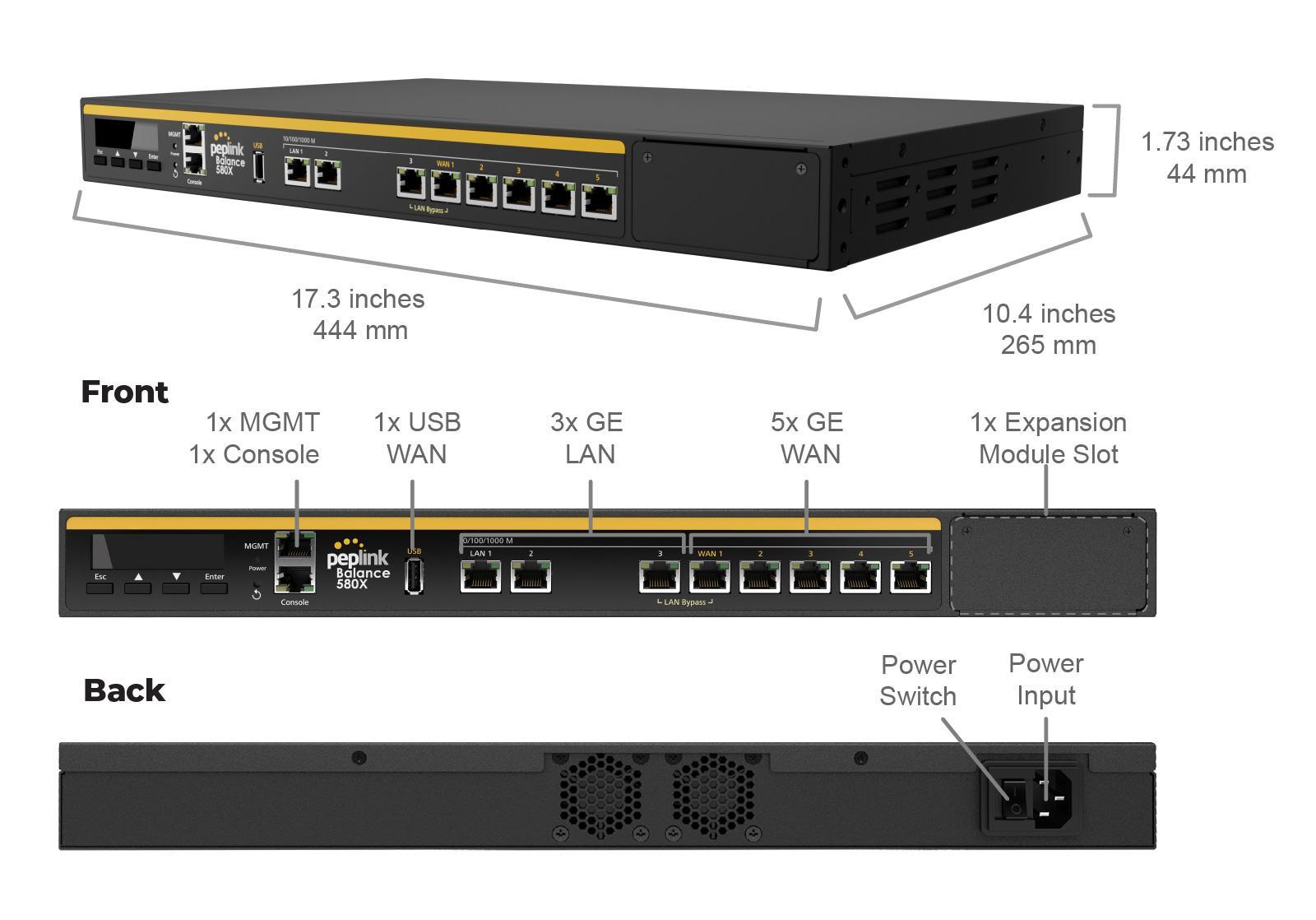
LED Indicators
The statuses indicated by the front panel LEDs are as follows:
Power and Status Indicators | |
Power LED | OFF – Power off |
Green – Power on | |
LAN Port, WAN 1 – 5 Ports | |
Right LED | Green – 1000 Mbps |
OFF – 10 / 100 Mbps | |
Left LED | Solid – Port is connected without traffic |
Blinking – Data is transferring | |
OFF – Port is not connected | |
Port Type | Auto MDI/MDI-X ports |
Console and USB Ports | |
Console Port | Reserved for engineering use |
USB Ports | For connecting a 4G/3G USB modem |
7.20. Peplink Balance 580X (HW2)
Panel Appearance
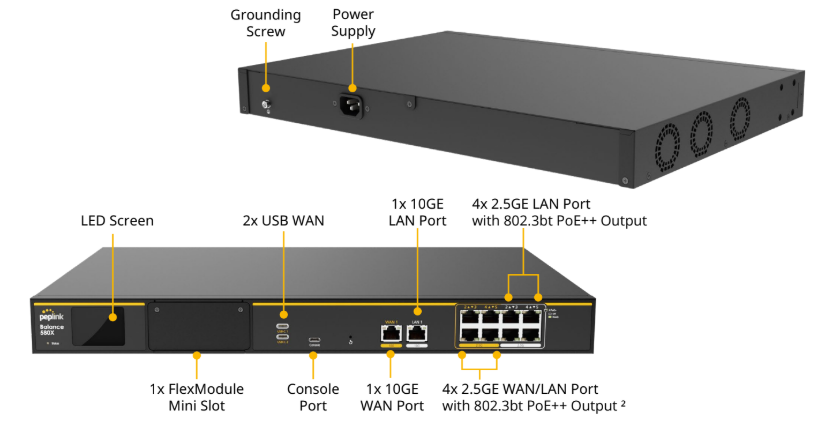
LED Indicators
The statuses indicated by the front panel LEDs are as follows:
Power and Status Indicators | |
Status | OFF – Upgrading firmware |
Red – Booting up or busy | |
Blinking red – Boot up error | |
Green – Ready | |
WAN and LAN Ports (10GBASE-T) | ||
Right | Green - 10 Gbps | |
Orange - 1000 Mbps / 2500 Mbps | ||
OFF - 100 Mbps | ||
Left | Blinking - Data is transferring | |
OFF - No data is being transferred or port is not connected | ||
2.5GE LAN Ports | ||
Green LED | ON – PoE++ Ready OFF – PoE Off | |
Orange LED | Blinking – Data is transferring | |
OFF – No data is being transferred or port is not connected | ||
Port Type | Auto MDI/MDI-X ports | |
Console and USB Ports | |
Console Port | Reserved for engineering use |
USB Ports | For connecting a 4G/3G USB modem |
Flex Module Mini
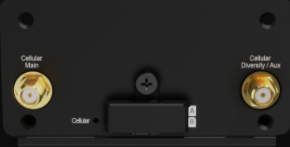
1x LTEA Module | |
Interface | 1x Embedded LTE-A Cellular Modems with Redundant SIM Slots |
Antenna Connectors | 2x SMA Cellular Antenna Connectors |
Downlink / Uplink Datarate | 300Mbps/50Mbps (CAT-6) 600Mbps/150Mbps (CAT-12) |
Power Consumption | 10W |
Weight | 0.83 pounds | 375 grams |
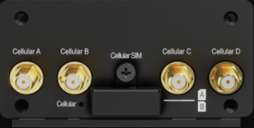
1xLTEA Module | |
Interface | 1x Embedded LTE-A Cellular Modems with Redundant SIM Slots |
Antenna Connectors | 4x SMA Cellular Antenna Connectors |
Downlink / Uplink Datarate | 1.2 Gbps/150 Mbps (CAT-18) |
Power Consumption | 10W |
Weight | 0.83 pounds | 375 grams |
7.21. Peplink Balance 710
Front Panel Appearance
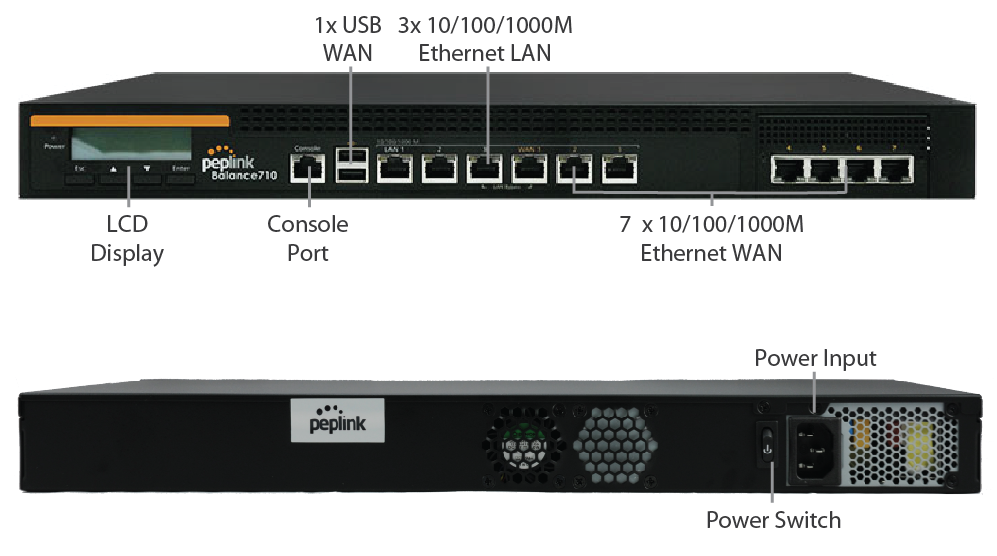
LED Indicators
Status indicated in the front panel is as follows:
LED Indicator | |
Power LED | OFF – Power off |
Green – Power on | |
LAN Port, WAN 1 – 7 Ports | |
Green LED | Orange – 1000 Mbps |
Green – 100 Mbps | |
OFF – 10 Mbps | |
Orange LED | Solid – Port is connected without traffic |
Blinking – Data is transferring | |
OFF – Port is not connected | |
Port Type | Auto MDI/MDI-X ports |
Console & USB Ports | |
Console Port | Reserved for engineering use |
USB Ports | For connecting a 4G/3G USB modem |
7.22. Peplink Balance 1350
Panel Appearance
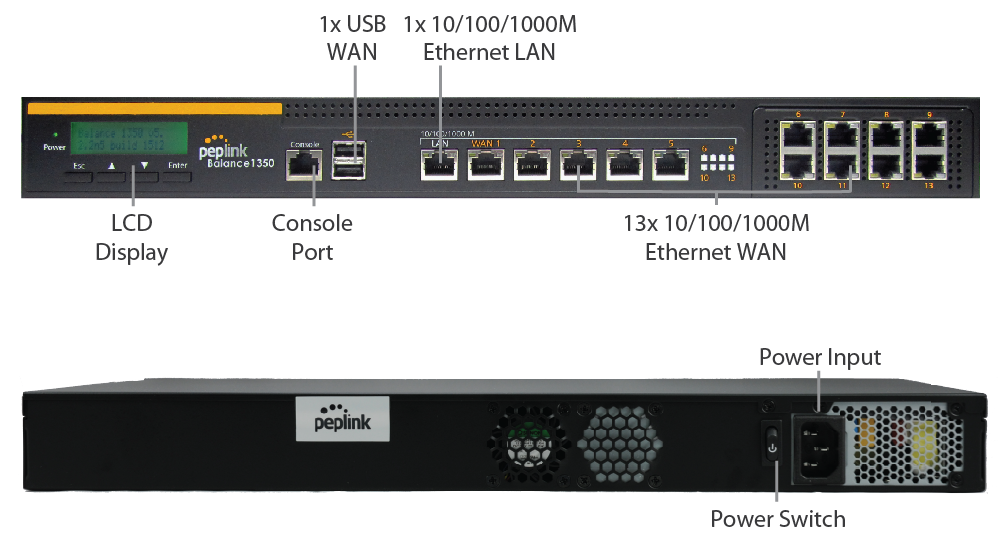
LED Indicators
Status indicated in the front panel is as follows:
LED Indicator | |
Power LED | OFF – Power off |
Green – Power on | |
LAN Port, WAN 1 – 13 Ports | |
Right LED | Orange – 1000 Mbps |
Green – 100 Mbps | |
OFF – 10 Mbps | |
Left LED | Solid – Port is connected without traffic |
Blinking – Data is transferring | |
OFF – Port is not connected | |
Port Type | Auto MDI/MDI-X ports |
Console & USB Ports | |
Console Port | Reserved for engineering use |
USB Ports | For connecting a 4G/3G USB modem |
7.23. Peplink Balance 1350 EC
Panel Appearance
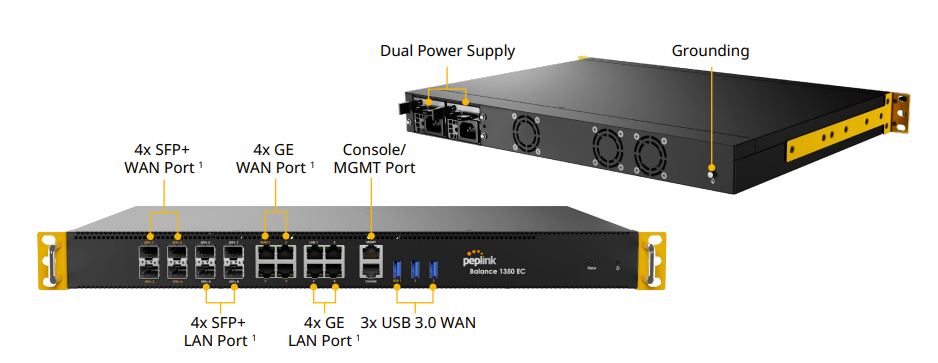
LED Indicators
The statuses indicated by the front panel LEDs are as follows:
Power and Status Indicators | |
Status | OFF – Upgrading firmware |
Red – Booting up or busy | |
Blinking red – Boot up error | |
Green – Ready | |
WAN and LAN Ports (10GBASE-T) | ||
Right | OFF - 10Mbps | |
Orange - 100Mbps | ||
Green - 1000Mbps | ||
Left | Blinking - Data is transferring | |
Solid - Port is connected without traffic | ||
OFF - Port is not connected | ||
Console and USB Ports | |
Console Port | Reserved for engineering use |
USB Ports | For connecting a 4G/3G USB modem |
7.24. Peplink Balance 2500
Panel Appearance
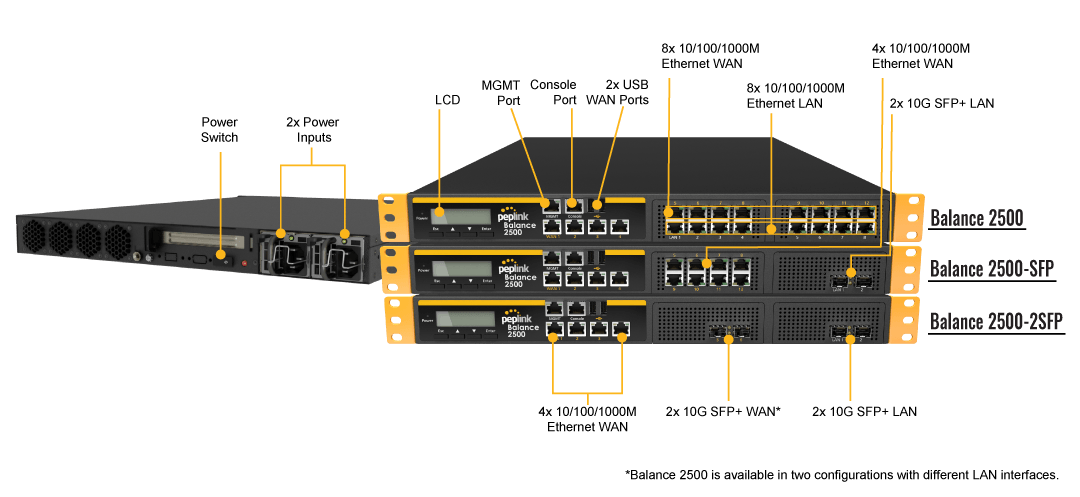
LED Indicators
Status indicated in the front panel is as follows:
LED Indicator | |
Power LED | OFF – Power off |
Green – Power on | |
LAN and WAN Ports | |
Right LED | Orange – 1000 Mbps |
Green – 100 Mbps | |
OFF – 10 Mbps | |
Left LED | Solid – Port is connected without traffic |
Blinking – Data is transferring | |
OFF – Port is not connected | |
Port Type | Auto MDI/MDI-X ports |
Console & USB Ports | |
Console Port | Reserved for engineering use |
USB Ports | For connecting a 4G/3G USB modem |
7.25. Peplink Balance 2500 EC
Panel Appearance
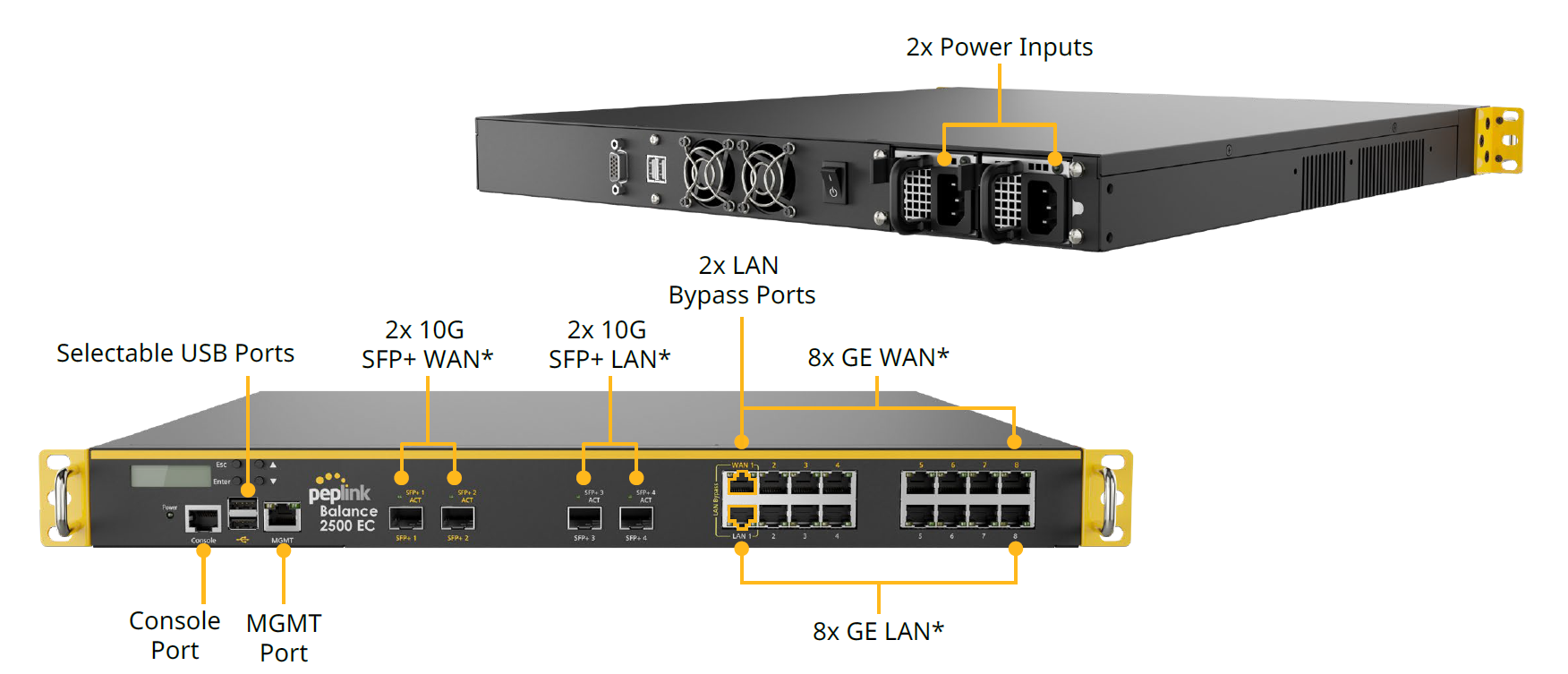
LED Indicators
Status indicated in the front panel is as follows:
LED Indicator | |
Power LED | OFF – Power off |
Green – Power on | |
LAN and WAN Ports | |
Right LED | Orange – 1000 Mbps |
Green – 100 Mbps | |
OFF – 10 Mbps | |
Left LED | Solid – Port is connected without traffic |
Blinking – Data is transferring | |
OFF – Port is not connected | |
Port Type | Auto MDI/MDI-X ports |
Console & USB Ports | |
USB Ports | For connecting a 4G/3G USB modem |
7.26. Peplink Balance 5000 EC
Panel Appearance
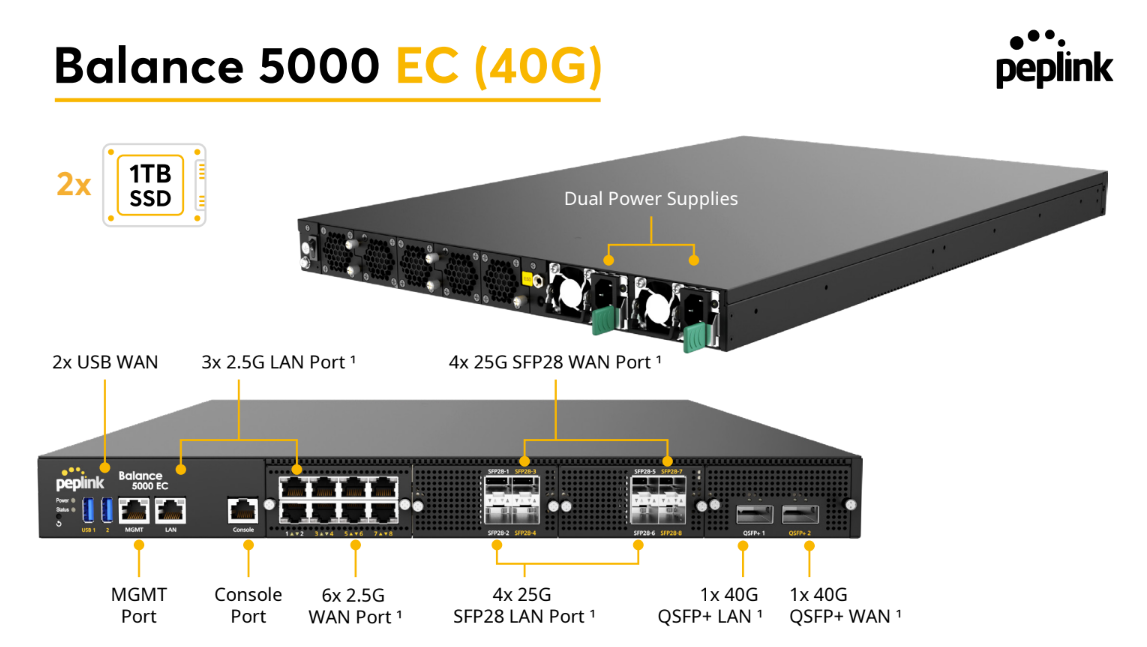
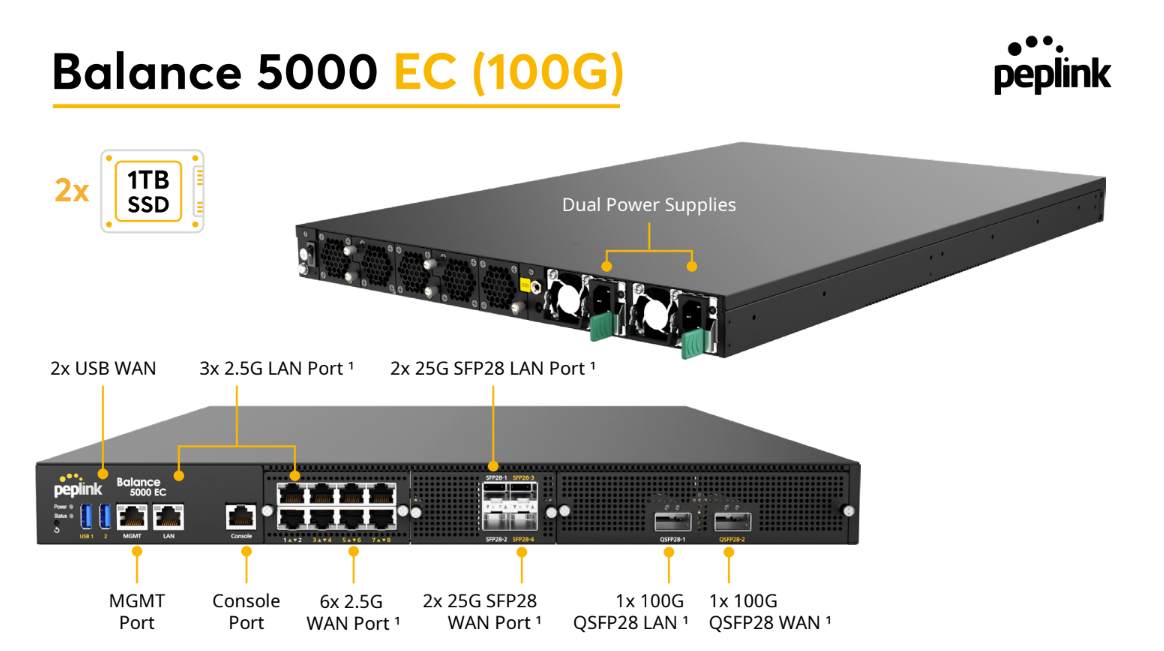
LED Indicators
Status indicated in the front panel is as follows:
LED Indicator | |
Power LED | OFF – Power off |
Green – Power on | |
Ethernet LAN and WAN Ports | |
Right LED | Orange – 1000 Mbps |
Green – 2500 Mbps | |
OFF – 100/10 Mbps | |
Left LED | Solid – Port is connected without traffic |
Blinking – Data is transferring | |
OFF – Port is not connected | |
Port Type | Auto MDI/MDI-X ports |
SFP28/QSFP+/QSFP28 Ports | |
Right LED | Solid – Link Up |
OFF – Link Down | |
Left LED | Solid – Port is connected without traffic |
Blinking – Data is transferring | |
OFF – Port is not connected | |
Console & USB Ports | |
USB Ports | For connecting a USB modem |