Appendix A. Restoration of Factory Defaults
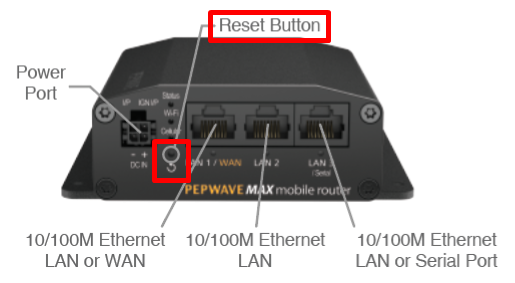
To restore the factory default settings on a Peplink router, follow the steps below:
- 1.Locate the reset button on the front or back panel of the Peplink router.
- 2.With a paperclip, press and keep the reset button pressed.
Hold for approximately 10 seconds for factory reset (Note: The LED status light shows in RED, until the status light off and release the button)
After the Peplink router finishes rebooting, the factory default settings will be restored.
Important Note |
All previous configurations and bandwidth usage data will be lost after restoring factory default settings. Regular backup of configuration settings is strongly recommended. |