
14. GRE Tunnel
Generic Routing Encapsulation (GRE) is a tunneling protocol that can encapsulate a wide variety of network layer protocols inside virtual point-to-point links over an Internet Protocol network. A GRE tunnel is similar to IPsec or SpeedFusion VPN.
To configure a GRE Tunnel, navigate to Advanced > GRE Tunnel.

Click the New Profile button to create new GRE tunnel profiles that establish tunnel connections to remote tunnel endpoints via available WAN connections. To edit a profile, click on its associated connection name in the leftmost column.
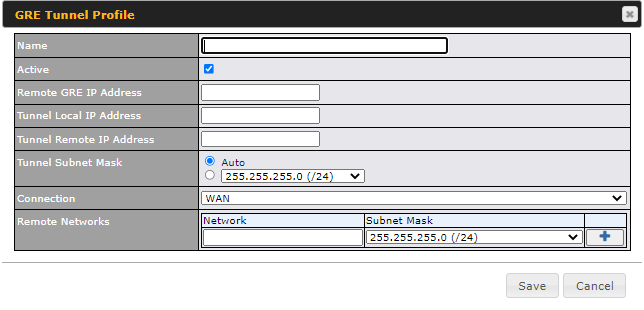
GRE Tunnel Profile Settings | |
Name | This field is for specifying a name to represent this GRE Tunnel connection profile. |
Active | When this box is checked, this GRE Tunnel connection profile will be enabled. Otherwise, it will be disabled. |
Remote GRE IP Address | This field is for entering the remote GRE’s IP address. |
Tunnel Local IP Address | This field is for specifying the tunnel source IP address. |
Tunnel Remote IP Address | This field is for specifying the tunnel destination IP address. |
Tunnel Subnet Mask | This field is to select the subnet mask that is to be used for the GRE tunnel. |
Connection | Select the appropriate WAN connection from the drop-down menu. |
Remote Networks | Input the LAN and subnets that are located at the remote site here. |