
4. Peplink MAX Mobile Router Overview
4.1. MAX 700
Panel Appearance
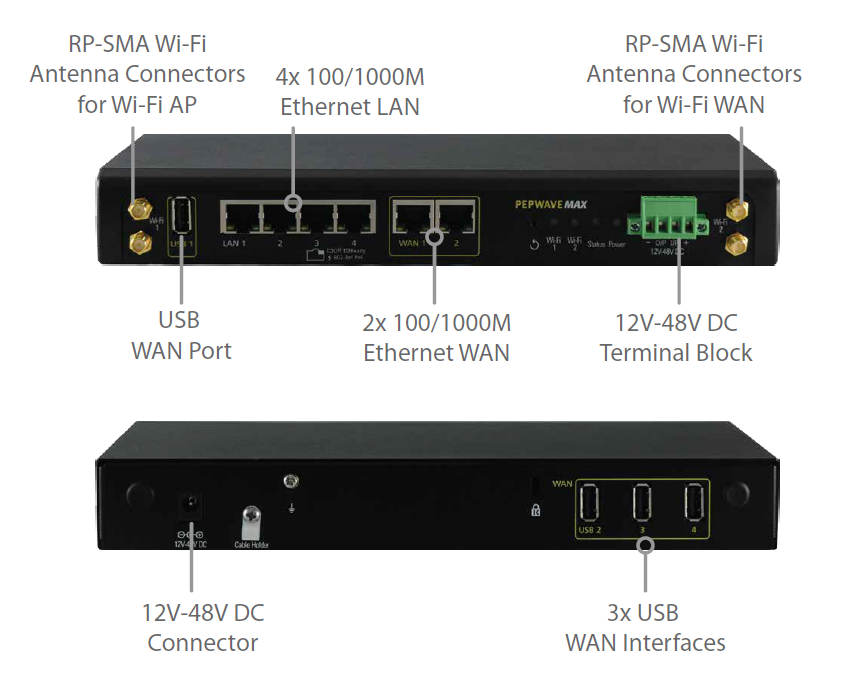
Note:
- For proper Wi-Fi performance and operations, please ensure all 4 Wi-Fi antenna connectors (labeled Wi-Fi 1 and Wi-Fi 2) have antennas attached.
- The LED indicators of Wi-Fi 1 & 2 shown as below are referring to the default settings of Wi-Fi Operation mode is WAN + AP under the AP.
LED Indicators
The statuses indicated by the front panel LEDs are as follows:
Status Indicators | ||
Status | OFF | System initializing |
Red | Booting up or busy | |
Blinking red | Boot up error | |
Blue | Ready | |
Wi-Fi AP Indicators | ||
Wi-Fi 1 | OFF | WiFi AP is disabled. |
ON | WiFi AP is enabled. | |
Wi-Fi WAN Indicators | ||
Wi-Fi 2 | OFF | Disabled Intermittent |
Blinking slowly | Connecting to wireless network(s) | |
Blinking | Connected to wireless network(s) with traffic | |
ON | Connected to wireless network(s) without traffic | |
LAN and Ethernet WAN Ports | ||
Green LED | ON | 10 / 100/ 1000 Mbps |
Orange LED | Blinking | Data is transferring |
OFF | No data is being transferred or port is not connected | |
Port Type | Auto MDI/MDI-X ports | |
4.2. MAX HD2
Panel Appearance
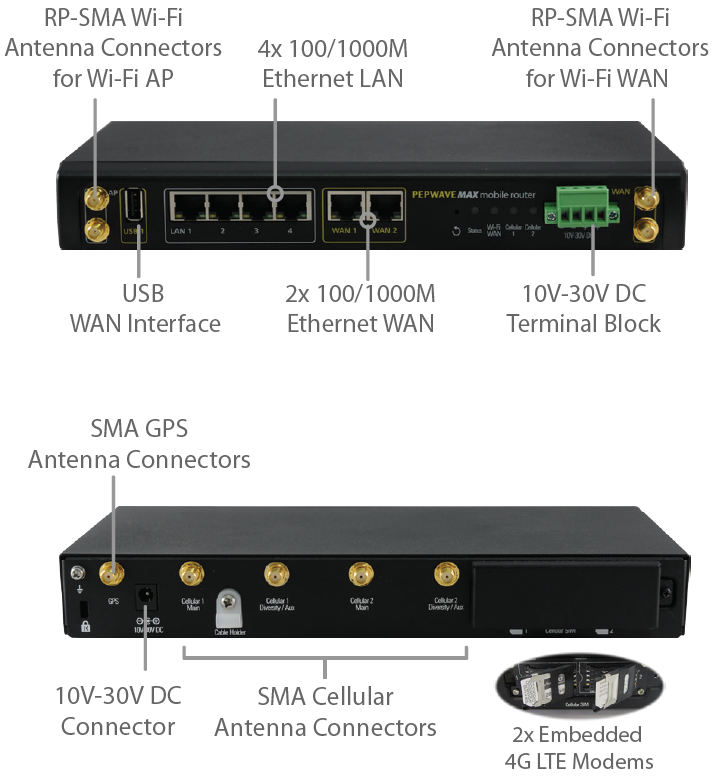
LED Indicators
The statuses indicated by the front panel LEDs are as follows:
Status Indicators | ||
Status | OFF | System initializing |
Red | Booting up or busy | |
Blinking red | Boot up error | |
Green | Ready | |
Wi-Fi WAN Indicators | ||
Wi-Fi WAN | OFF | Disabled Intermittent |
Blinking slowly | Connecting to wireless network(s) | |
Blinking | Connected to wireless network(s) with traffic | |
ON | Connected to wireless network(s) without traffic | |
Cellular Indicators | ||
Cellular 1 / Cellular 2 | OFF | Disabled or no SIM card inserted |
Blinking slowly | Connecting to network(s) | |
Green | Connected to network(s) | |
LAN and Ethernet WAN Ports | ||
Green LED | ON | 1000 Mbps |
OFF | 10 Mbps / 100 Mbps or port is not connected | |
Orange LED | ON | Port is connected without traffic |
Blinking | Data is transferring | |
OFF | Port is not connected | |
Port Type | Auto MDI/MDI-X ports | |
4.3. MAX HD2 IP67
Panel Appearance
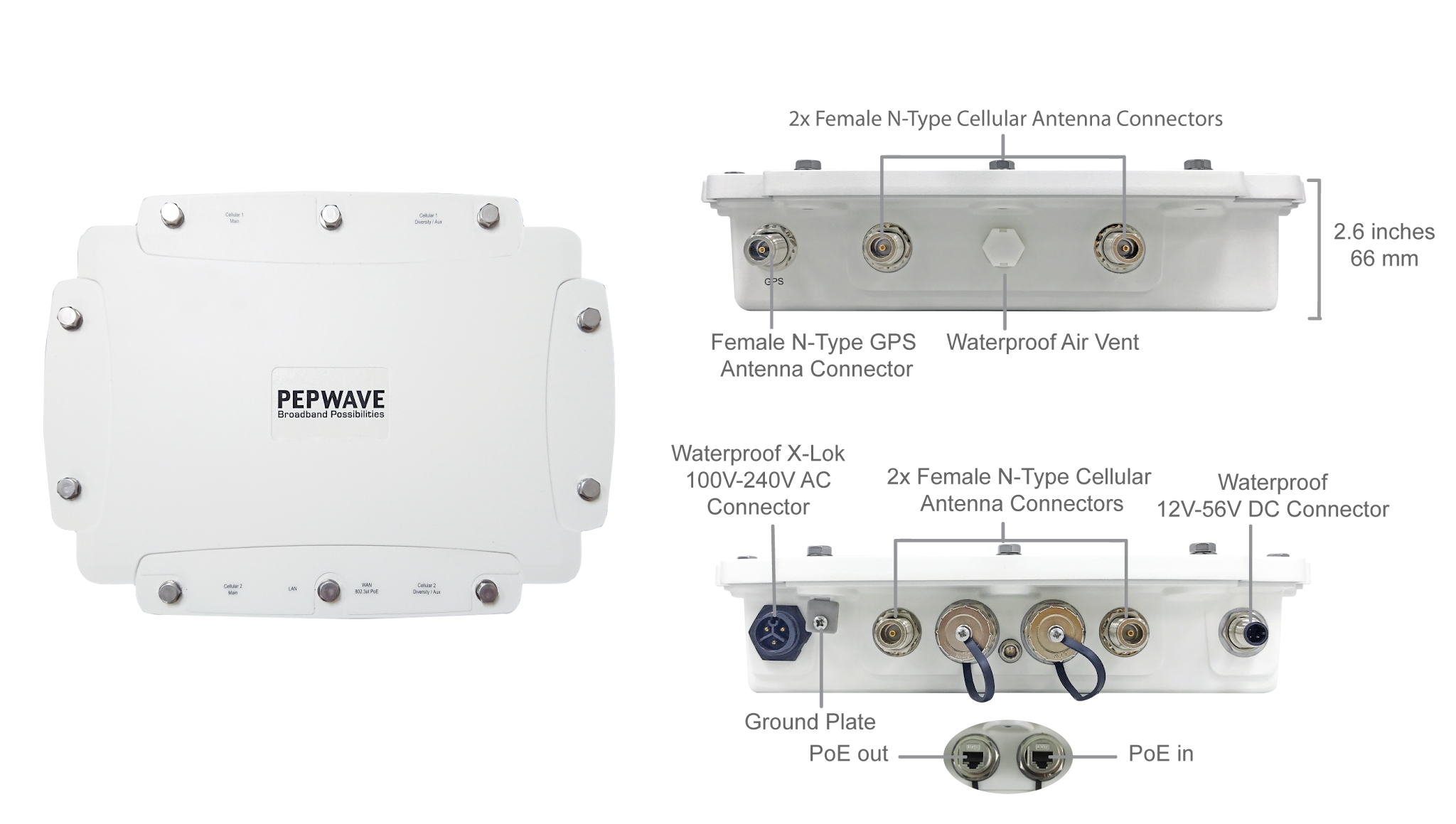
LED Indicators
The statuses indicated by the front panel LEDs are as follows:
Status Indicators | ||
Status | OFF | System initializing |
Red | Booting up or busy | |
Blinking red | Boot up error | |
Green | Ready | |
4.4. MAX HD2 Mini
Panel Appearance
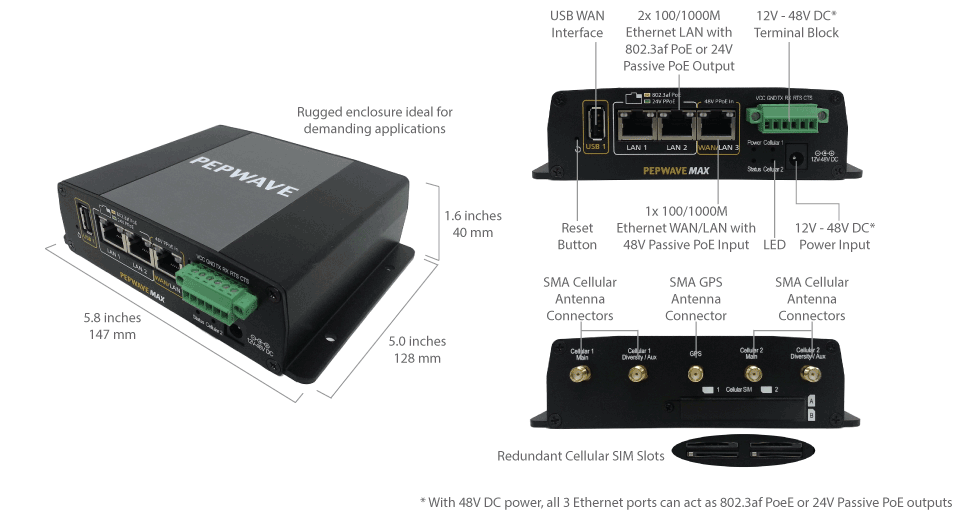
LED Indicators
The statuses indicated by the front panel LEDs are as follows:
Status Indicators | ||
Status | OFF | System initializing |
Red | Booting up or busy | |
Blinking red | Boot up error | |
Green | Ready | |
Cellular Indicators | ||
Cellular 1 / Cellular 2 | OFF | Disabled or no SIM card inserted |
Blinking slowly | Connecting to network(s) | |
Green | Connected to network(s) | |
LAN and Ethernet WAN Ports | ||
Green LED | ON | PoE Enabled |
OFF | PoE Disabled | |
Orange LED | Blinking | 10 / 100 / 1000 Mbps and Data is transferring |
OFF | No data is being transferred or port is not connected | |
Port Type | Auto MDI/MDI-X ports | |
4.5. MAX HD Dome
Panel Appearance
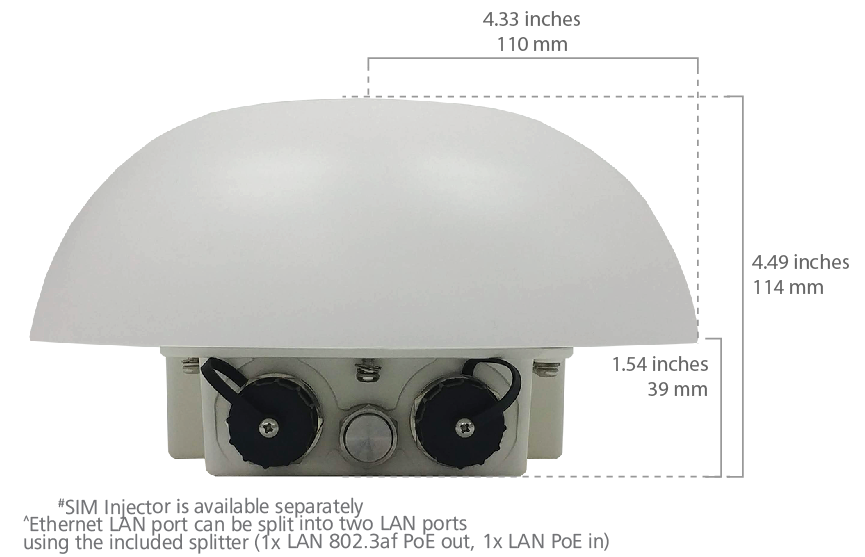
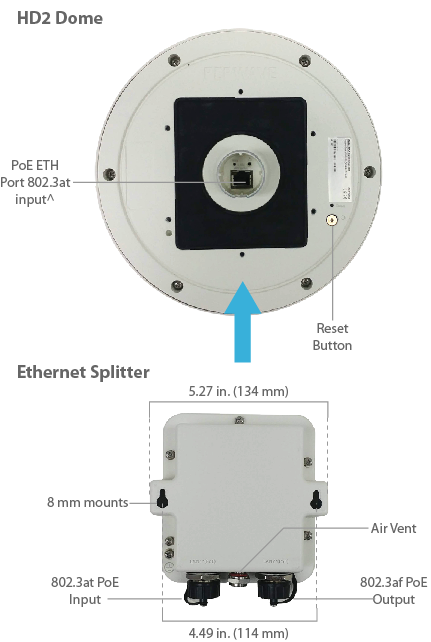
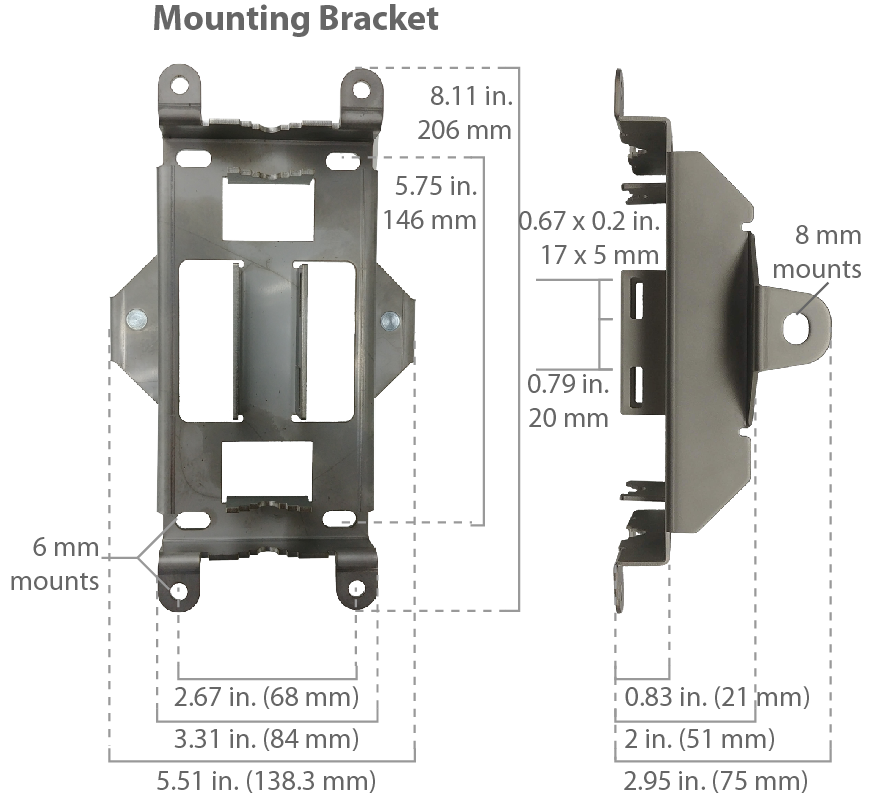
4.6. MAX HD Dome Pro
Panel Appearance
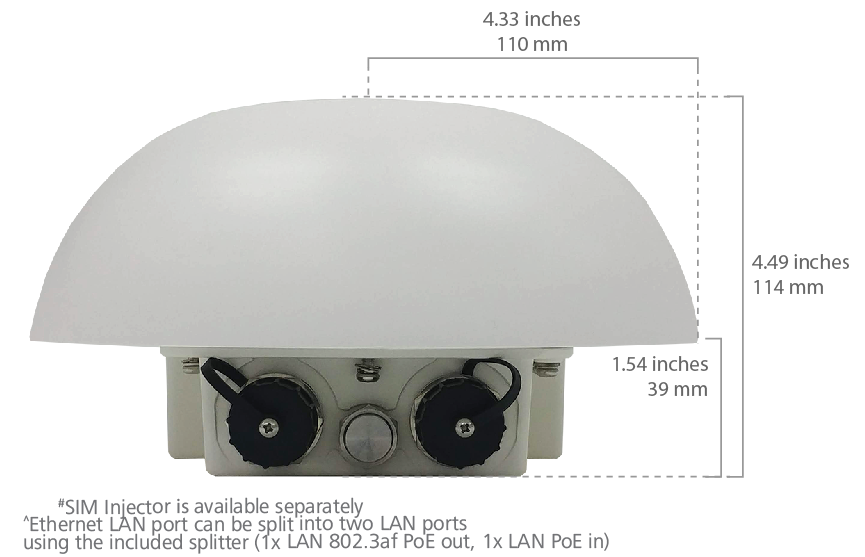
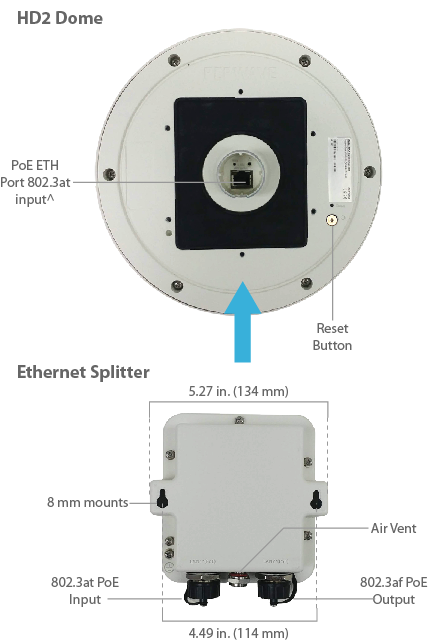
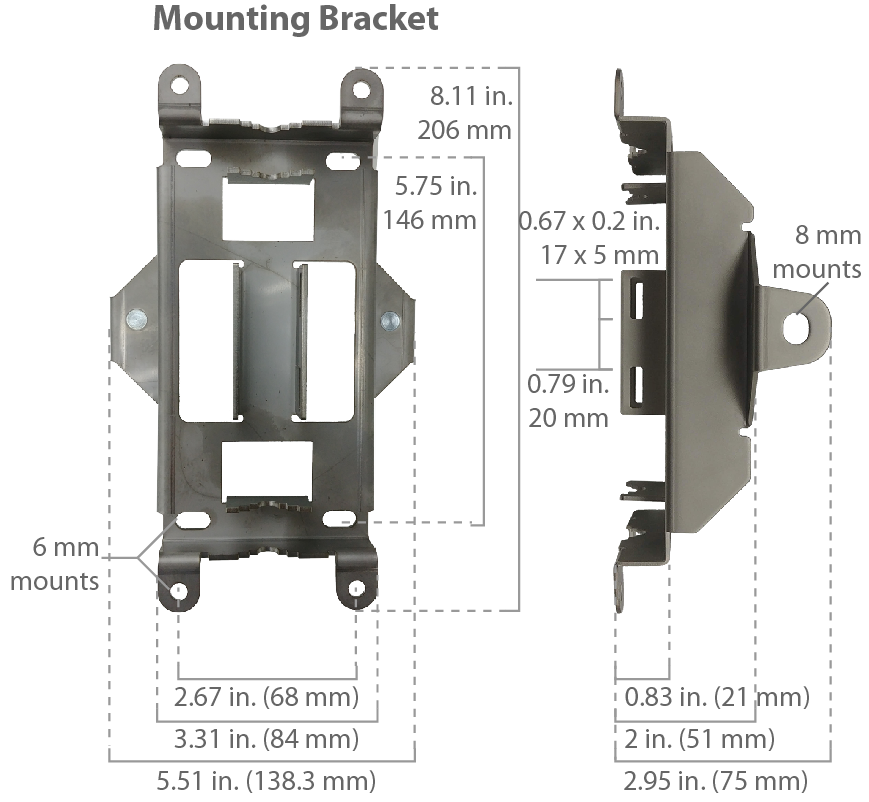
4.7. MAX Dome Pro Duo
Panel Appearance
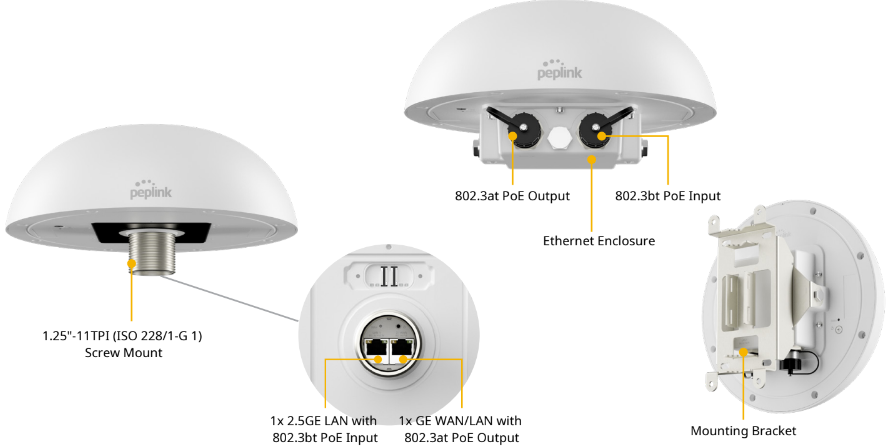
LED Indicators
The statuses indicated by the front panel LEDs are as follows:
Status Indicator | ||
Status | OFF | System initializing/power off |
Red | Booting up or busy | |
Blinking red | Boot up error | |
Green | Ready | |
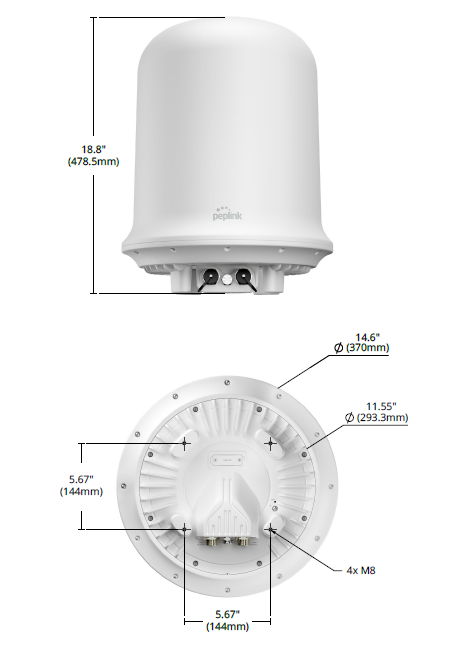
4.8. MAX Dome Pro LR
Panel Appearance
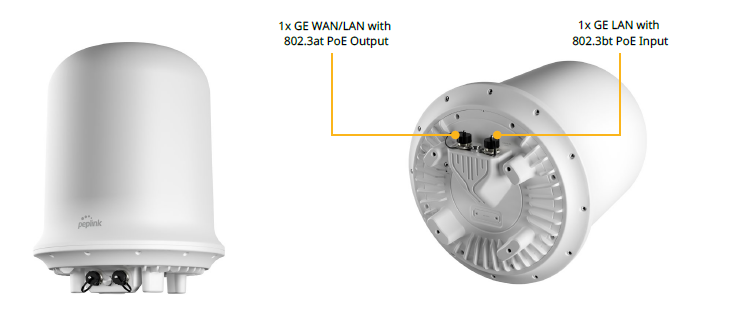
LED Indicators
The statuses indicated by the front panel LEDs are as follows:
Status Indicator | ||
Status | OFF | System initializing/power off |
Red | Booting up or busy | |
Blinking red | Boot up error | |
Green | Ready | |
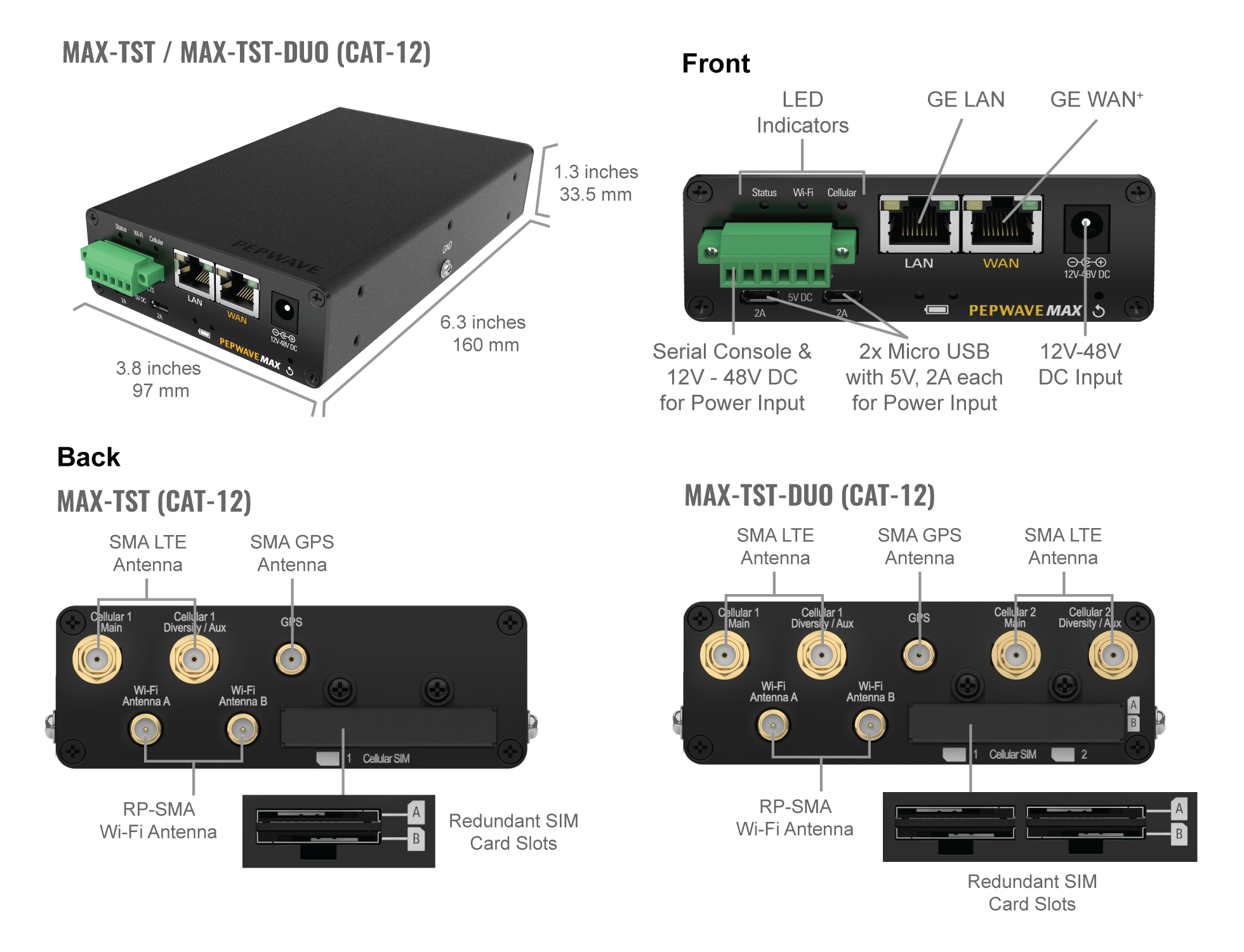
4.9. MAX Transit / MAX Transit Duo (CAT-12)
Panel Appearance
LED Indicators
The statuses indicated by the front panel LEDs are as follows:
Status Indicators | ||
Status | OFF | System initializing |
Red | Booting up or busy | |
Blinking red | Boot up error | |
Green | Ready | |
Cellular Indicators | ||
Cellular 1 / Cellular 2* | OFF | Disabled or no SIM card inserted |
Blinking slowly | Connecting to network(s) | |
Green | Connected to network(s) | |
* For MAX-TST_DUO
Wi-Fi Indicators | ||
Wi-Fi | OFF | Wi-Fi AP is turned off |
Blinking | Wi-Fi AP is turned on | |
LAN and Ethernet WAN Ports | ||
Green LED | ON | 1000 Mbps |
OFF | 10 Mbps / 100 Mbps or port is not connected | |
Orange LED | ON | Port is connected without traffic |
Blinking | Data is transferring | |
OFF | Port is not connected | |
Port Type | Auto MDI/MDI-X ports | |
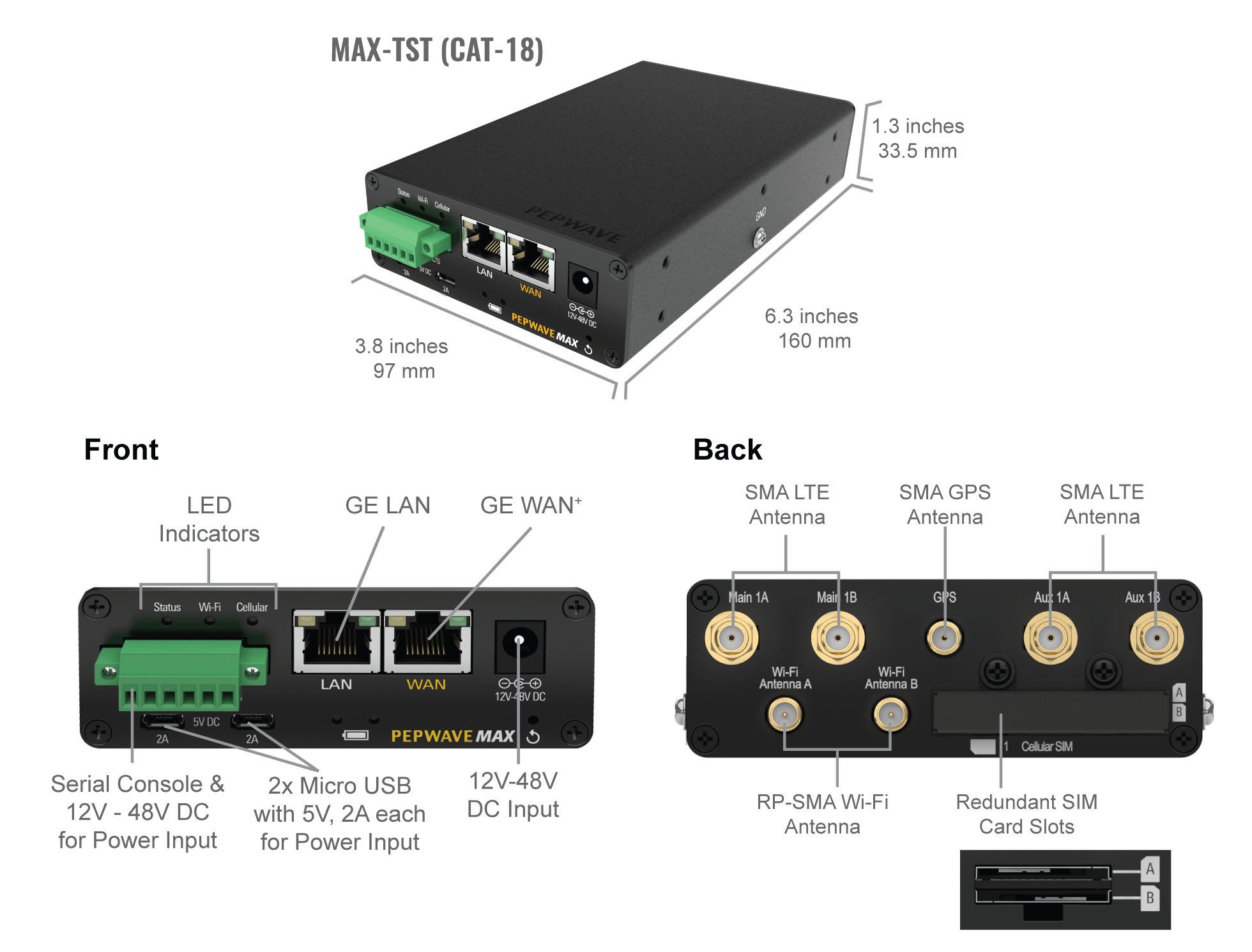
4.10. MAX Transit (CAT-18)
Panel Appearance
LED Indicators
The statuses indicated by the front panel LEDs are as follows:
Status Indicators | ||
Status | OFF | System initializing |
Red | Booting up or busy | |
Blinking red | Boot up error | |
Green | Ready | |
Cellular Indicators | ||
Cellular 1 / Cellular 2* | OFF | Disabled or no SIM card inserted |
Blinking slowly | Connecting to network(s) | |
Green | Connected to network(s) | |
* For MAX-TST_DUO
Wi-Fi Indicators | ||
Wi-Fi | OFF | Wi-Fi AP is turned off |
Blinking | Wi-Fi AP is turned on | |
LAN and Ethernet WAN Ports | ||
Green LED | ON | 1000 Mbps |
OFF | 10 Mbps / 100 Mbps or port is not connected | |
Orange LED | ON | Port is connected without traffic |
Blinking | Data is transferring | |
OFF | Port is not connected | |
Port Type | Auto MDI/MDI-X ports | |
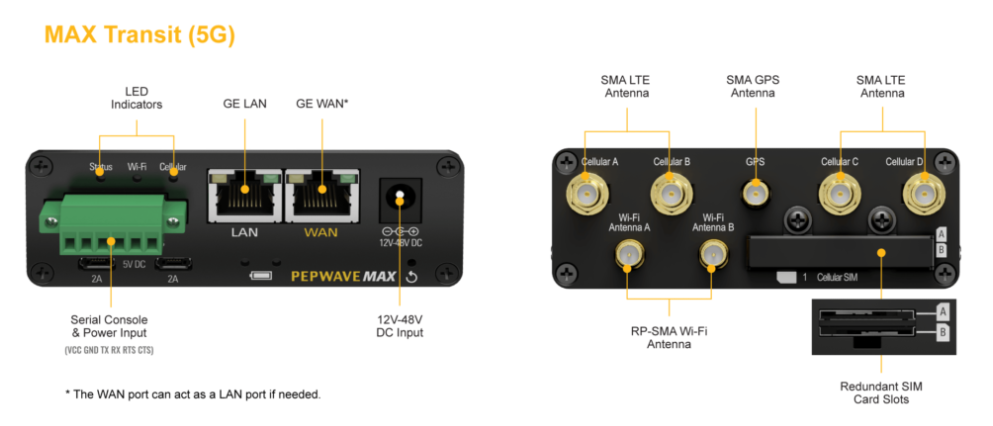
4.11. MAX Transit 5G
Panel Appearance
LED Indicators
The statuses indicated by the front panel LEDs are as follows:
Status Indicators | ||
Status | OFF | System initializing |
Red | Booting up or busy | |
Blinking red | Boot up error | |
Green | Ready | |
Cellular Indicators | ||
Cellular 1 / Status | OFF | Disabled or no SIM card inserted |
Blinking slowly | Connecting to network(s) | |
Green | Connected to network(s) | |
Wi-Fi Indicators | ||
Wi-Fi | OFF | Wi-Fi AP is turned off |
Blinking | Wi-Fi AP is turned on | |
LAN and Ethernet WAN Ports | ||
Green LED | ON | 1000 Mbps |
OFF | 10 Mbps / 100 Mbps or port is not connected | |
Orange LED | ON | Port is connected without traffic |
Blinking | Data is transferring | |
OFF | Port is not connected | |
Port Type | Auto MDI/MDI-X ports | |
4.12. MAX Transit Mini
Panel Appearance
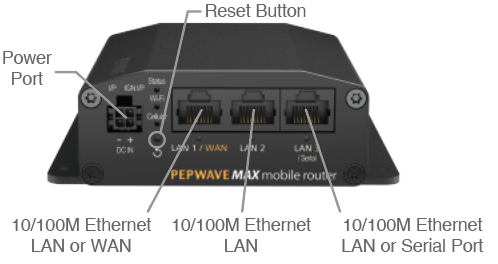
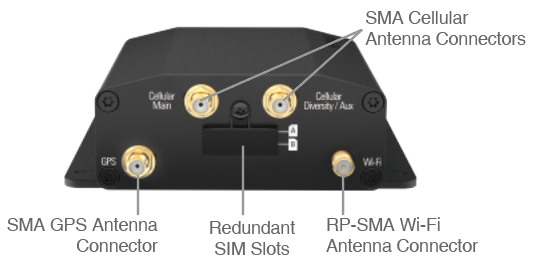
LED Indicators
The statuses indicated by the front panel LEDs are as follows:
Status Indicators | ||
Status | OFF | System initializing |
Red | Booting up or busy | |
Blinking red | Boot up error | |
Green | Ready | |
Wi-Fi Indicators | ||
Wi-Fi | OFF | Disabled intermittent |
Blinking slowly | Connecting to wireless network(s) | |
Blinking | Connected to wireless network(s) with traffic | |
ON | Connected to wireless network(s) without traffic | |
Cellular Indicators | ||
Cellular | OFF | Disabled or no SIM card inserted |
Blinking slowly | Connecting to network(s) | |
Green | Connected to network(s) | |
4.13. MAX Transit Pro E
Panel Appearance
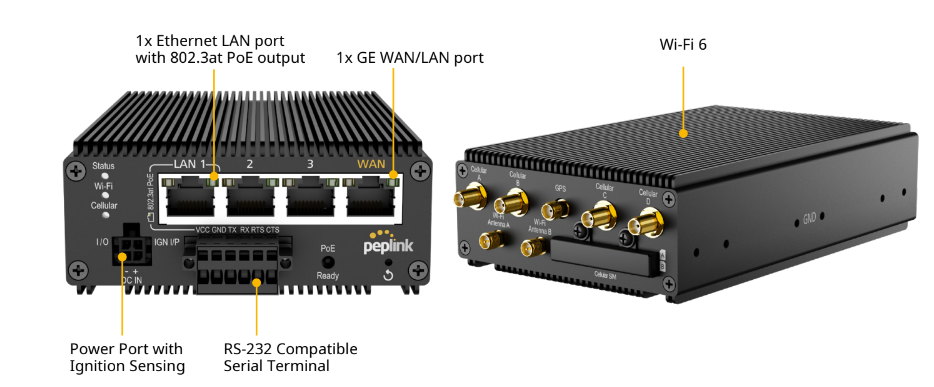
LED Indicators
The statuses indicated by the front panel LEDs are as follows:
Status Indicator | ||
Status | OFF | System initializing |
Red | Booting up or busy | |
Blinking red | Boot up error | |
Green | Ready | |
Wi-Fi Indicators | ||
Wi-Fi | OFF | Wi-Fi AP is turned off |
Green | Wi-Fi AP is turned on | |
Cellular Indicators | ||
Cellular | OFF | Disabled or no SIM card inserted |
Blinking slowly | Connecting to network(s) | |
Green | Connected to network(s) | |
4.14. MAX Transit Duo Pro E
Panel Appearance
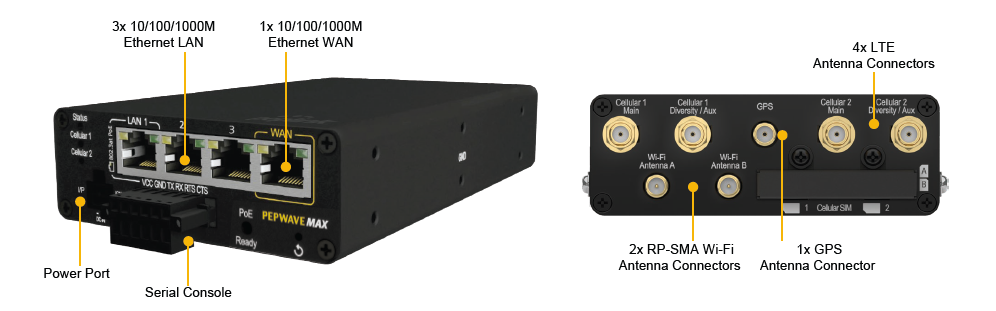
LED Indicators
The statuses indicated by the front panel LEDs are as follows:
Status Indicators | ||
Status | OFF | System initializing |
Red | Booting up or busy | |
Blinking red | Boot up error | |
Green | Ready | |
LAN 1 Port | ||
Green LED | ON | PoE Enabled |
OFF | PoE Disabled | |
Orange LED | Blinking | 10 / 100 / 1000 Mbps and Data is transferring |
OFF | No data is being transferred or port is not connected | |
Port Type | Auto MDI/MDI-X ports | |
LAN 2-3 Port and Ethernet WAN Port | ||
Green LED | ON | 1000 Mbps |
OFF | 10 Mbps / 100 Mbps or port is not connected | |
Orange LED | ON | Port is connected without traffic |
Blinking | Data is transferring | |
OFF | Port is not connected | |
Port Type | Auto MDI/MDI-X ports | |
Cellular Indicators | ||
Cellular | OFF | Disabled or no SIM card inserted |
Blinking slowly | Connecting to network(s) | |
Green | Connected to network(s) | |
4.15. MAX Transit Core
Panel Appearance
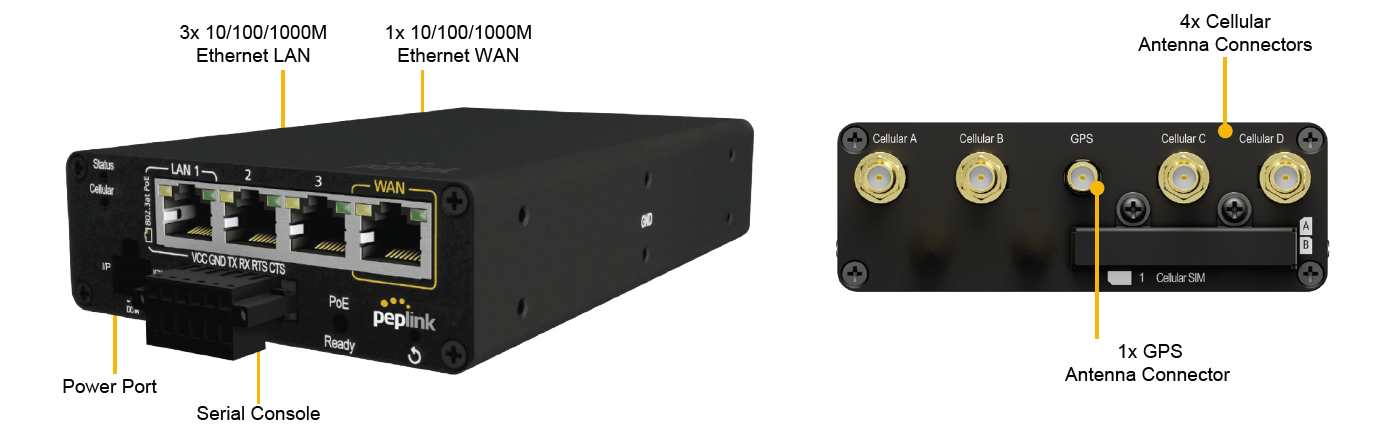
LED Indicators
Status indicated in the front panel is as follows:
LED Indicator | |
Power LED | OFF – Power off |
GREEN – Power on | |
LAN 1 Port | |
Green LED | ON – PoE Enabled OFF - PoE Disabled |
Orange LED | Blinking – 10 / 100 / 1000 Mbps with activity |
OFF – No data is being transferred or port is not connected | |
Port Type | Auto MDI/MDI-X ports |
LAN 2-3 Ports, WAN Port | |
Right LED | GREEN – 1000 Mbps |
OFF – 10 / 100 Mbps or ports are not connected | |
Left LED | ORANGE – Port is connected without traffic |
Blinking – Data is transferring | |
OFF – Port is not connected | |
Port Type | Auto MDI/MDI-X ports |
Console & USB Ports | |
Console Port | Reserved for engineering use |
USB Ports | For connecting 4G/3G USB modems |
4.16. MAX Transit Duo Pro
Panel Appearance
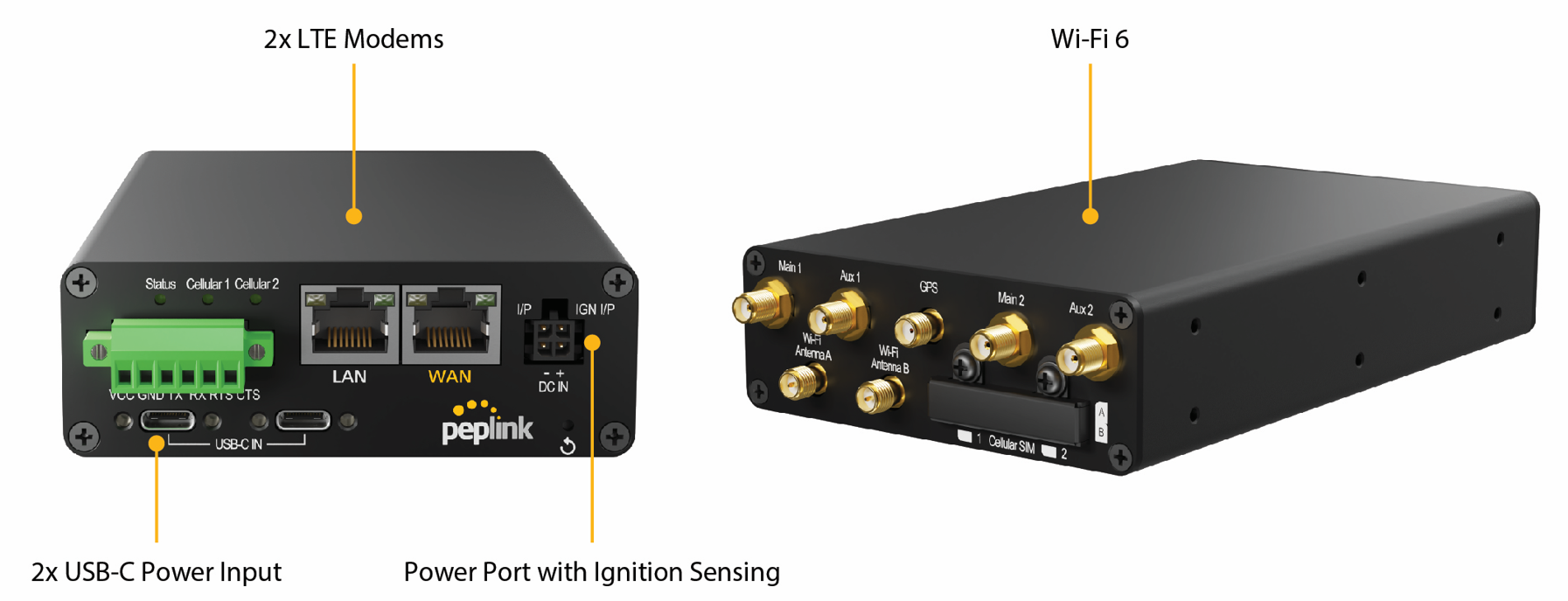
LED Indicators
The statuses indicated by the front panel LEDs are as follows:
Status Indicators | ||
Status | OFF | System initializing |
Red | Booting up or busy | |
Blinking red | Boot up error | |
Green | Ready | |
Cellular Indicators | ||
Cellular 1 / Cellular 2* | OFF | Disabled or no SIM card inserted |
Blinking slowly | Connecting to network(s) | |
Green | Connected to network(s) | |
Wi-Fi Indicators | ||
Wi-Fi | OFF | Wi-Fi AP is turned off |
Blinking | Wi-Fi AP is turned on | |
LAN and Ethernet WAN Ports | ||
Green LED | ON | 1000 Mbps |
OFF | 10 Mbps / 100 Mbps or port is not connected | |
Orange LED | ON | Port is connected without traffic |
Blinking | Data is transferring | |
OFF | Port is not connected | |
Port Type | Auto MDI/MDI-X ports | |
4.17. MAX BR1 ESN
Panel Appearance
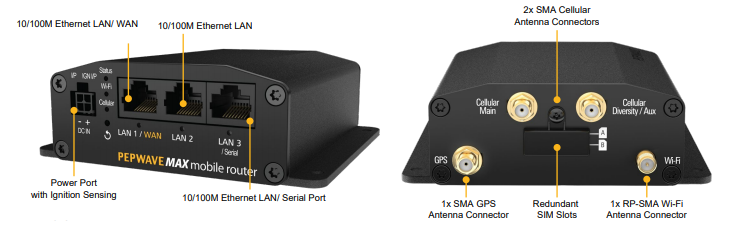
LED Indicators
The statuses indicated by the front panel LEDs are as follows:
Status Indicators | ||
Status | OFF | System initializing |
Red | Booting up or busy | |
Blinking red | Boot up error | |
Green | Ready | |
Wi-Fi Indicators | ||
Wi-Fi | OFF | Disabled intermittent |
Blinking slowly | Connecting to wireless network(s) | |
Blinking | Connected to wireless network(s) with traffic | |
ON | Connected to wireless network(s) without traffic | |
Cellular Indicators | ||
Cellular | OFF | Disabled or no SIM card inserted |
Blinking slowly | Connecting to network(s) | |
Green | Connected to network(s) | |
4.18. MAX HD2 and HD4 with MediaFast
Panel Appearance
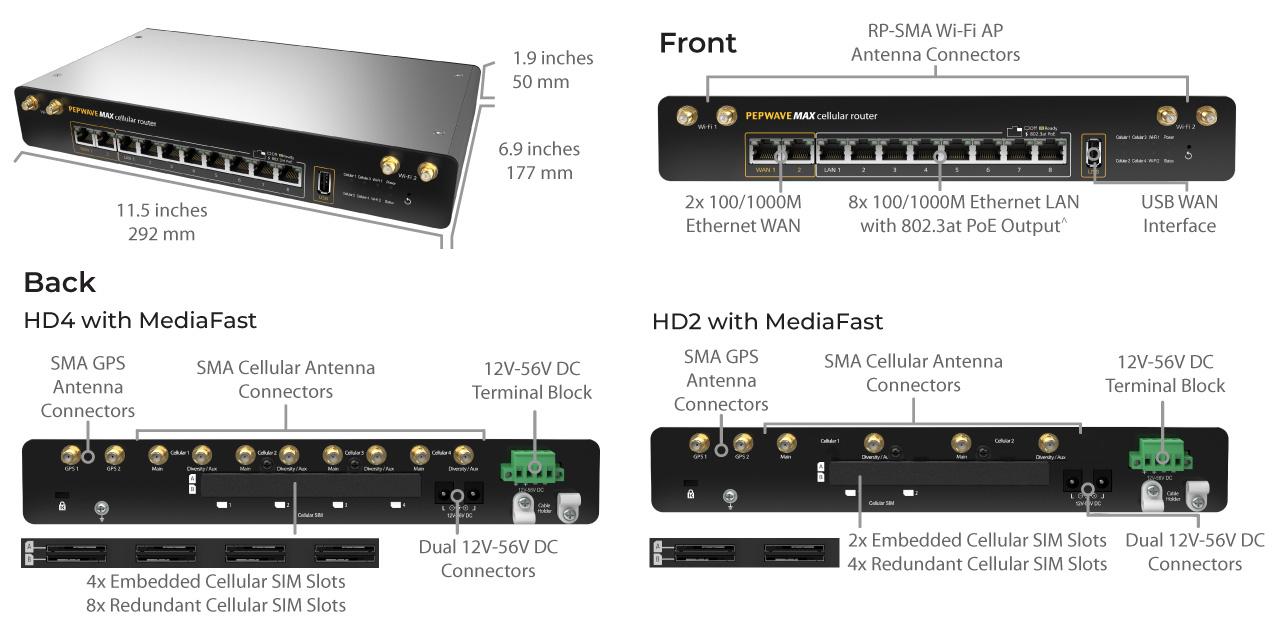
Note:
- For proper Wi-Fi performance and operations, please ensure all 4 Wi-Fi antenna connectors (labeled Wi-Fi 1 and Wi-Fi 2) have antennas attached.
- The LED indicators of Wi-Fi 1 & 2 shown as below are referring to the default settings of Wi-Fi Operation mode is WAN + AP under the AP. For more details, please refer to the section 28.4.
LED Indicators
The statuses indicated by the front panel LEDs are as follows:
Status Indicators | ||
Status | OFF | System initializing |
Red | Booting up or busy | |
Blinking red | Boot up error | |
Green | Ready | |
Wi-Fi WAN Indicators | ||
Wi-Fi 1 | OFF | Disabled Intermittent |
Blinking slowly | Connecting to wireless network(s) | |
Blinking | Connected to wireless network(s) with traffic | |
ON | Connected to wireless network(s) without traffic | |
Wi-Fi AP Indicators | ||
Wi-Fi 2 | OFF | WiFi AP is disabled. |
ON | WiFi AP is enabled. | |
Cellular Indicators | ||
Cellular 1 / 2 / 3 / 4 | OFF | Disabled or no SIM card inserted |
Blinking slowly | Connecting to network(s) | |
Green | Connected to network(s) | |
LAN Ports | ||
Green LED | ON | PoE Enabled |
OFF | PoE Disabled | |
Orange LED | Blinking | 10 / 100 / 1000 Mbps and Data is transferring |
OFF | No data is being transferred or port is not connected | |
Port Type | Auto MDI/MDI-X ports | |
Ethernet WAN Ports | ||
Green LED | ON | 1000 Mbps |
OFF | 10 Mbps / 100 Mbps or port is not connected | |
Orange LED | ON | Port is connected without traffic |
Blinking | Data is transferring | |
OFF | Port is not connected | |
Port Type | Auto MDI/MDI-X ports | |
4.19. MAX HD4
Panel Appearance
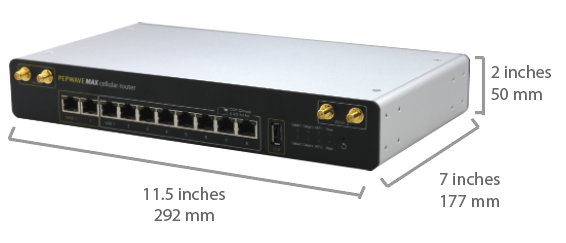
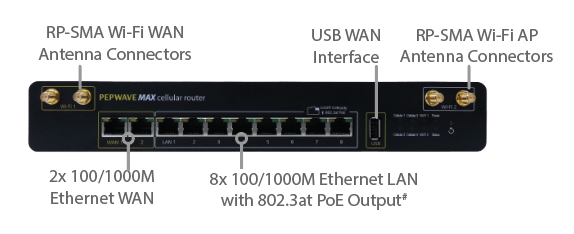
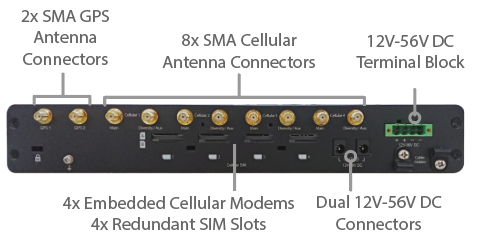
Note:
- For proper Wi-Fi performance and operations, please ensure all 4 Wi-Fi antenna connectors (labeled Wi-Fi 1 and Wi-Fi 2) have antennas attached.
- The LED indicators of Wi-Fi 1 & 2 shown as below are referring to the default settings of Wi-Fi Operation mode is WAN + AP under the AP.
LED Indicators
The statuses indicated by the front panel LEDs are as follows:
Status Indicators | ||
Status | OFF | System initializing |
Red | Booting up or busy | |
Blinking red | Boot up error | |
Green | Ready | |
Wi-Fi WAN Indicators | ||
Wi-Fi 1 | OFF | Disabled Intermittent |
Blinking slowly | Connecting to wireless network(s) | |
Blinking | Connected to wireless network(s) with traffic | |
ON | Connected to wireless network(s) without traffic | |
Wi-Fi AP Indicators | ||
Wi-Fi 2 | OFF | WiFi AP is disabled. |
ON | WiFi AP is enabled. | |
Cellular Indicators | ||
Cellular 1 / 2 / 3 / 4 | OFF | Disabled or no SIM card inserted |
Blinking slowly | Connecting to network(s) | |
Green | Connected to network(s) | |
LAN Ports | ||
Green LED | ON | PoE Enabled |
OFF | PoE Disabled | |
Orange LED | Blinking | 10 / 100 / 1000 Mbps and Data is transferring |
OFF | No data is being transferred or port is not connected | |
Port Type | Auto MDI/MDI-X ports | |
Ethernet WAN Ports | ||
Green LED | ON | 1000 Mbps |
OFF | 10 Mbps / 100 Mbps or port is not connected | |
Orange LED | ON | Port is connected without traffic |
Blinking | Data is transferring | |
OFF | Port is not connected | |
Port Type | Auto MDI/MDI-X ports | |
4.20. MAX HD4 MBX (CAT-12)
Panel Appearance
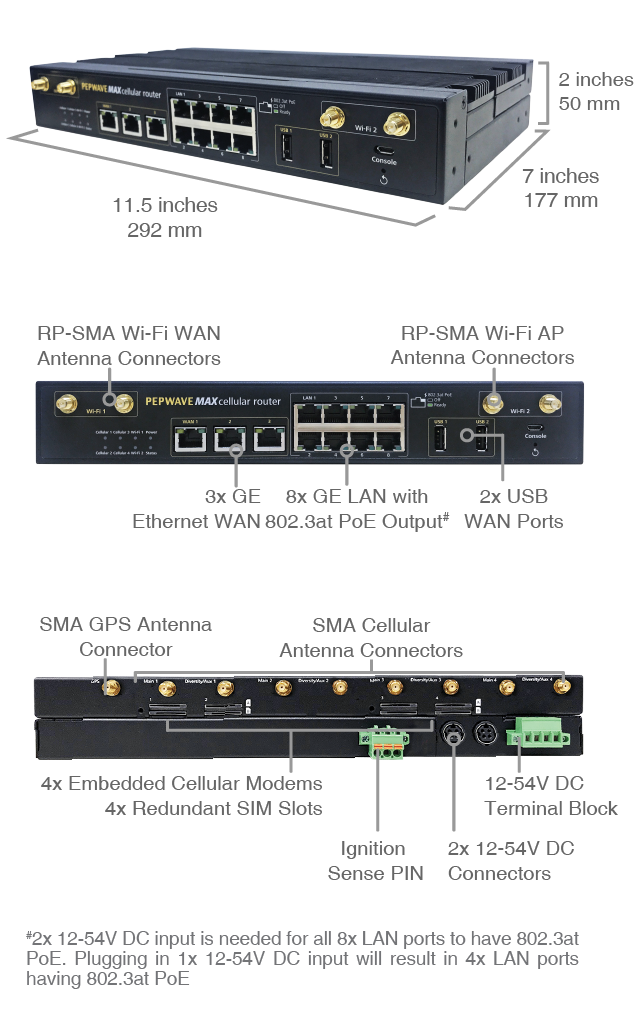
|
|
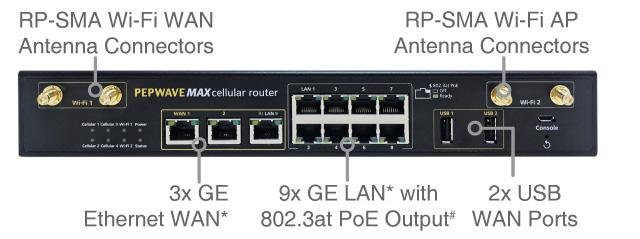
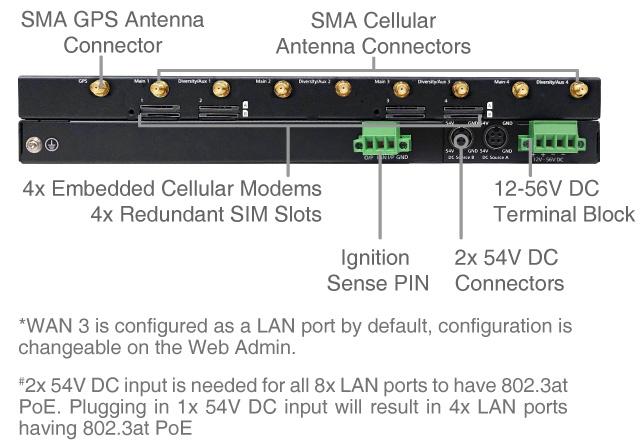
Note:
- For proper Wi-Fi performance and operations, please ensure all 4 Wi-Fi antenna connectors (labeled Wi-Fi 1 and Wi-Fi 2) have antennas attached.
- The LED indicators of Wi-Fi 1 & 2 shown as below are referring to the default settings of Wi-Fi Operation mode is WAN + AP under the AP. For more details, please refer to the section 28.4.
LED Indicators
The statuses indicated by the front panel LEDs are as follows:
Status Indicators | ||
Status | OFF | System initializing |
Red | Booting up or busy | |
Blinking red | Boot up error | |
Green | Ready | |
Wi-Fi WAN Indicators | ||
Wi-Fi 1 | OFF | Disabled Intermittent |
Blinking slowly | Connecting to network(s) | |
Blinking | Connected to network(s) with traffic | |
ON | Connected to network(s) without traffic | |
Wi-Fi AP Indicators | ||
Wi-Fi 2 | OFF | WiFi AP is disabled. |
ON | WiFi AP is enabled. | |
Cellular Indicators | ||
Cellular 1 / 2 / 3 / 4 | OFF | Disabled or no SIM card inserted |
Blinking slowly | Connecting to network(s) | |
Green | Connected to network(s) | |
Ethernet WAN Ports | ||
Right Green | OFF | Port is not connected or slower than 1000 Mbps |
ON | Gigabit speed | |
Left Orange | OFF | Port is not connected |
Blinking | Data is transferring | |
ON | Port is connected without traffic | |
Ethernet LAN Ports | ||
Right Green | OFF | PoE disabled |
ON | PoE enabled | |
Left Orange | OFF | Port is not connected |
Blinking | Data is transferring | |
ON | Port is connected without traffic | |
4.21. MAX HD2/4 MBX (CAT-20)
Panel Appearance
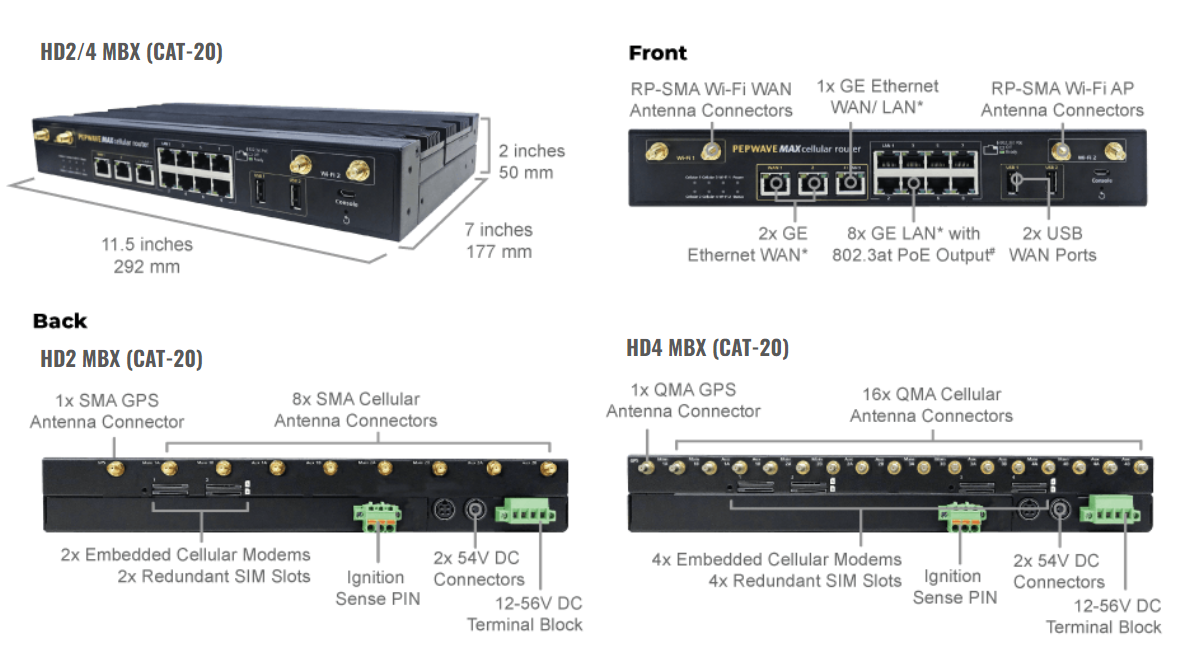
Note:
- For proper Wi-Fi performance and operations, please ensure all 4 Wi-Fi antenna connectors (labeled Wi-Fi 1 and Wi-Fi 2) have antennas attached.
- The LED indicators of Wi-Fi 1 & 2 shown as below are referring to the default settings of Wi-Fi Operation mode is WAN + AP under the AP. For more details, please refer to the section 28.4.
LED Indicators
The statuses indicated by the front panel LEDs are as follows:
Status Indicators | ||
Status | OFF | System initializing |
Red | Booting up or busy | |
Blinking red | Boot up error | |
Green | Ready | |
Wi-Fi WAN Indicators | ||
Wi-Fi 1 | OFF | Disabled Intermittent |
Blinking slowly | Connecting to network(s) | |
Blinking | Connected to network(s) with traffic | |
ON | Connected to network(s) without traffic | |
Wi-Fi AP Indicators | ||
Wi-Fi 2 | OFF | WiFi AP is disabled. |
ON | WiFi AP is enabled. | |
Cellular Indicators | ||
Cellular 1 / 2 / 3 / 4 | OFF | Disabled or no SIM card inserted |
Blinking slowly | Connecting to network(s) | |
Green | Connected to network(s) | |
Ethernet WAN Ports | ||
Right Green | OFF | Port is not connected or slower than 1000 Mbps |
ON | Gigabit speed | |
Left Orange | OFF | Port is not connected |
Blinking | Data is transferring | |
ON | Port is connected without traffic | |
Ethernet LAN Ports | ||
Right Green | OFF | PoE disabled |
ON | PoE enabled | |
Left Orange | OFF | Port is not connected |
Blinking | Data is transferring | |
ON | Port is connected without traffic | |
4.22. MAX HD2/4 MBX (5G)
Panel Appearance
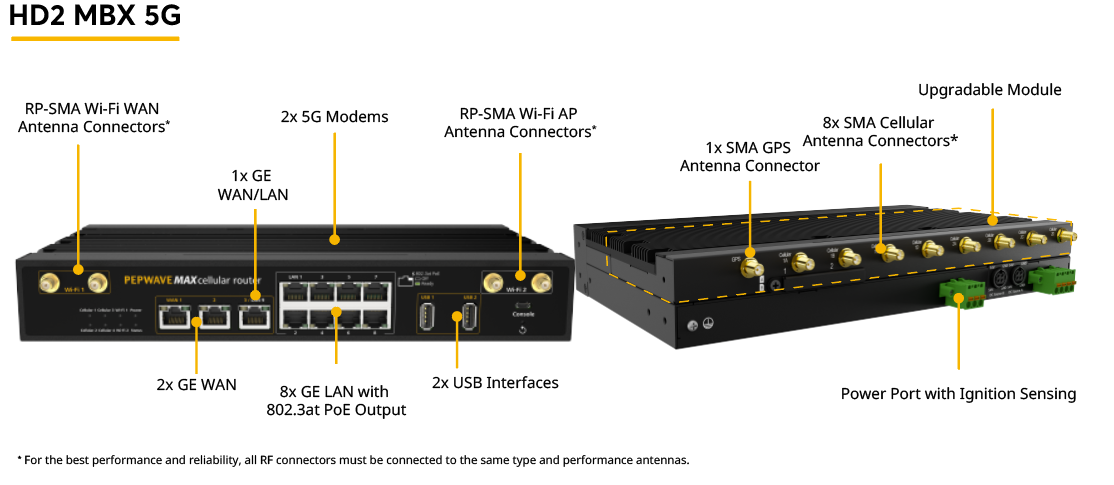
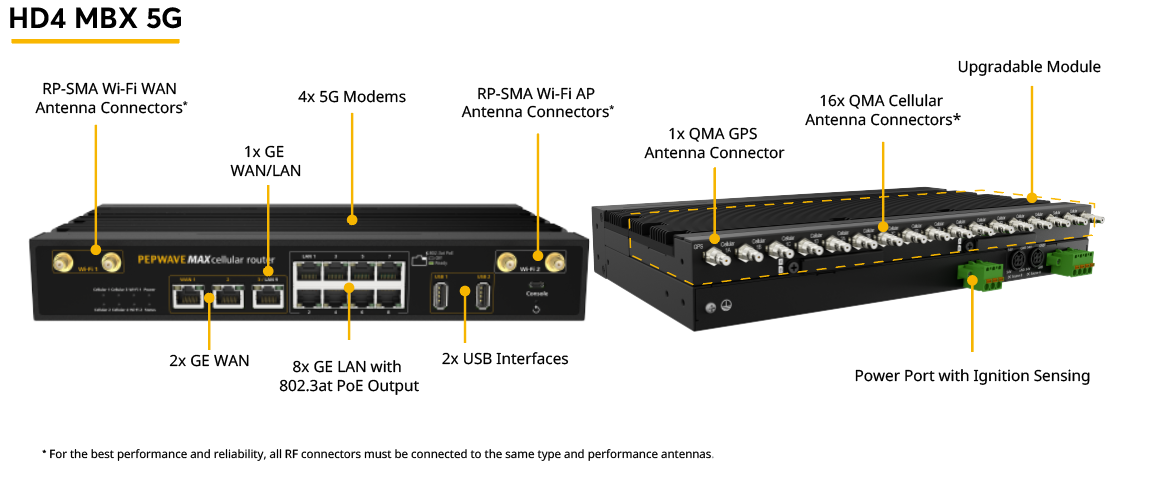
Note:
- For proper Wi-Fi performance and operations, please ensure all 4 Wi-Fi antenna connectors (labeled Wi-Fi 1 and Wi-Fi 2) have antennas attached.
- The LED indicators of Wi-Fi 1 & 2 shown as below are referring to the default settings of Wi-Fi Operation mode is WAN + AP under the AP. For more details, please refer to the section 28.4.
LED Indicators
The statuses indicated by the front panel LEDs are as follows:
Status Indicators | ||
Status | OFF | System initializing |
Red | Booting up or busy | |
Blinking red | Boot up error | |
Green | Ready | |
Wi-Fi WAN Indicators | ||
Wi-Fi 1 | OFF | Disabled Intermittent |
Blinking slowly | Connecting to network(s) | |
Blinking | Connected to network(s) with traffic | |
ON | Connected to network(s) without traffic | |
Wi-Fi AP Indicators | ||
Wi-Fi 2 | OFF | WiFi AP is disabled. |
ON | WiFi AP is enabled. | |
Cellular Indicators | ||
Cellular 1 / 2 / 3 / 4 | OFF | Disabled or no SIM card inserted |
Blinking slowly | Connecting to network(s) | |
Green | Connected to network(s) | |
Ethernet WAN Ports | ||
Right Green | OFF | Port is not connected or slower than 1000 Mbps |
ON | Gigabit speed | |
Left Orange | OFF | Port is not connected |
Blinking | Data is transferring | |
ON | Port is connected without traffic | |
Ethernet LAN Ports | ||
Right Green | OFF | PoE disabled |
ON | PoE enabled | |
Left Orange | OFF | Port is not connected |
Blinking | Data is transferring | |
ON | Port is connected without traffic | |
4.23. MAX MBX Mini
Panel Appearance
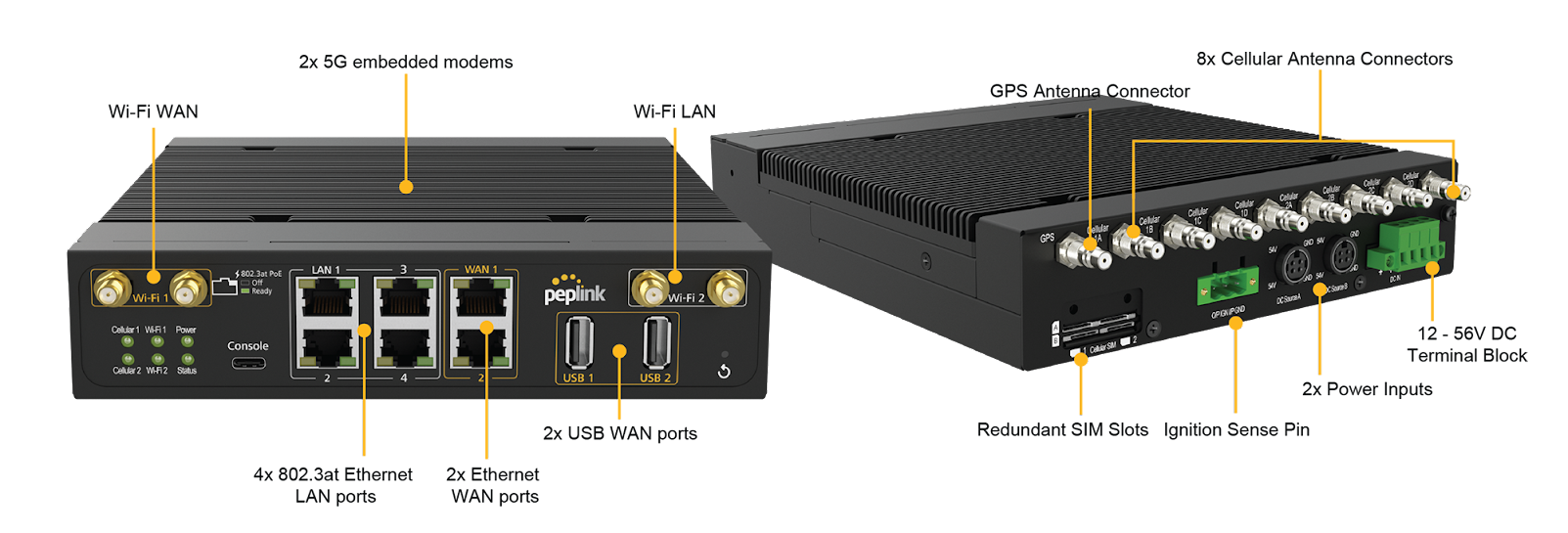
Note:
- For proper Wi-Fi performance and operations, please ensure all 4 Wi-Fi antenna connectors (labeled Wi-Fi 1 and Wi-Fi 2) have antennas attached.
- The LED indicators of Wi-Fi 1 & 2 shown as below are referring to the default settings of Wi-Fi Operation mode is WAN + AP under the AP. For more details, please refer to the section 28.4.
LED Indicators
The statuses indicated by the front panel LEDs are as follows:
LED Indicator | |
Power LED | OFF – Power off |
GREEN – Power on | |
Ethernet WAN Ports | ||
Right Green | OFF | Port is not connected or slower than 1000 Mbps |
ON | Gigabit speed | |
Left Orange | OFF | Port is not connected |
Blinking | Data is transferring | |
ON | Port is connected without traffic | |
Ethernet LAN Ports | ||
Right Green | OFF | PoE disabled |
ON | PoE enabled | |
Left Orange | OFF | Port is not connected |
Blinking | Data is transferring | |
ON | Port is connected without traffic | |
Wi-Fi WAN Indicators | ||
Wi-Fi 1 | OFF | Disabled Intermittent |
Blinking slowly | Connecting to network(s) | |
Blinking | Connected to network(s) with traffic | |
ON | Connected to network(s) without traffic | |
Wi-Fi AP Indicators | ||
Wi-Fi 2 | OFF | WiFi AP is disabled. |
ON | WiFi AP is enabled. | |
Cellular Indicators | ||
Cellular 1 / 2 | OFF | Disabled or no SIM card inserted |
Blinking slowly | Connecting to network(s) | |
Green | Connected to network(s) | |
Console & USB Ports | |
Console Port | Reserved for engineering use |
USB Ports | For connecting 4G/3G USB modems |
4.24. MAX HD4 IP67
Panel Appearance
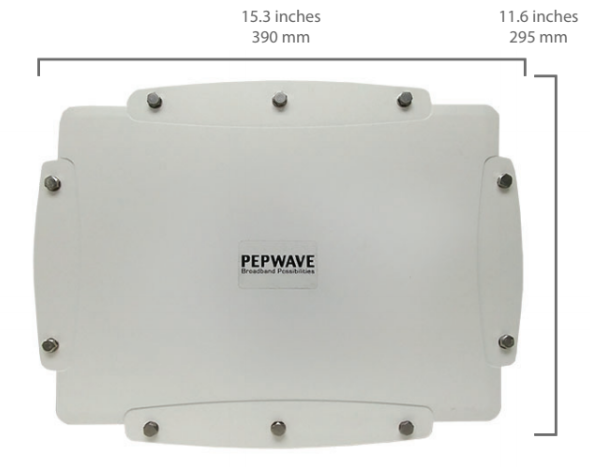
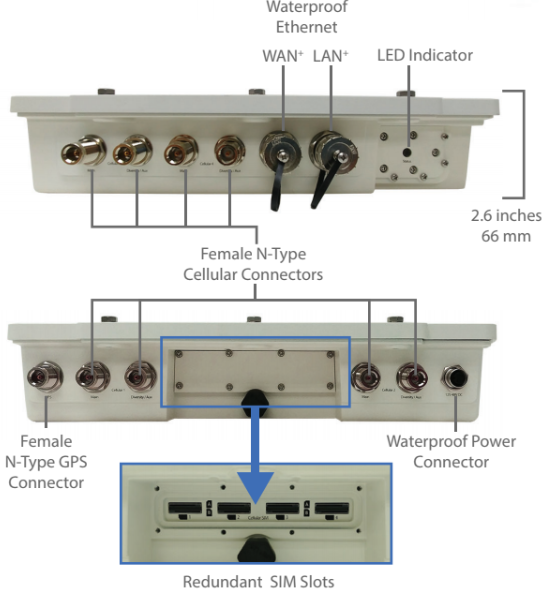
LED Indicators
The statuses indicated by the front panel LEDs are as follows:
Status Indicators | ||
Status | OFF | System initializing |
Red | Booting up or busy | |
Blinking red | Boot up error | |
Green | Ready | |
4.25. MAX BR1 Classic
Panel Appearance
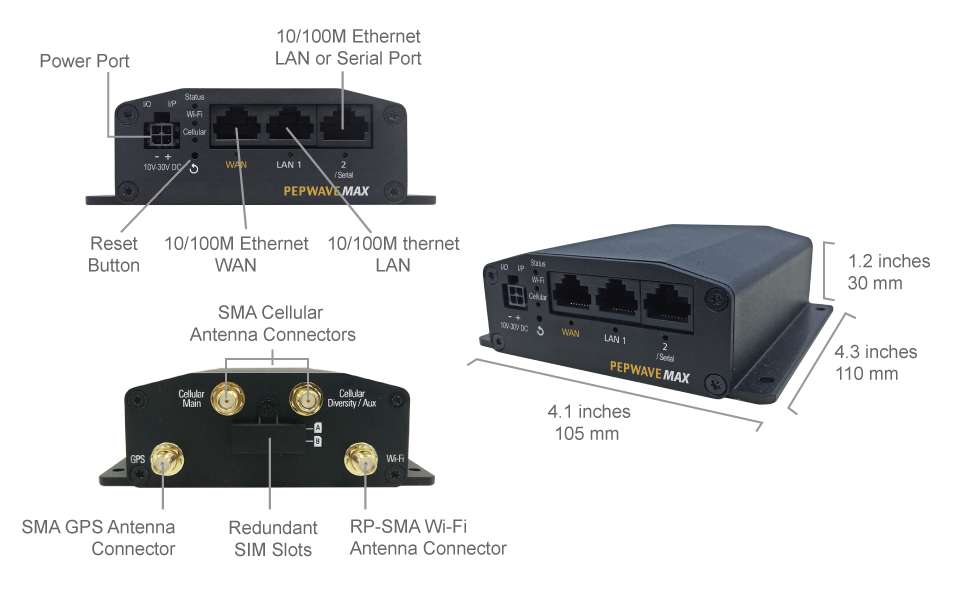
LED Indicators
The statuses indicated by the front panel LEDs are as follows:
Status Indicators | ||
Status | OFF | System initializing |
Red | Booting up or busy | |
Blinking red | Boot up error | |
Green | Ready | |
Wi-Fi Indicators | ||
Wi-Fi | OFF | Disabled intermittent |
Blinking slowly | Connecting to wireless network(s) | |
Blinking | Connected to wireless network(s) with traffic | |
ON | Connected to wireless network(s) without traffic | |
Cellular Indicators | ||
Cellular | OFF | Disabled or no SIM card inserted |
Blinking slowly | Connecting to network(s) | |
Green | Connected to network(s) | |
4.26. MAX BR1 MK2
Panel Appearance
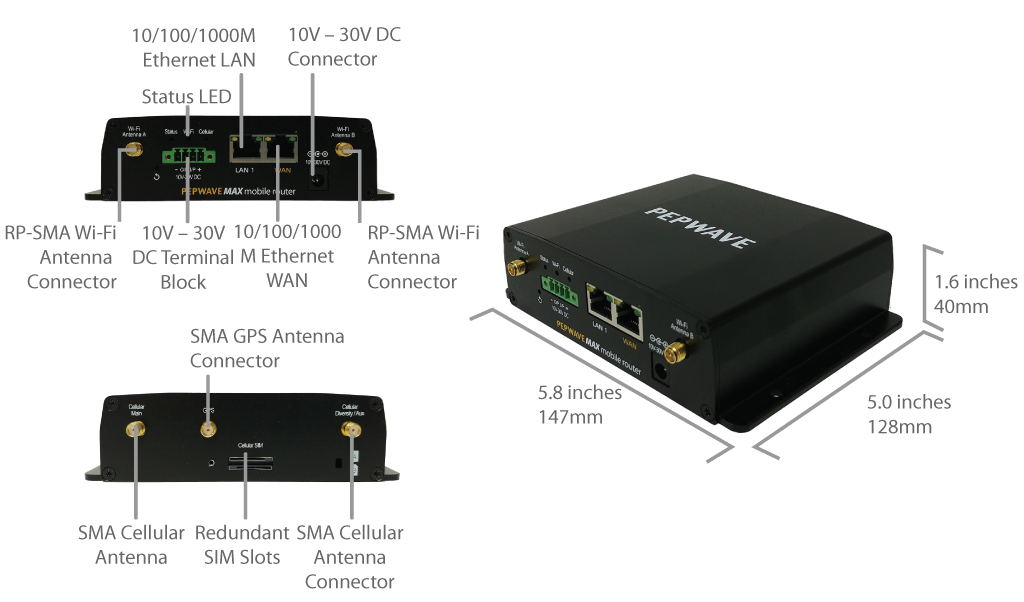
LED Indicators
The statuses indicated by the front panel LEDs are as follows:
Status Indicators | ||
Status | OFF | System initializing |
Red | Booting up or busy | |
Blinking red | Boot up error | |
Green | Ready | |
Wi-Fi Indicators | ||
Wi-Fi | OFF | Disabled intermittent |
Blinking slowly | Connecting to wireless network(s) | |
Blinking | Connected to wireless network(s) with traffic | |
ON | Connected to wireless network(s) without traffic | |
Cellular Indicators | ||
Cellular | OFF | Disabled or no SIM card inserted |
Blinking slowly | Connecting to network(s) | |
Green | Connected to network(s) | |
LAN and Ethernet WAN Ports | ||
Green LED | ON | 1000 Mbps |
OFF | 10 Mbps / 100 Mbps or port is not connected | |
Orange LED | ON | Port is connected without traffic |
Blinking | Data is transferring | |
OFF | Port is not connected | |
Port Type | Auto MDI/MDI-X ports | |
4.27. MAX BR1 Slim
Panel Appearance
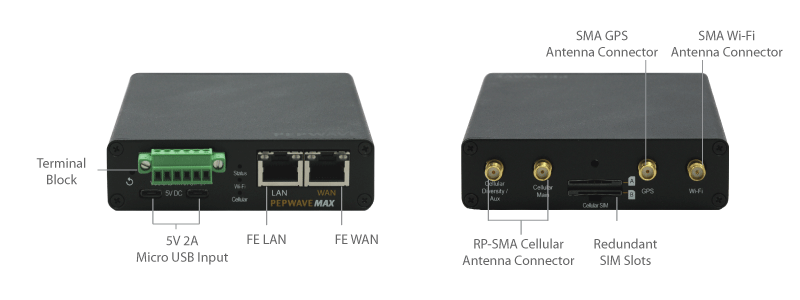
LED Indicators
The statuses indicated by the front panel LEDs are as follows:
Status Indicators | ||
Status | OFF | System initializing |
Red | Booting up or busy | |
Blinking red | Boot up error | |
Green | Ready | |
Wi-Fi Indicators | ||
Wi-Fi | OFF | Disabled intermittent |
Blinking slowly | Connecting to wireless network(s) | |
Blinking | Connected to wireless network(s) with traffic | |
ON | Connected to wireless network(s) without traffic | |
Cellular Indicators | ||
Cellular | OFF | Disabled or no SIM card inserted |
Blinking slowly | Connecting to network(s) | |
Green | Connected to network(s) | |
LAN and Ethernet WAN Ports | ||
Green LED | ON | 100 Mbps |
OFF | 10 Mbps | |
Orange LED | ON | Port is connected without traffic |
Blinking | Data is transferring | |
OFF | Port is not connected | |
Port Type | Auto MDI/MDI-X ports | |
4.28. MAX BR1 Mini (HW2)
Panel Appearance
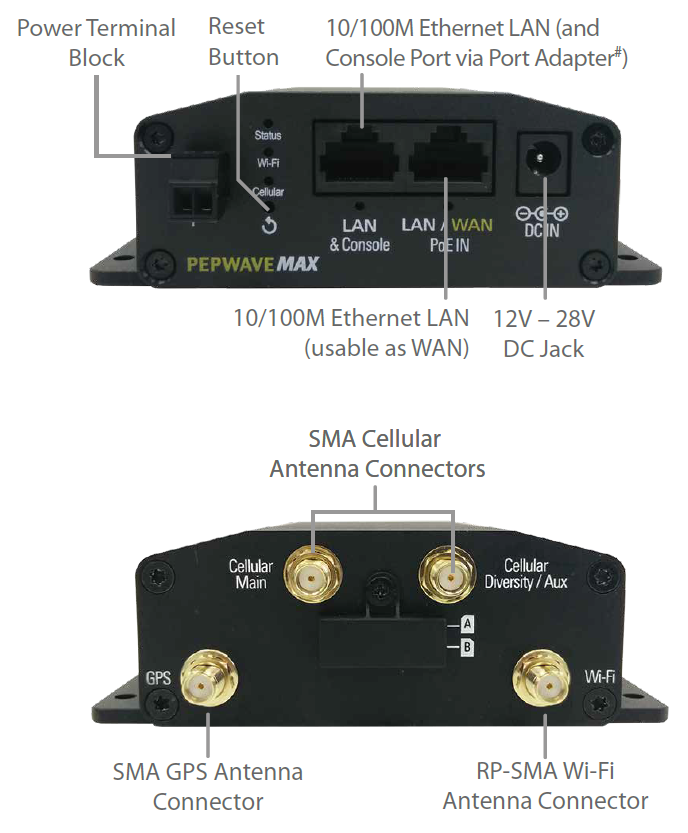
LED Indicators
Status Indicators | ||
Status | OFF | System initializing |
Red | Booting up or busy | |
Blinking red | Boot up error | |
Green | Ready | |
Cellular Indicators | ||
Cellular | OFF | Disabled or no SIM card inserted |
Blinking slowly | Connecting to network(s) | |
Green | Connected to network(s) | |
Wi-Fi Indicators | ||
Wi-Fi | OFF | Disabled intermittent |
Blinking slowly | Connecting to wireless network(s) | |
Blinking | Connected to wireless network(s) with traffic | |
ON | Connected to wireless network(s) without traffic | |
4.29. MAX BR1 Mini (HW3)
Panel Appearance
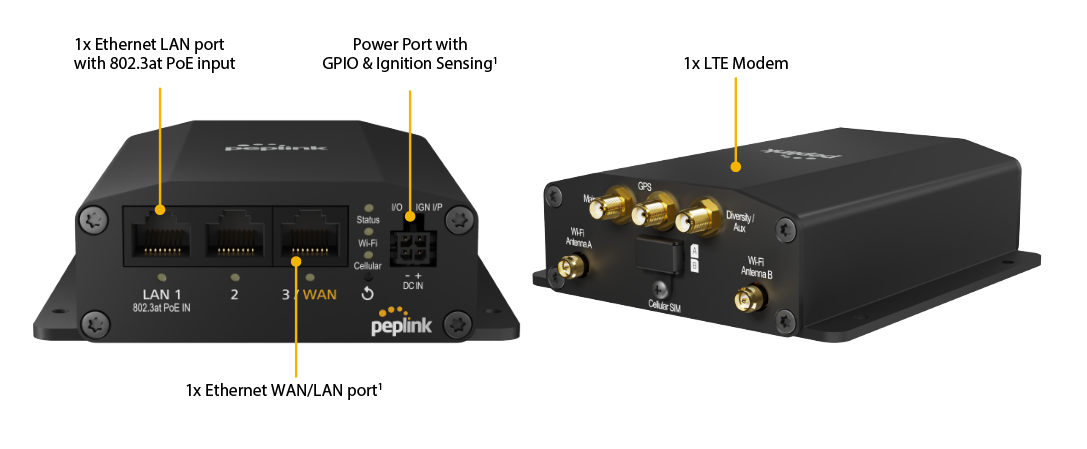
LED Indicators
Status Indicators | ||
Status | OFF | System initializing |
Red | Booting up or busy | |
Blinking red | Boot up error | |
Green | Ready | |
Cellular Indicators | ||
Cellular | OFF | Disabled or no SIM card inserted |
Blinking slowly | Connecting to network(s) | |
Green | Connected to network(s) | |
Wi-Fi Indicators | ||
Wi-Fi | OFF | Wi-Fi AP is turned off |
ON | Wi-Fi AP is turned on | |
4.30. MAX BR1 Mini 5G
Panel Appearance
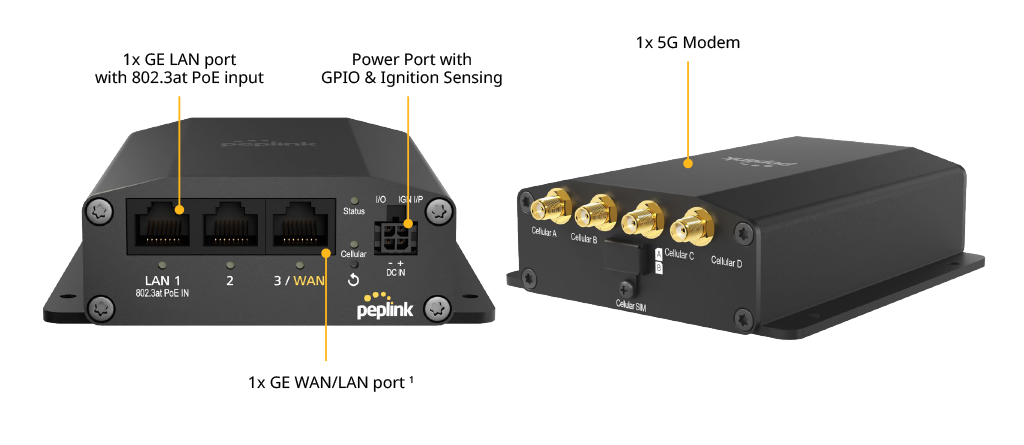
LED Indicators
Status Indicators | ||
Status | OFF | System initializing |
Red | Booting up or busy | |
Blinking red | Boot up error | |
Green | Ready | |
Cellular Indicators | ||
Cellular | OFF | Disabled or no SIM card inserted |
Blinking slowly | Connecting to network(s) | |
Green | Connected to network(s) | |
4.31. MAX BR1 Mini Core
Panel Appearance
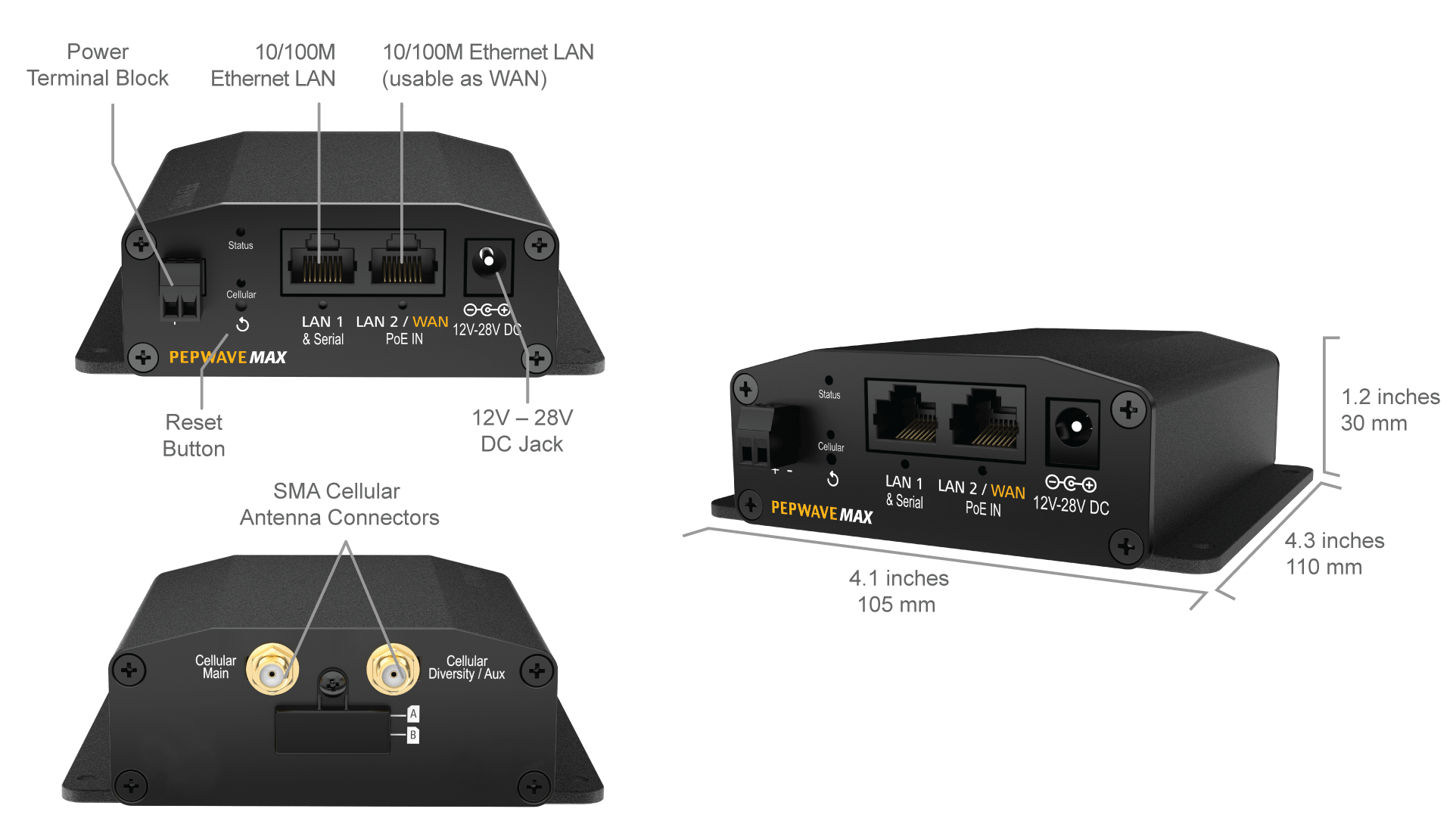
LED Indicators
The statuses indicated by the front panel LEDs are as follows:
Status Indicators | ||
Status | OFF | System initializing |
Red | Booting up or busy | |
Blinking red | Boot up error | |
Green | Ready | |
Cellular Indicators | ||
Cellular | OFF | Disabled or no SIM card inserted |
Blinking slowly | Connecting to network(s) | |
Green | Connected to network(s) | |
4.32. MAX BR1 Mini Core (HW3)
Panel Appearance
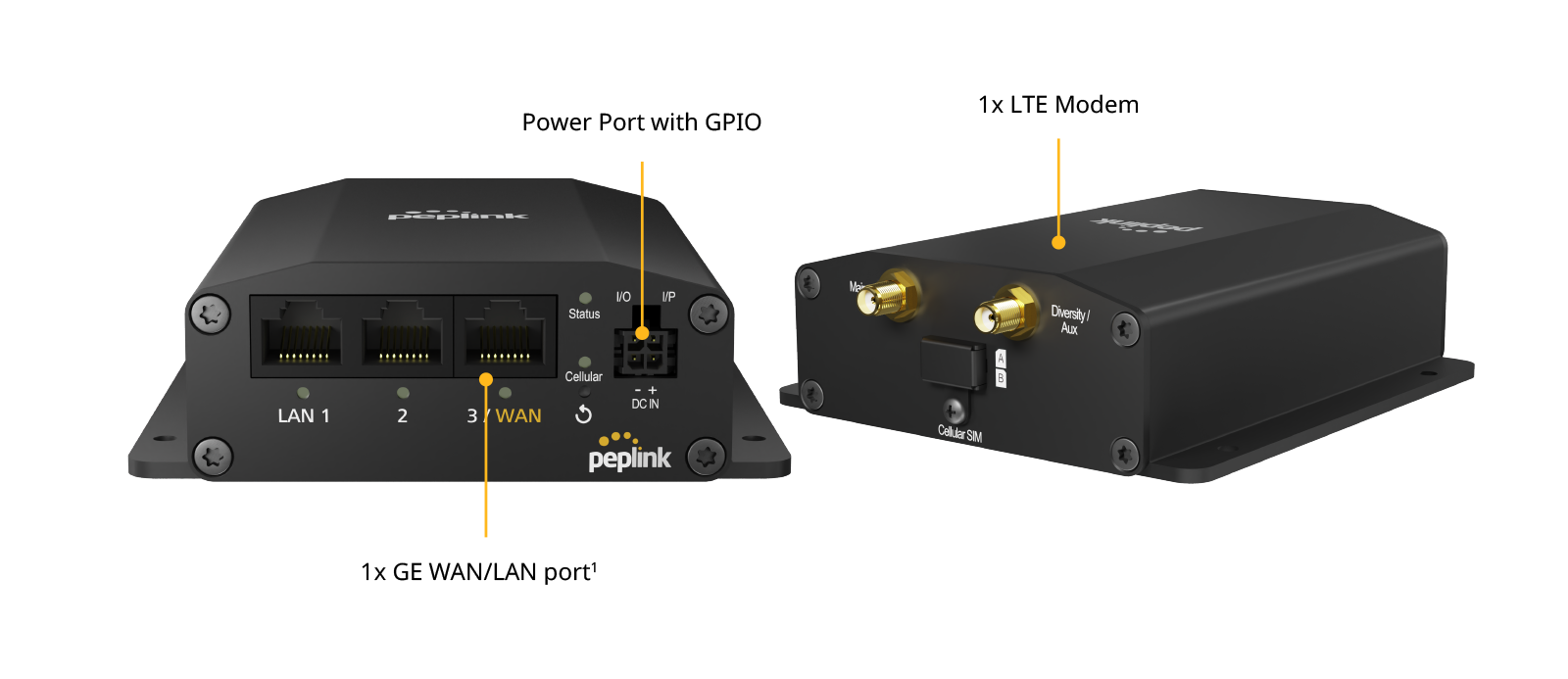
LED Indicators
The statuses indicated by the front panel LEDs are as follows:
Status Indicators | ||
Status | OFF | System initializing |
Red | Booting up or busy | |
Blinking red | Boot up error | |
Green | Ready | |
Cellular Indicators | ||
Cellular | OFF | Disabled or no SIM card inserted |
Blinking slowly | Connecting to network(s) | |
Green | Connected to network(s) | |
4.33. MAX BR1 Mini M2M
Panel Appearance
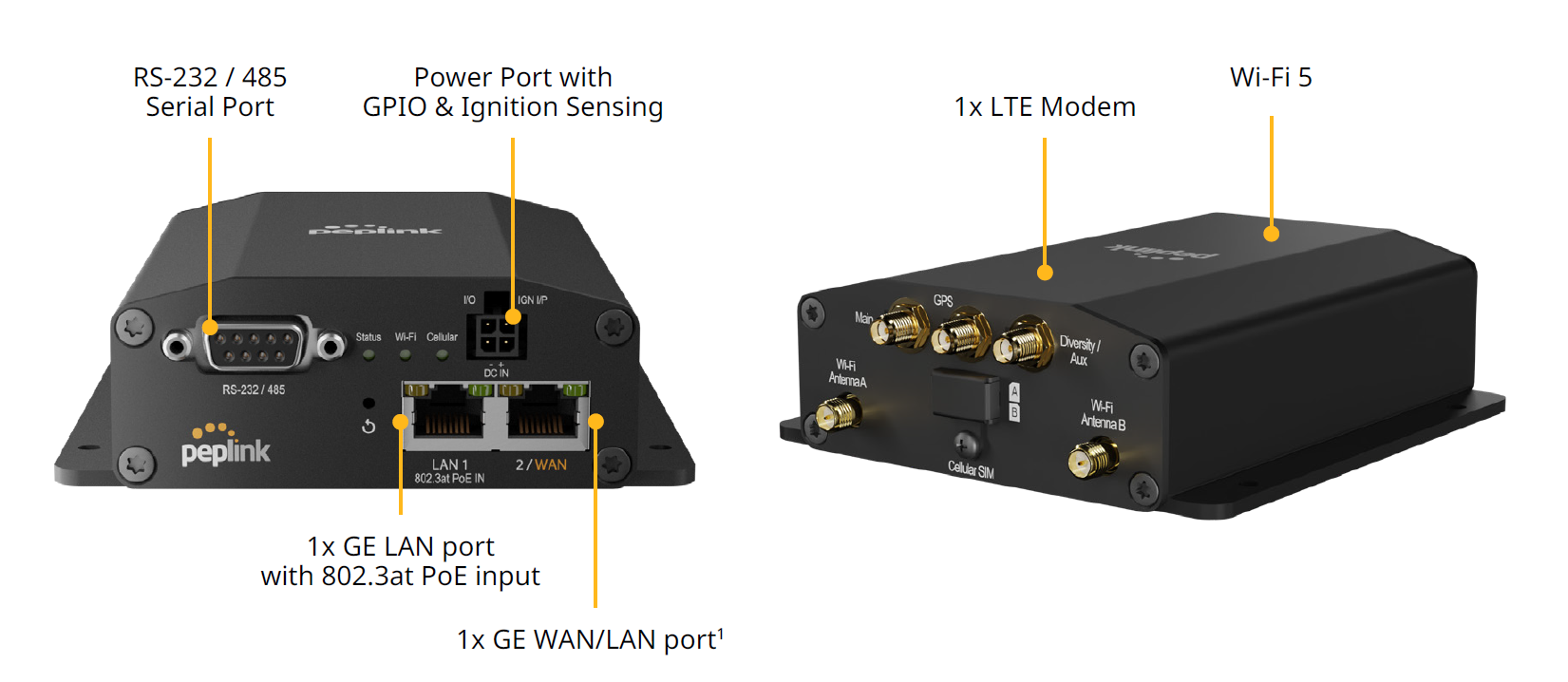
LED Indicators
The statuses indicated by the front panel LEDs are as follows:
Status Indicators | ||
Status | OFF | System initializing |
Red | Booting up or busy | |
Blinking red | Boot up error | |
Green | Ready | |
Cellular Indicators | ||
Cellular | OFF | Disabled or no SIM card inserted |
Blinking slowly | Connecting to network(s) | |
Green | Connected to network(s) | |
Wi-Fi Indicators | ||
Wi-Fi | OFF | Wi-Fi AP is turned off |
ON | Wi-Fi AP is turned on | |
4.34. MAX BR1 Mini RedCap
Panel Appearance
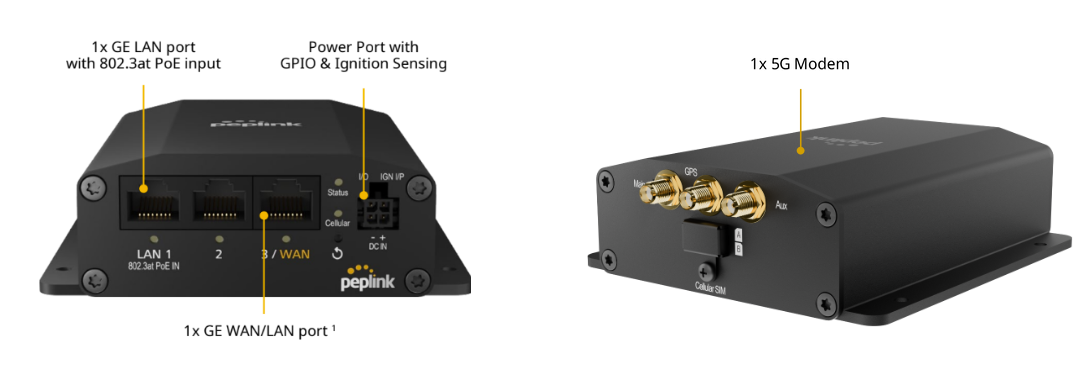
LED Indicators
The statuses indicated by the front panel LEDs are as follows:
Status Indicators | ||
Status | OFF | System initializing |
Red | Booting up or busy | |
Blinking red | Boot up error | |
Green | Ready | |
Cellular Indicators | ||
Cellular | OFF | Disabled or no SIM card inserted |
Blinking slowly | Connecting to network(s) | |
Green | Connected to network(s) | |
4.35. MAX BR1 Mini RedCap (Wi-Fi)
Panel Appearance
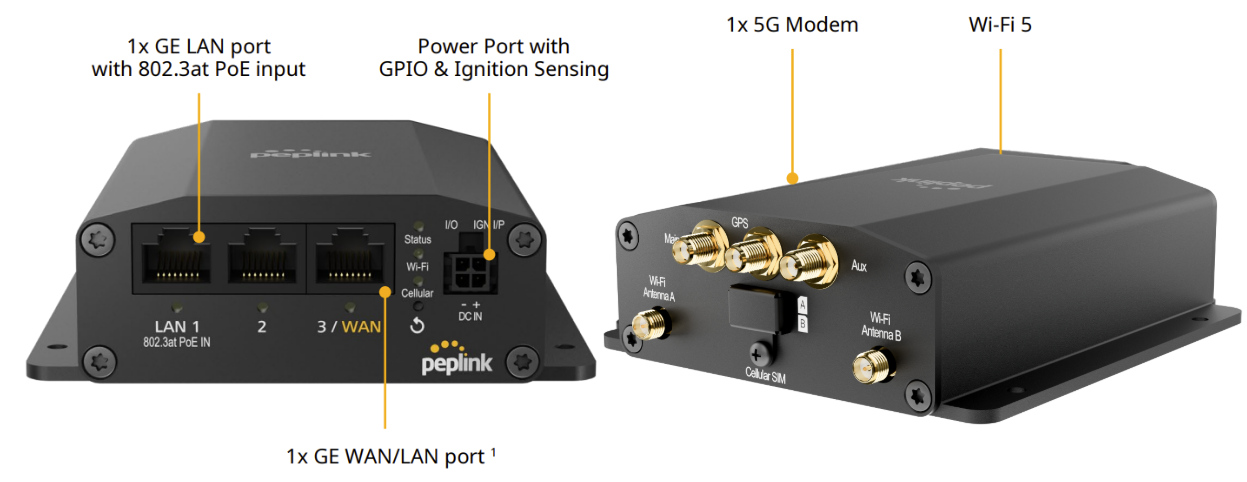
LED Indicators
The statuses indicated by the front panel LEDs are as follows:
Status Indicators | ||
Status | OFF | System initializing |
Red | Booting up or busy | |
Blinking red | Boot up error | |
Green | Ready | |
Cellular Indicators | ||
Cellular | OFF | Disabled or no SIM card inserted |
Blinking slowly | Connecting to network(s) | |
Green | Connected to network(s) | |
Wi-Fi Indicators | ||
Wi-Fi | OFF | Wi-Fi AP is turned off |
ON | Wi-Fi AP is turned on | |
4.36. MAX BR1 Mini M2M RedCap
Panel Appearance
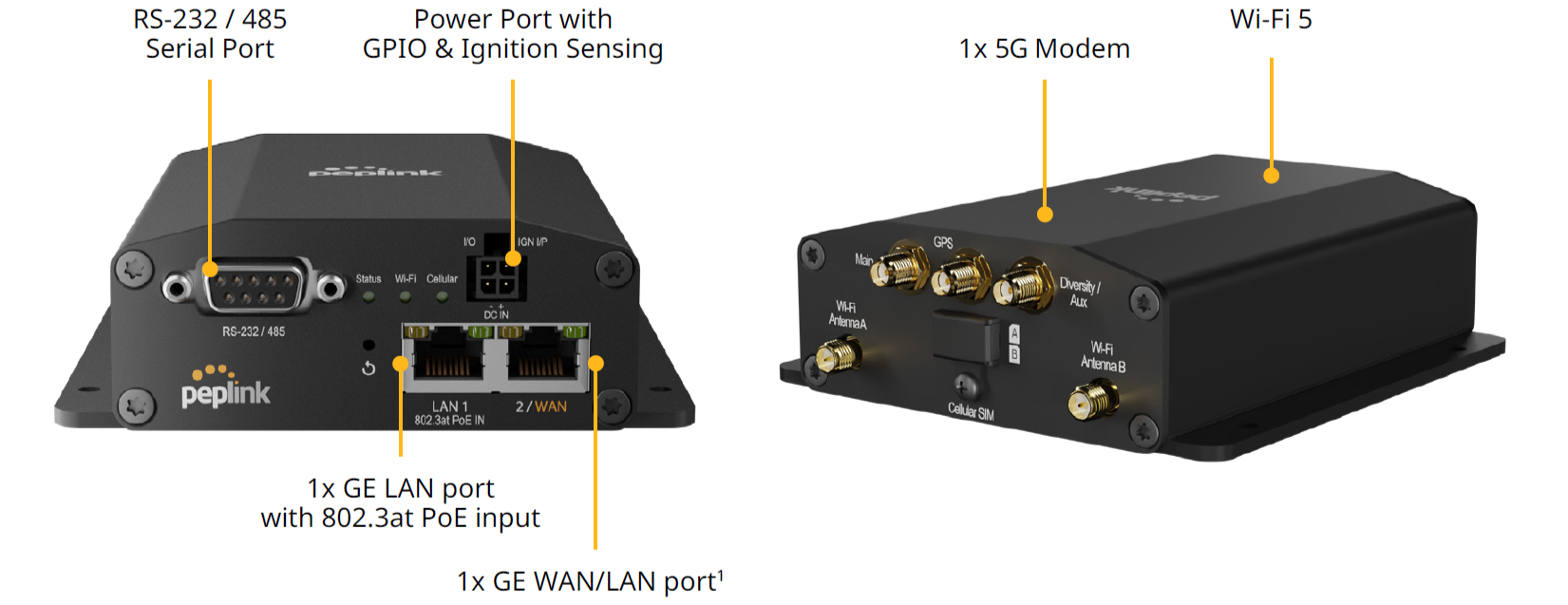
LED Indicators
The statuses indicated by the front panel LEDs are as follows:
Status Indicators | ||
Status | OFF | System initializing |
Red | Booting up or busy | |
Blinking red | Boot up error | |
Green | Ready | |
Cellular Indicators | ||
Cellular | OFF | Disabled or no SIM card inserted |
Blinking slowly | Connecting to network(s) | |
Green | Connected to network(s) | |
Wi-Fi Indicators | ||
Wi-Fi | OFF | Wi-Fi AP is turned off |
ON | Wi-Fi AP is turned on | |
4.37. MAX BR1 M2M
Panel Appearance
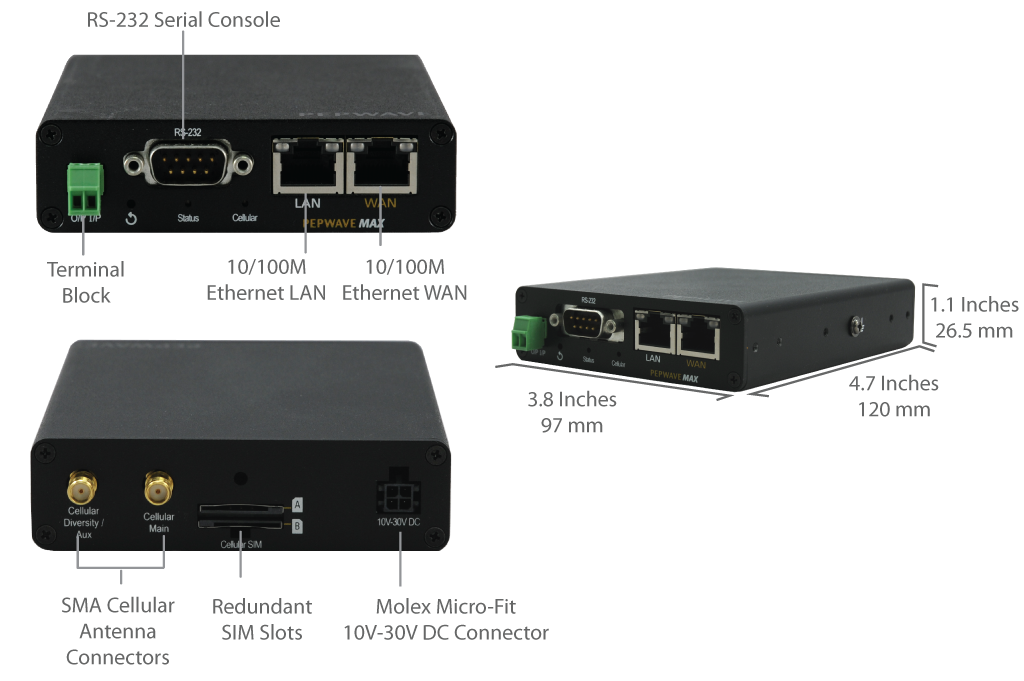
LED Indicators
The statuses indicated by the front panel LEDs are as follows:
Status Indicators | ||
Status | OFF | System initializing |
Red | Booting up or busy | |
Blinking red | Boot up error | |
Green | Ready | |
Cellular Indicators | ||
Cellular | OFF | Disabled or no SIM card inserted |
Blinking slowly | Connecting to network(s) | |
Green | Connected to network(s) | |
LAN and Ethernet WAN Ports | ||
Green LED | ON | 100 Mbps |
OFF | 10 Mbps | |
Orange LED | ON | Port is connected without traffic |
Blinking | Data is transferring | |
OFF | Port is not connected | |
Port Type | Auto MDI/MDI-X ports | |
4.38. MAX BR1 ENT
Panel Appearance
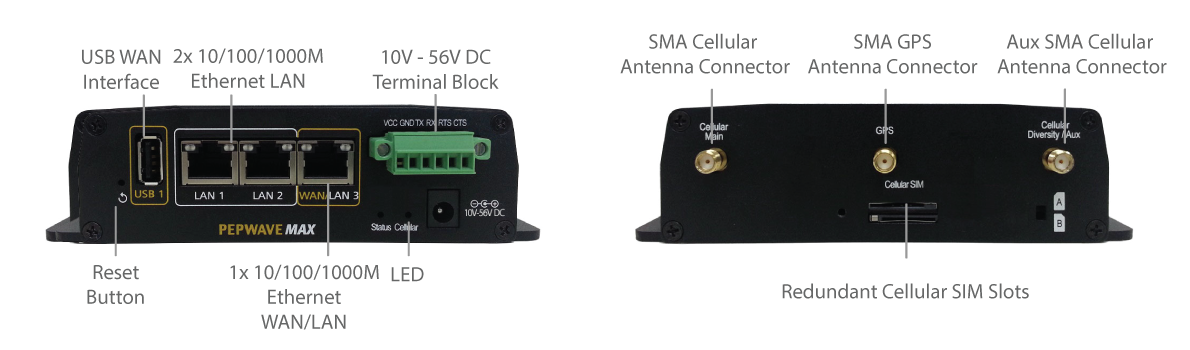
LED Indicators
The statuses indicated by the front panel LEDs are as follows:
Status Indicators | ||
Status | OFF | System initializing |
Red | Booting up or busy | |
Blinking red | Boot up error | |
Green | Ready | |
Cellular Indicators | ||
Cellular | OFF | Disabled or no SIM card inserted |
Blinking slowly | Connecting to network(s) | |
Green | Connected to network(s) | |
LAN and Ethernet WAN Ports | ||
Green LED | ON | 10 / 100 / 1000 Mbps |
Orange LED | Blinking | Data is transferring |
OFF | No data is being transferred or port is not connected | |
Port Type | Auto MDI/MDI-X ports | |
4.39. MAX BR1 Pro
Panel Appearance
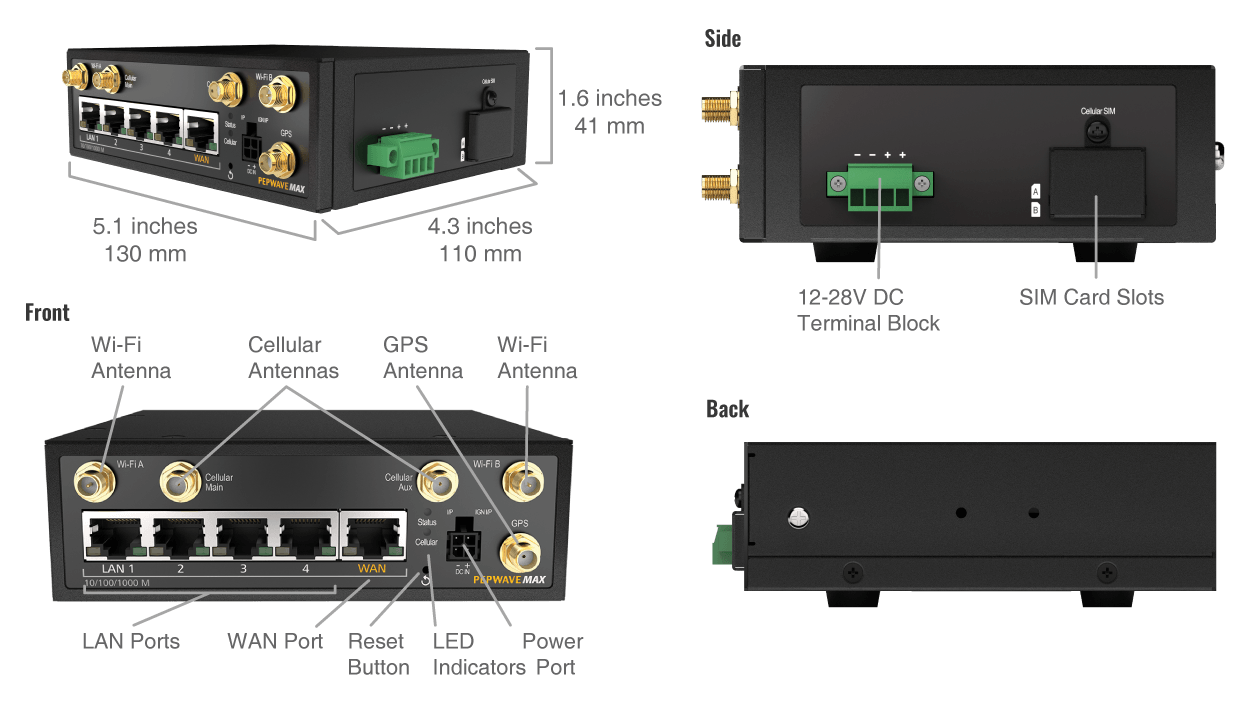
LED Indicators
The statuses indicated by the front panel LEDs are as follows:
Status Indicators | ||
Status | OFF | System initializing |
Red | Booting up or busy | |
Blinking red | Boot up error | |
Green | Ready | |
Cellular Indicators | ||
Cellular | OFF | Disabled or no SIM card inserted |
Blinking Slowly | Connecting to network(s) | |
Green | Connected to network(s) | |
LAN and Ethernet WAN Ports | ||
Green LED | ON | 1000 Mbps |
OFF | 10 Mbps / 100 Mbps or port is not connected | |
Orange LED | ON | Port is connected without traffic |
Blinking | Data is transferring | |
OFF | No data is being transferred or port is not connected | |
Port Type | Auto MDI/MDI-X ports | |
4.40. MAX BR1 Pro (CAT-20)
Panel Appearance
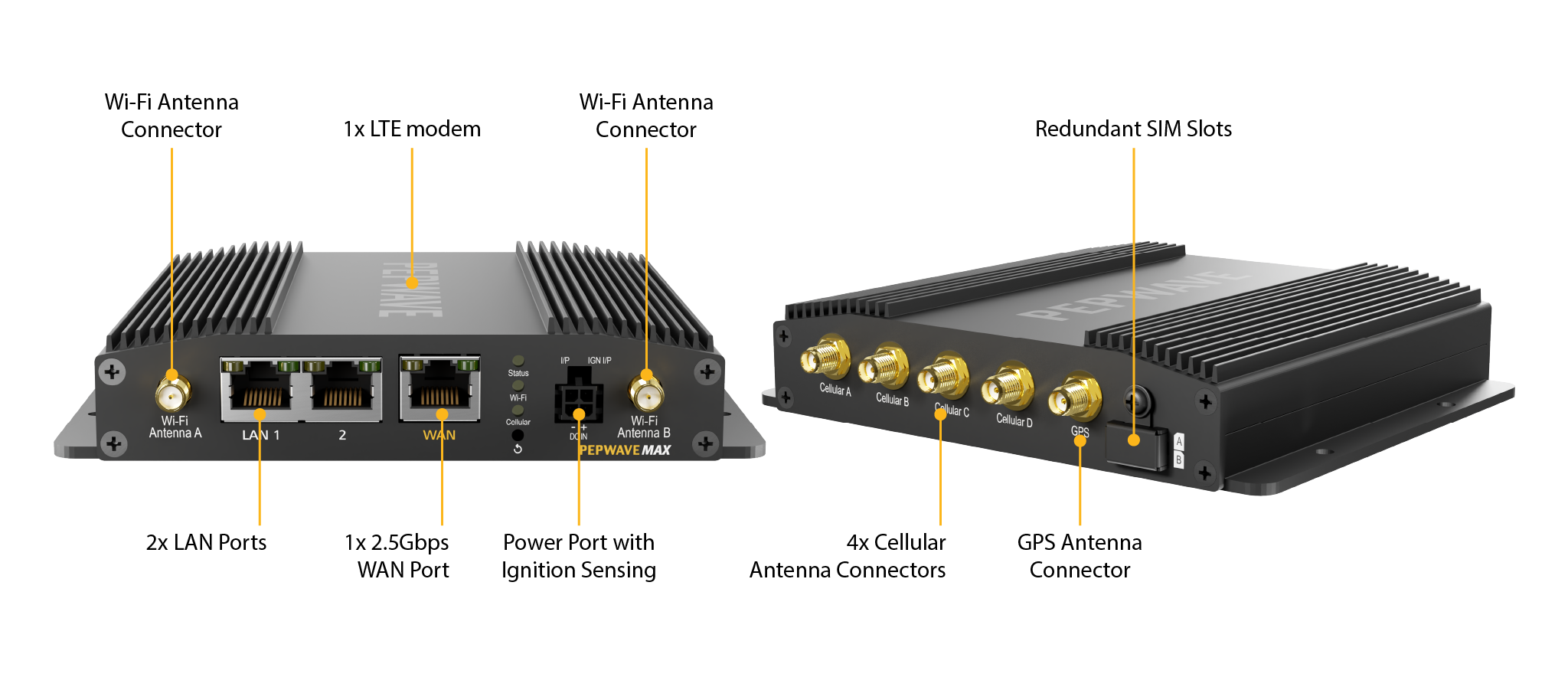
LED Indicators
The statuses indicated by the front panel LEDs are as follows:
Status Indicators | ||
Status | OFF | System initializing |
Red | Booting up or busy | |
Blinking red | Boot up error | |
Green | Ready | |
Cellular Indicators | ||
Cellular | OFF | Disabled or no SIM card inserted |
Blinking Slowly | Connecting to network(s) | |
Green | Connected to network(s) | |
Wi-Fi Indicators | ||
Wi-Fi / Wi-Fi AP | OFF | Disabled intermittent |
ON | Connected to wireless network(s) | |
LAN Ports | ||
Green LED | ON | 1000 Mbps |
OFF | 10 Mbps / 100 Mbps or port is not connected | |
Orange LED | ON | Port is connected without traffic |
Blinking | Data is transferring | |
OFF | No data is being transferred or port is not connected | |
Port Type | Auto MDI/MDI-X ports | |
WAN Port | ||
Right LED | ON | 1000 Mbps |
OFF | 10 Mbps / 100 Mbps or port is not connected | |
Left LED | ON | Port is connected without traffic |
Blinking | Data is transferring | |
OFF | No data is being transferred or port is not connected | |
Port Type | Auto MDI/MDI-X ports | |
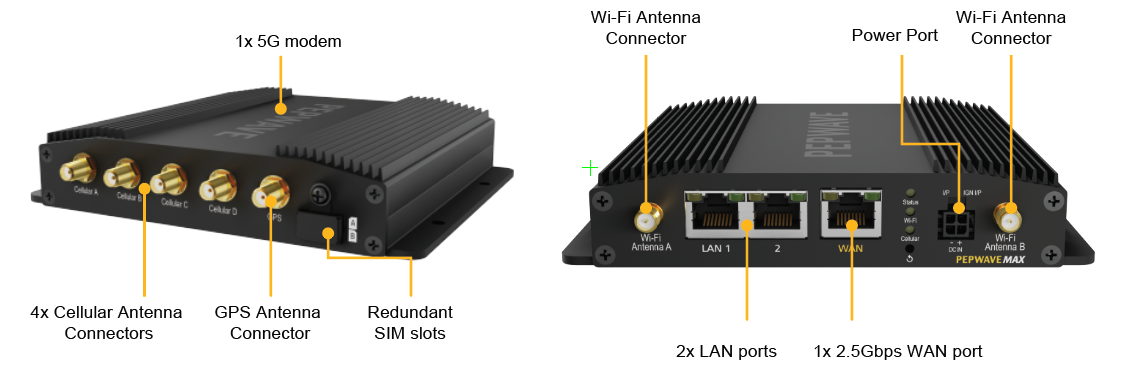
4.41. MAX BR1 Pro 5G
Panel Appearance
LED Indicators
The statuses indicated by the front panel LEDs are as follows:
Status Indicators | ||
Status | OFF | System initializing |
Red | Booting up or busy | |
Blinking red | Boot up error | |
Green | Ready | |
Cellular Indicators | ||
Cellular | OFF | Disabled or no SIM card inserted |
Blinking Slowly | Connecting to network(s) | |
Green | Connected to network(s) | |
Wi-Fi Indicators | ||
Wi-Fi / Wi-Fi AP | OFF | Disabled intermittent |
ON | Connected to wireless network(s) | |
LAN Ports | ||
Green LED | ON | 1000 Mbps |
OFF | 10 Mbps / 100 Mbps or port is not connected | |
Orange LED | ON | Port is connected without traffic |
Blinking | Data is transferring | |
OFF | No data is being transferred or port is not connected | |
Port Type | Auto MDI/MDI-X ports | |
WAN Port | ||
Right LED | ON | 1000 Mbps |
OFF | 10 Mbps / 100 Mbps or port is not connected | |
Left LED | ON | Port is connected without traffic |
Blinking | Data is transferring | |
OFF | No data is being transferred or port is not connected | |
Port Type | Auto MDI/MDI-X ports | |
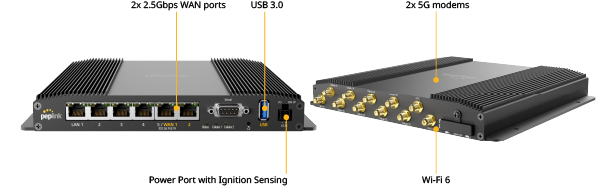
4.42. MAX BR2 Pro
Panel Appearance
LED Indicators
The statuses indicated by the front panel LEDs are as follows:
Status Indicators | ||
Status | OFF | System initializing |
Red | Booting up or busy | |
Blinking red | Boot up error | |
Green | Ready | |
Cellular Indicators | ||
Cellular | OFF | Disabled or no SIM card inserted |
Blinking Slowly | Connecting to network(s) | |
Green | Connected to network(s) | |
Wi-Fi Indicators | ||
Wi-Fi / Wi-Fi AP | OFF | Disabled intermittent |
ON | Connected to wireless network(s) | |
LAN Ports | ||
Green LED | ON | 1000 Mbps |
OFF | 10 Mbps / 100 Mbps or port is not connected | |
Orange LED | ON | Port is connected without traffic |
Blinking | Data is transferring | |
OFF | No data is being transferred or port is not connected | |
Port Type | Auto MDI/MDI-X ports | |
WAN Port | ||
Right LED | ON | 1000 Mbps |
OFF | 10 Mbps / 100 Mbps or port is not connected | |
Left LED | ON | Port is connected without traffic |
Blinking | Data is transferring | |
OFF | No data is being transferred or port is not connected | |
Port Type | Auto MDI/MDI-X ports | |
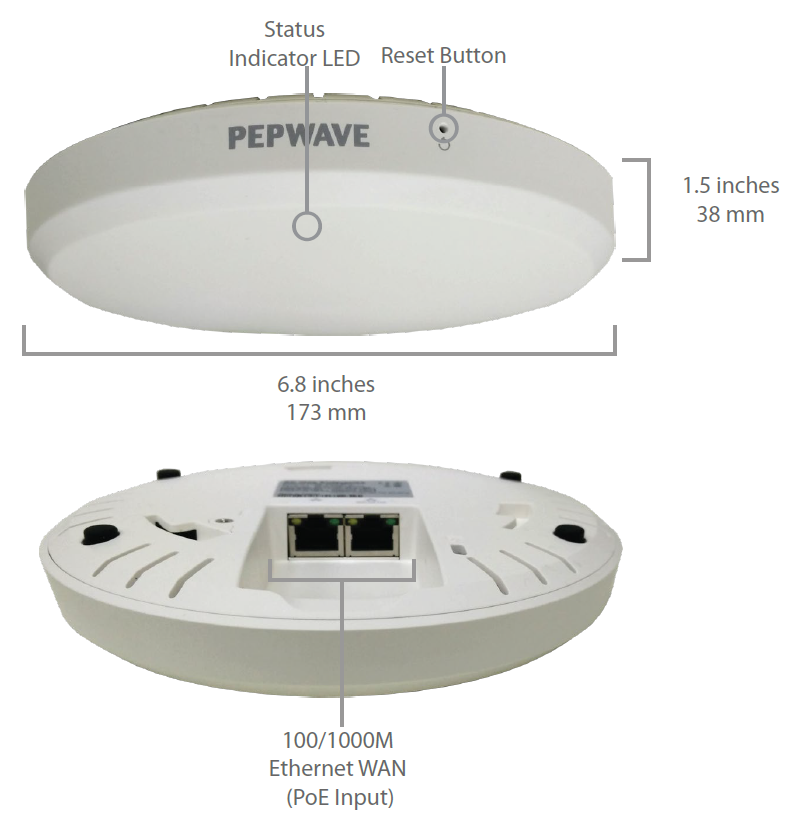
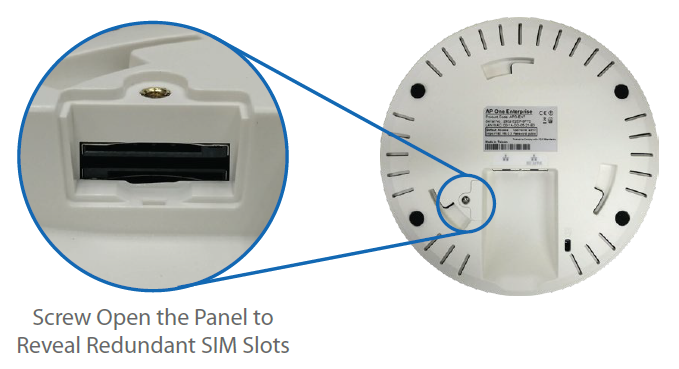
4.43. MAX Hotspot
Panel Appearance
LED Indicators
The statuses indicated by the front panel LEDs are as follows:
LAN and Ethernet WAN Ports | ||
Green LED | ON | 1000 Mbps |
OFF | 10 Mbps / 100 Mbps or port is not connected | |
Orange LED | ON | Port is connected without traffic |
Blinking | Data is transferring | |
OFF | No data is being transferred or port is not connected | |
Port Type | Auto MDI/MDI-X ports | |
4.44. MAX BR1 IP55
Panel Appearance
LED Indicators
The statuses indicated by the front panel LEDs are as follows:
Status Indicators | ||
Status | OFF | System initializing |
Red | Booting up or busy | |
Blinking red | Boot up error | |
Green | Ready | |
LAN and Ethernet WAN Ports | ||
Green LED | ON | 1000Mbps |
OFF | 10 Mbps / 100 Mbps or port is not connected | |
Orange LED | ON | Port is connected without traffic |
Blinking | Data is transferring | |
OFF | Port is not connected | |
Port Type | Auto MDI/MDI-X ports | |
Cellular Indicators | ||
Cellular
| OFF | Disabled or no SIM card inserted |
Blinking | Connecting to network(s) in Standby Mode | |
Green | Connected to network(s) in Priority 1 (Active) | |
LAN and WAN Indicators | ||
| Green | Powered-on device connected to Ethernet port |
OFF | No device connected to Ethernet port | |

4.45. MAX BR2 IP55
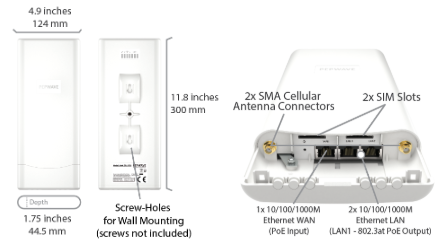
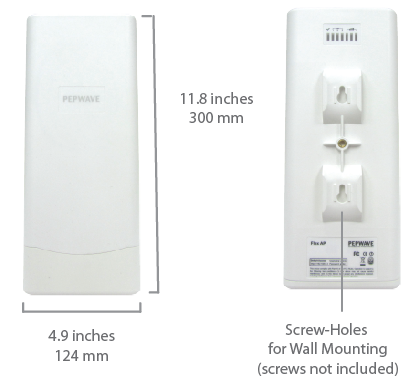
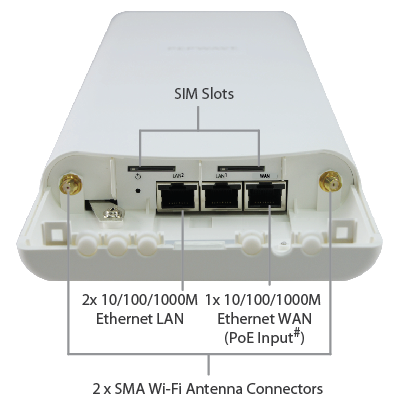
Panel Appearance
LED Indicators
The statuses indicated by the front panel LEDs are as follows:
Status Indicators | ||
Status | OFF | System initializing |
Red | Booting up or busy | |
Blinking red | Boot up error | |
Green | Ready | |
Wi-Fi Indicators | ||
Wi-Fi | OFF | Disabled Intermittent |
Blinking slowly | Connecting to wireless network(s) | |
Blinking | Connected to wireless network(s) with traffic | |
ON | Connected to wireless network(s) without traffic | |
Cellular Indicators | ||
Cellular | OFF | Disabled or no SIM card inserted |
ON | Connecting or connected to network(s) | |
LAN and Ethernet WAN Ports | ||
Green LED | ON | 1000Mbps |
OFF | 10 Mbps / 100 Mbps or port is not connected | |
Orange LED | ON | Port is connected without traffic |
Blinking | Data is transferring | |
OFF | Port is not connected | |
Port Type | Auto MDI/MDI-X ports | |
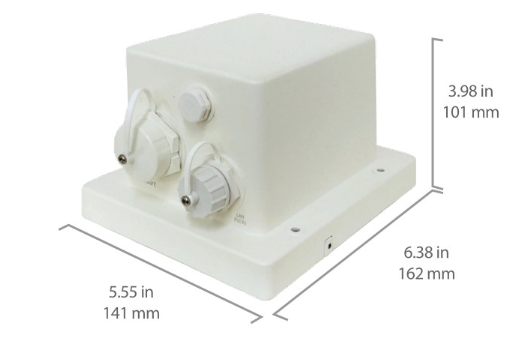
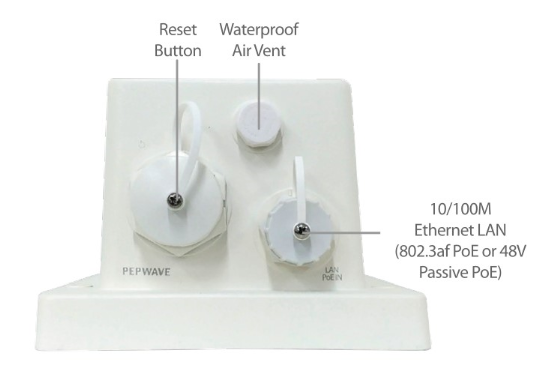
4.46. MAX BR1 IP67
Panel Appearance
4.47. MAX On-The-Go
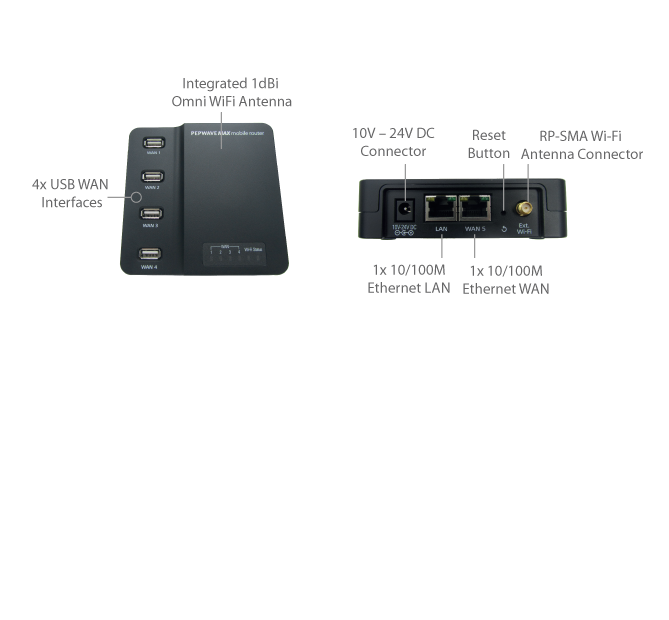
Panel Appearance
LED Indicators
The statuses indicated by the front panel LEDs are as follows:
Cellular Indicators | ||
WAN | OFF | Modem is not attached to the port |
Green | Modem is attached to the port | |
Wi-Fi Indicators | ||
Wi-Fi | OFF | Disconnected from AP |
Green | Connected to AP | |
Status Indicators | ||
Status | OFF | System initializing |
Red | Booting up or busy | |
Green | Ready | |
LAN and Ethernet WAN Ports | ||
Green LED | ON | 100 Mbps |
OFF | 10 Mbps | |
Orange LED | ON | Port is connected without traffic |
Blinking | Data is transferring | |
Port Type | Auto MDI/MDI-X ports | |
4.48. BR2 Micro
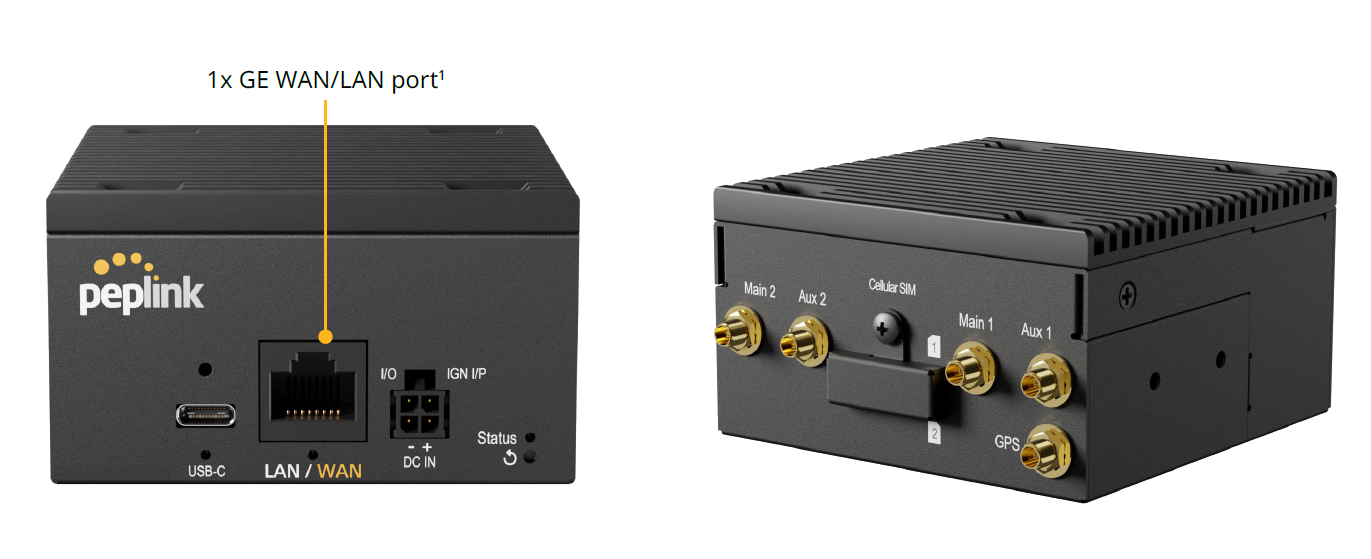
Panel Appearance
LED Indicators
The statuses indicated by the front panel LEDs are as follows:
Status Indicator | ||
Status | OFF | Power off |
Red | Booting up | |
Green | Ready | |
Status Indicator | ||
USB-C | OFF | System initializing/power off |
Blinking | Data is transferring | |
Green | Port is connected without traffic | |
Status Indicator | ||
WAN/LAN | OFF | System initializing/power off |
Blinking | Data is transferring | |
Green | Port is connected without traffic | |
4.49. MAX BR2
Panel Appearance
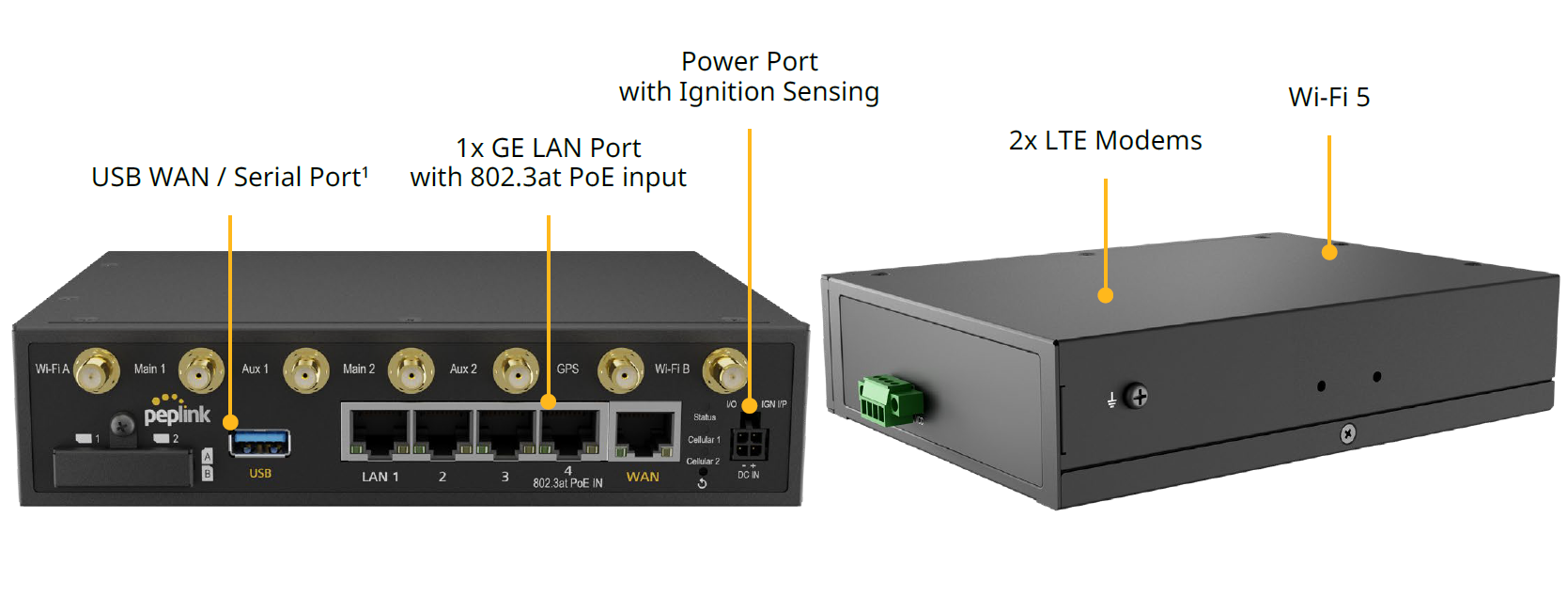
LED Indicator
The statuses indicated by the front panel LEDs are as follows:
Status Indicator | ||
Status | OFF | System initializing/power off |
Red | Booting up or busy | |
Blinking red | Boot up error | |
Green | Ready | |
Cellular Indicators | ||
Cellular 1 | OFF | Disabled or no SIM card inserted |
Blinking slowly | Connecting to network(s) | |
Green | Connected to network(s) | |
Cellular Indicators | ||
Cellular 2 | OFF | Disabled or no SIM card inserted |
Blinking slowly | Connecting to network(s) | |
Green | Connected to network(s) | |
4.50. UBR LTE
Panel Appearance
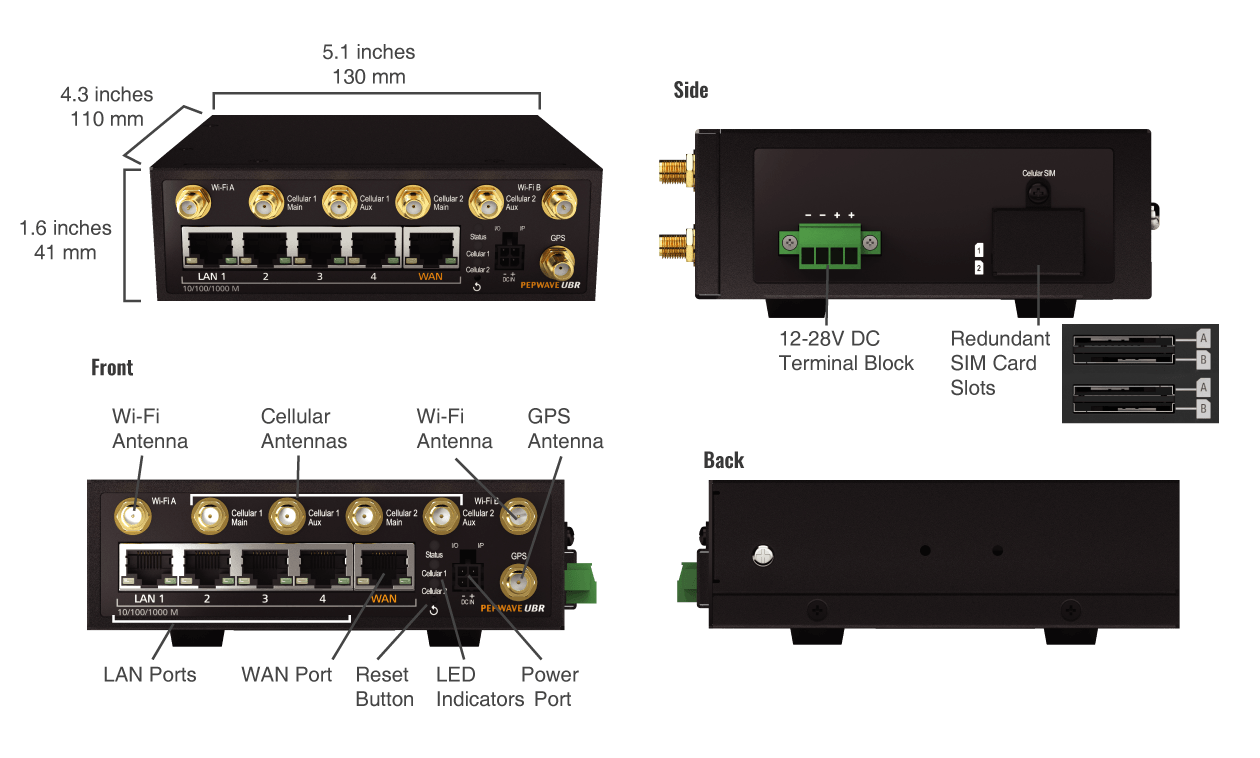
LED Indicators
The statuses indicated by the front panel LEDs are as follows:
Status Indicators | ||
Status | OFF | System initializing |
Red | Booting up or busy | |
Blinking Red | Boot up error | |
Green | Ready | |
LAN and Ethernet WAN Ports | ||
Green LED | ON | 1000 Mbps |
OFF | 10 Mbps / 100 Mbps or port is not connected | |
Orange LED | ON | Port is connected without traffic |
Blinking | Data is transferring | |
OFF | No data is being transferred or port is not connected | |
Port Type | Auto MDI/MDI-X ports | |
Cellular Indicators | ||
Cellular | OFF | Disabled or no SIM card inserted |
Blinking Slowly | Connecting to network(s) | |
Green | Connected to network(s) | |
4.51. UBR Plus
Panel Appearance
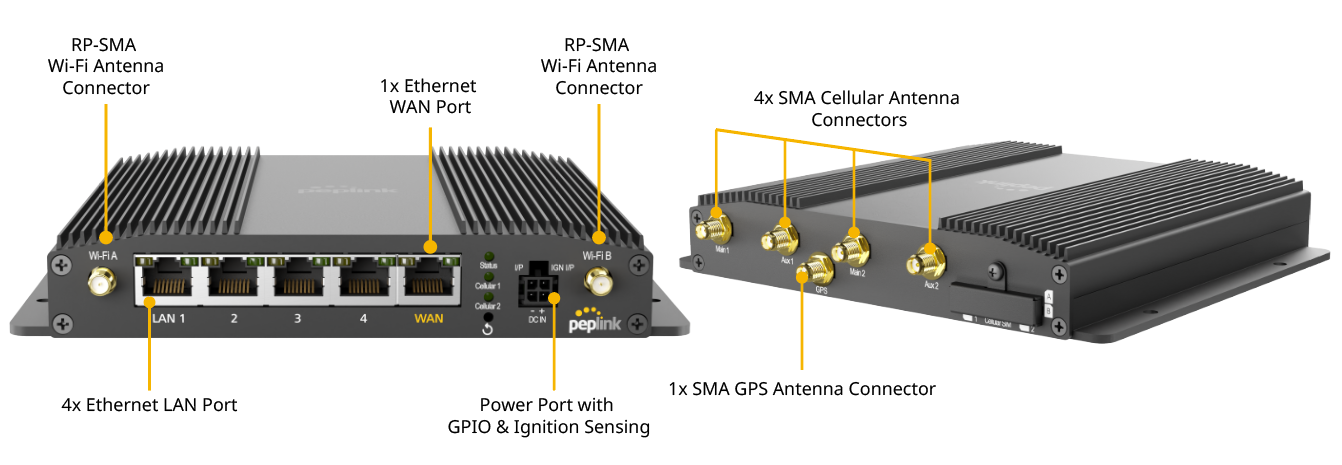
LED Indicators
The statuses indicated by the front panel LEDs are as follows:
Status Indicators | ||
Status | OFF | System initializing |
Red | Booting up or busy | |
Blinking Red | Boot up error | |
Green | Ready | |
LAN and Ethernet WAN Ports | ||
Green LED | ON | 1000 Mbps |
OFF | 10 Mbps / 100 Mbps or port is not connected | |
Orange LED | ON | Port is connected without traffic |
Blinking | Data is transferring | |
OFF | No data is being transferred or port is not connected | |
Port Type | Auto MDI/MDI-X ports | |
Cellular Indicators | ||
Cellular | OFF | Disabled or no SIM card inserted |
Blinking Slowly | Connecting to network(s) | |
Green | Connected to network(s) | |
4.52. PDX
Panel Appearance
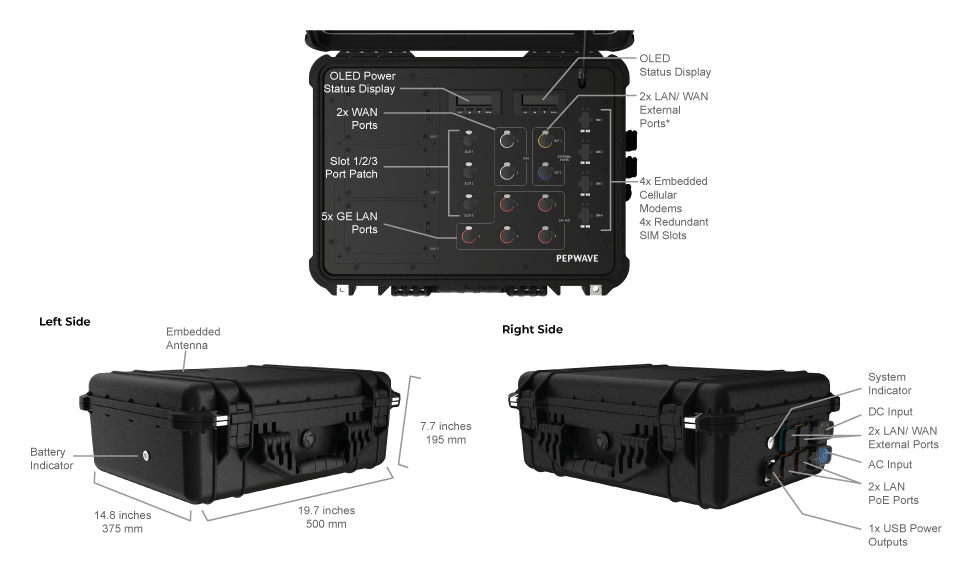
LED Indicators
The statuses indicated by the front panel LEDs are as follows:
Status Indicators | ||
Status | OFF | No battery installed |
Red | Charging | |
Blinking red | Low Battery | |
Green | Fully Charged | |