
2. Models & Specifications
2.1. 8 PoE 10G Switch
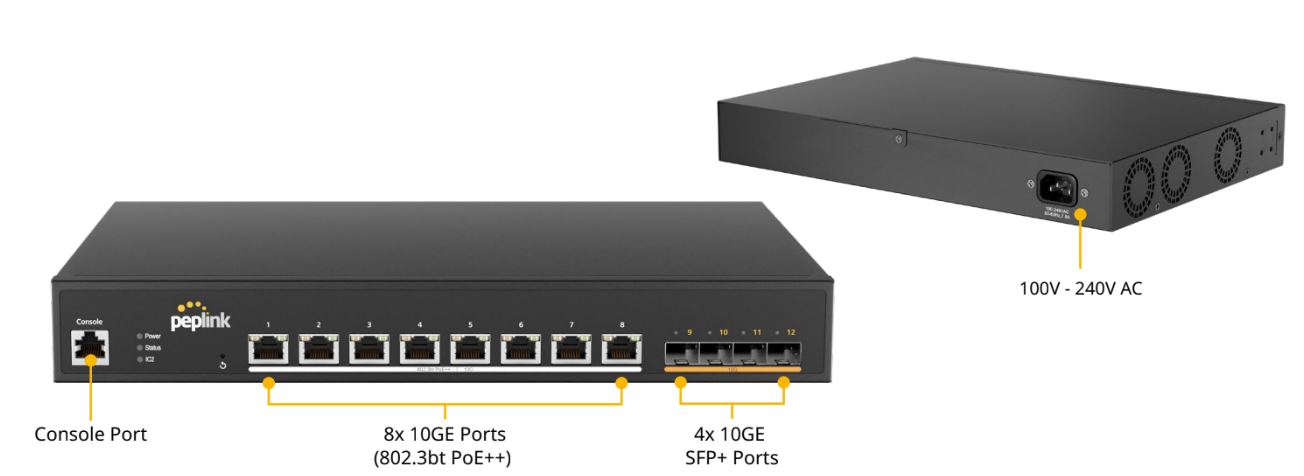
LED Indicators:
Status Indicators | ||
Power | OFF | No power |
Green (Solid light) | System boot ongoing | |
Green (Solid light) | System boot ready | |
Status | OFF | System boot ongoing / System off |
Green (Solid light) | System boot ready | |
IC2 | OFF | No link with IC2 |
Green (Solid light) | IC2 connected | |
Ethernet Ports | ||
RJ45 Left LED (Activity) | OFF | Port is not connected |
Amber ( Blinking) | Data is transferring | |
Amber (Solid Light) | Port is connected | |
RJ45 Right LED (PoE Switch) | Off | PoE disable |
Green (Solid Light) | PoE enabled (even if no cable is connected) | |
RJ45 Right LED (Non PoE Switch) | Off | Other speed / No link |
Green (Solid light) | Highest speed | |
SFP Ports | ||
SFP LED (Activity) | Off | No link |
Green (Blinking) | Activity | |
Green (Solid light) | Link | |
Reset Button | ||
Hold the reset button | 0 - 10 seconds | Status light (green) blinking slowly. |
10 -15 seconds | Status light (green) blinking fast | |
Over 15 seconds | Status light off; release the reset button, and the device starts rebooting. | |
2.2. 24 PoE 2.5G Switch Rugged
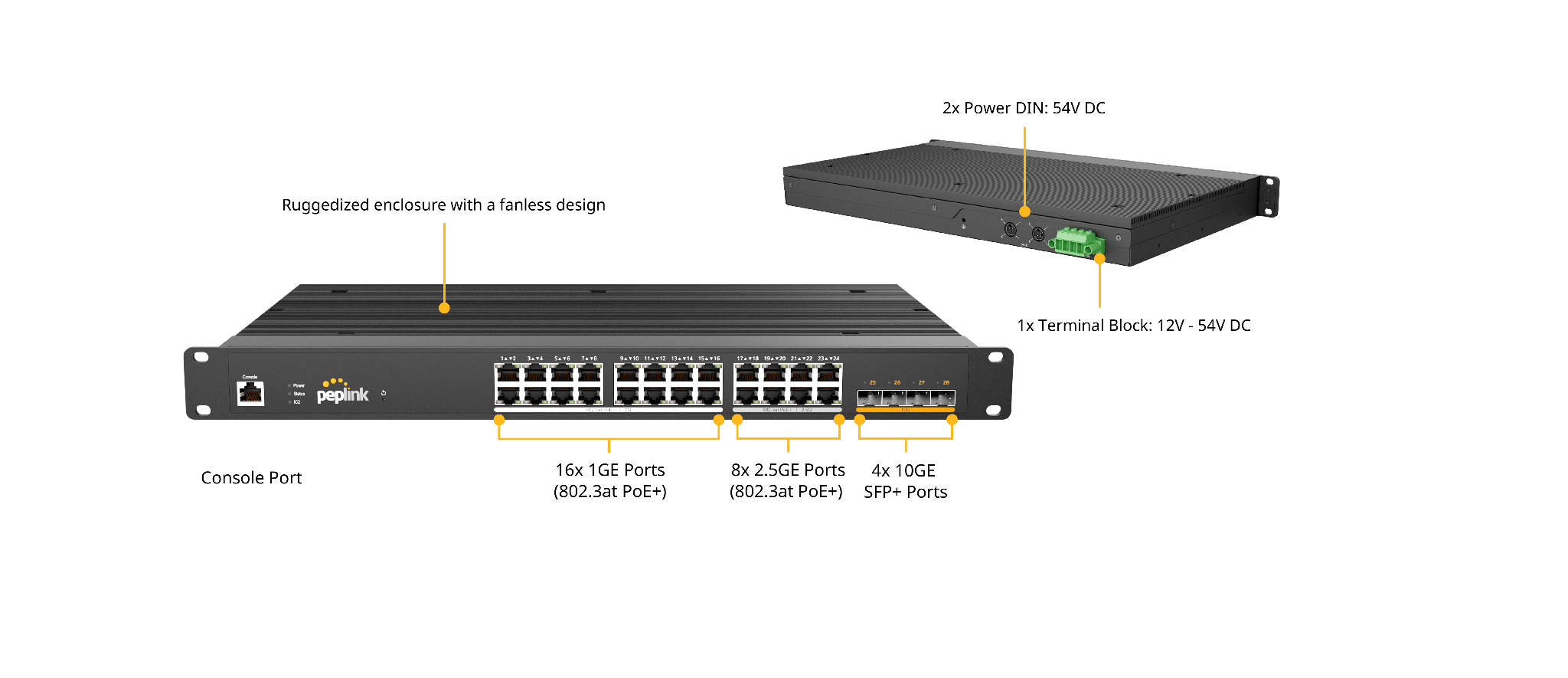
LED Indicators:
Status Indicators | ||
Power | OFF | No power |
Green (Solid light) | System boot ongoing | |
Green (Solid light) | System boot ready | |
Status | OFF | System boot ongoing / System off |
Green (Solid light) | System boot ready | |
IC2 | OFF | No link with IC2 |
Green (Solid light) | IC2 connected | |
Ethernet Ports | ||
RJ45 Left LED (Activity) | OFF | Port is not connected |
Amber ( Blinking) | Data is transferring | |
Amber (Solid Light) | Port is connected | |
RJ45 Right LED (PoE Switch) | Off | PoE disable |
Green (Solid Light) | PoE enabled (even if no cable is connected) | |
RJ45 Right LED (Non PoE Switch) | Off | Other speed / No link |
Green (Solid light) | Highest speed | |
SFP Ports | ||
SFP LED (Activity) | Off | No link |
Green (Blinking) | Activity | |
Green (Solid light) | Link | |
Reset Button | ||
Hold the reset button | 0 - 10 seconds | Status light (green) blinking slowly. |
10 -15 seconds | Status light (green) blinking fast | |
Over 15 seconds | Status light off; release the reset button, and the device starts rebooting. | |
2.3. 24 PoE 2.5G Switch
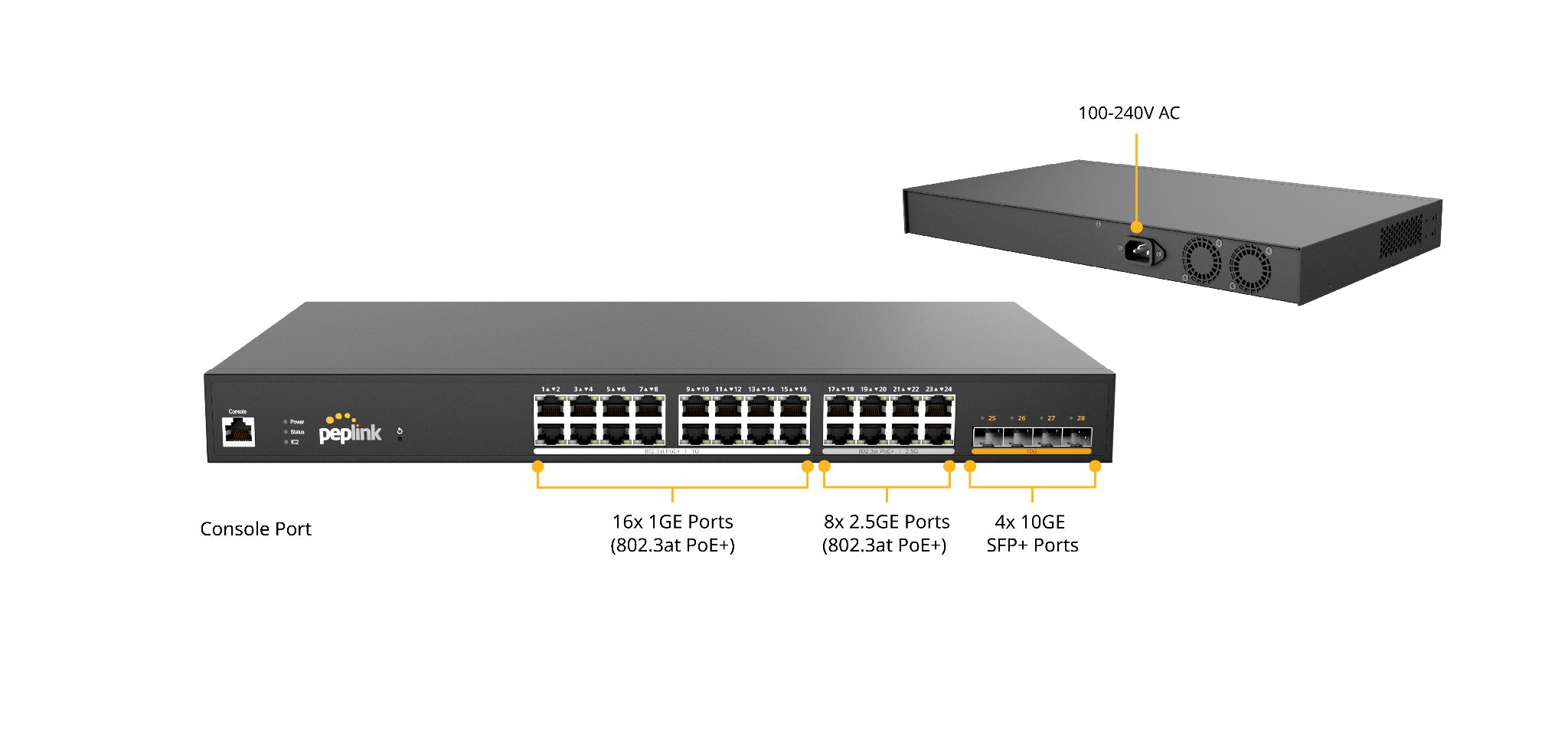
LED Indicators:
Status Indicators | ||
Power | OFF | No power |
Green (Solid light) | System boot ongoing | |
Green (Solid light) | System boot ready | |
Status | OFF | System boot ongoing / System off |
Green (Solid light) | System boot ready | |
IC2 | OFF | No link with IC2 |
Green (Solid light) | IC2 connected | |
Ethernet Ports | ||
RJ45 Left LED (Activity) | OFF | Port is not connected |
Amber ( Blinking) | Data is transferring | |
Amber (Solid Light) | Port is connected | |
RJ45 Right LED (PoE Switch) | Off | PoE disable |
Green (Solid Light) | PoE enabled (even if no cable is connected) | |
RJ45 Right LED (Non PoE Switch) | Off | Other speed / No link |
Green (Solid Light) | Highest speed | |
SFP Ports | ||
SFP LED (Activity) | Off | No link |
Green (Blinking) | Activity | |
Green (Solid light) | Link | |
Reset Button | ||
Hold the reset button | 0 - 10 seconds | Status light (green) blinking slowly. |
10 -15 seconds | Status light (green) blinking fast | |
Over 15 seconds | Status light off; release the reset button, and the device starts rebooting. | |
2.4. 48 PoE 2.5G Switch
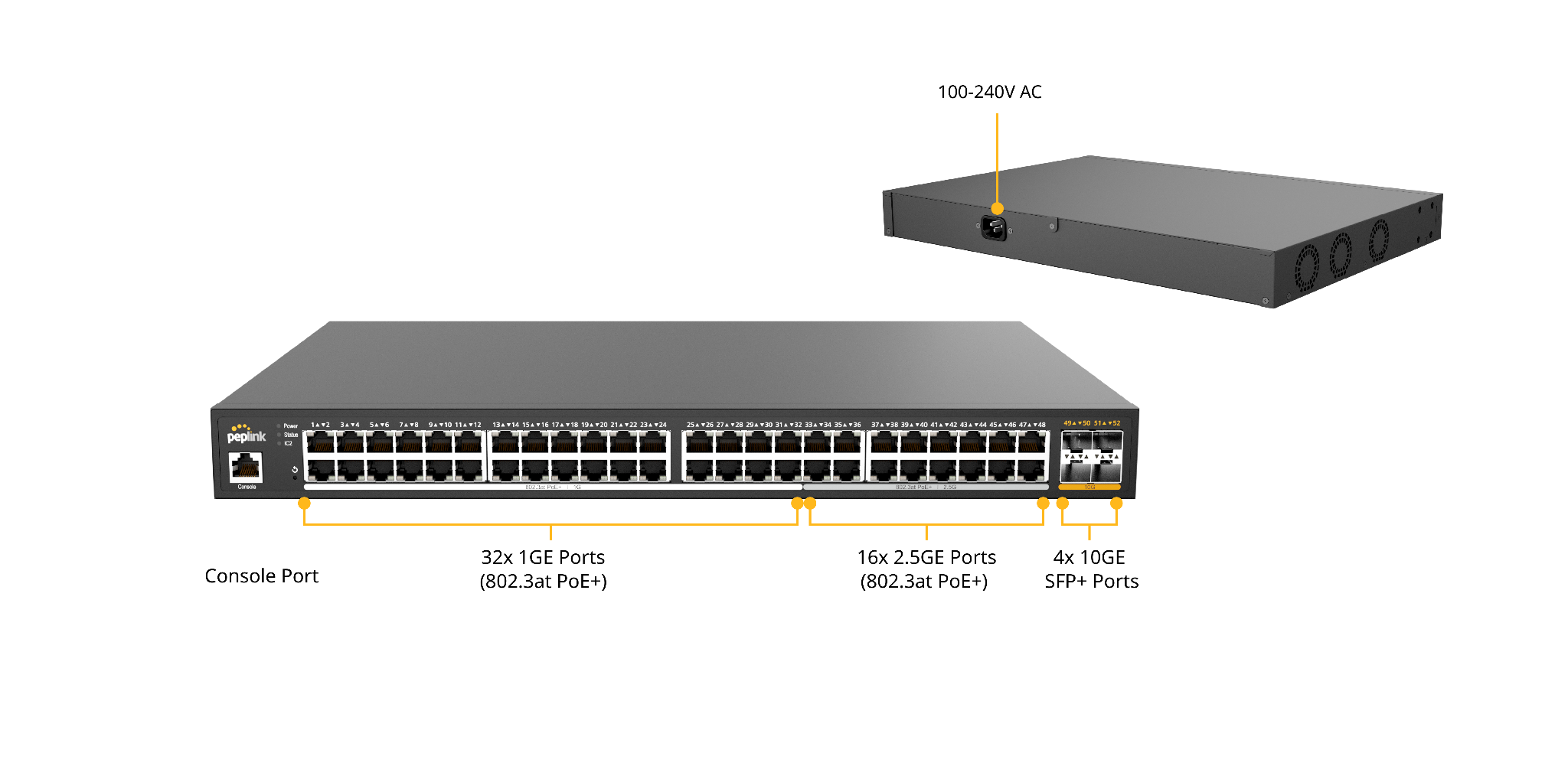
LED Indicators:
Status Indicators | ||
Power | OFF | No power |
Green (Solid light) | System boot ongoing | |
Green (Solid light) | System boot ready | |
Status | OFF | System boot ongoing / System off |
Green (Solid light) | System boot ready | |
IC2 | OFF | No link with IC2 |
Green (Solid light) | IC2 connected | |
Ethernet Ports | ||
RJ45 Left LED (Activity) | OFF | Port is not connected |
Amber ( Blinking) | Data is transferring | |
Amber (Solid Light) | Port is connected | |
RJ45 Right LED (PoE Switch) | Off | PoE disable |
Green (Solid Light) | PoE enabled (even if no cable is connected) | |
RJ45 Right LED (Non PoE Switch) | Off | Other speed / No link |
Green (Solid Light) | Highest speed | |
SFP Ports | ||
SFP LED (Activity) | Off | No link |
Green (Blinking) | Activity | |
Green (Solid light) | Link | |
Reset Button | ||
Hold the reset button | 0 - 10 seconds | Status light (green) blinking slowly. |
10 -15 seconds | Status light (green) blinking fast | |
Over 15 seconds | Status light off; release the reset button, and the device starts rebooting. | |